

MacroDroid - Device Automation is a powerful automation application. With its intuitive interface, it simplifies task automation on Android devices, allowing users to easily automate tasks and revolutionize the way Android devices are used. Whether you want to automate repetitive tasks, optimize apps, or explore new possibilities in games, MacroDroid can meet your needs. Furthermore, this application offers ready-made templates and customizable macros, allowing you to easily automate tasks and create personalized automation experiences. Download now!
Click to load YouTube / 点击加载视频
YouTube ↗Highlights:
Simple Yet Robust Workflow: MacroDroid’s 3-step workflow to create automation is straightforward enough for beginners yet provides advanced customization for power users.
Highly Intuitive Drag & Drop UI: The drag-and-drop interface allows anyone, regardless of technical skill, to build automation. No coding is required!
No Prior Knowledge Needed: Building effective automation requires no coding experience or knowledge about automation. It’s that easy!
Massive Range of Trigger Options: With over 70 trigger options like location, sensors, battery level, notifications, and more, you can precisely control when automation activate.
Customizable Triggers For Your Needs: Location triggers can use GPS, WiFi networks, or cell towers. Fine-tune geo-fences and contextual conditions specifically for your unique needs.
Quick Access Via Home Screen: Easily access and launch your automations anytime through handy shortcuts right on your home screen.
Features:
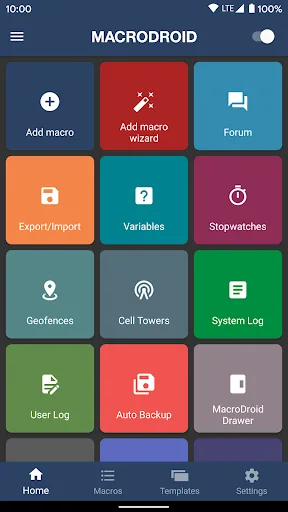
Automation: MacroDroid allows users to automate daily activities on their Android phones. It can perform standard operations such as turning Wi-Fi on and off, changing device settings, and starting or closing programs.
Ready-made Templates: The app comes with a variety of ready-made templates that users can choose from. These templates can be edited as per the user's preferences.
Customizable Macros: Users can create their own macros easily using MacroDroid's simple and intuitive interface. They can select triggers and define actions with their own parameters.
Personalization: The app allows users to add exceptions to their macros, such as excluding weekends. Users can also choose a name and category for their macros, making them more organized.
Free Usage: It can be used for free, but it displays ads and limits the usage to 5 macros.
Easy to Use: Even novice users can easily understand the process of creating macros in app. It provides a user-friendly experience.
Tips for Users:
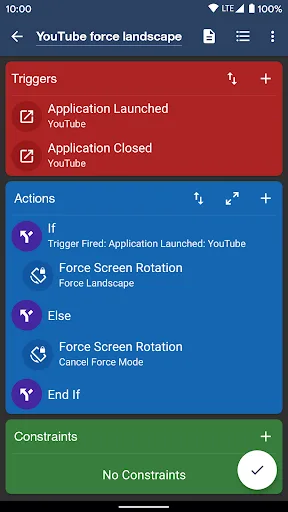
Select a Trigger.
The trigger is the cue for the macro to start. MacroDroid offers over 80 triggers to start your macro, i.e. location based triggers (like GPS, cell towers, etc), device status triggers (like battery level, app starting/closing), sensor triggers (like shaking, light levels, etc) and connectivity triggers (like Bluetooth, Wifi and Notifications).
You can also create a shortcut on the homescreen of your device or run using the unique and customizable Macrodroid sidebar.
Select the Actions you like to automate.
MacroDroid can perform over 100 different actions, that you typically would do by hand. Connect to your Bluetooth or Wifi device, select volume levels, speak text (like your incoming notifications or current time), start a timer, dim your screen, run Tasker plugin and many more.
Optionally: Configure Constraints.
Constraints help you to let the macro fire only when you want it to.
Living near your work, but only want to connect to your company's Wifi during work days? With a constraint you can select specific times or days that the macro can be invoked. MacroDroid offers over 50 constraint types.
Cahngelog:
Added MacroDroid Icon Long Press Shortcut trigger.
Added Shizuku support to the Shell Script action and added Shizuku support to existing root only features.
Added simultaneous "Volume Down + Volume Up" options to Volume Button Trigger.
Added dynamic file and local file URI support to the Set Wallpaper action.
Updated Animation Overlay action to add Animated Gif support with Giphy search engine.
Selection Dialog Action configuration now supports reordering of entries.
Conclusion:
MacroDroid is a unique toolkit that can automate almost any process in the system based on user settings and choices. Its compatibility is extensive and versatile, mainly directly changing systems or user interaction for a few functions in large applications. Of course, it also comes with an automatic optimization system, which promises to give users a new experience.








