
ES File Explorer File Manager is a popular file management software that not only provides users with professional file management tools but also improves the running speed of their mobile phones. The software offers diverse file management tools, automatically cleaning up various junk files and deleting duplicate files. It also manages mobile phone storage space, reducing the space occupied by software and games, significantly improving phone performance, and meeting users' personalized needs. Interested users can download this software from this site to keep their phones looking brand new.
Click to load YouTube / 点击加载视频
YouTube ↗Features:
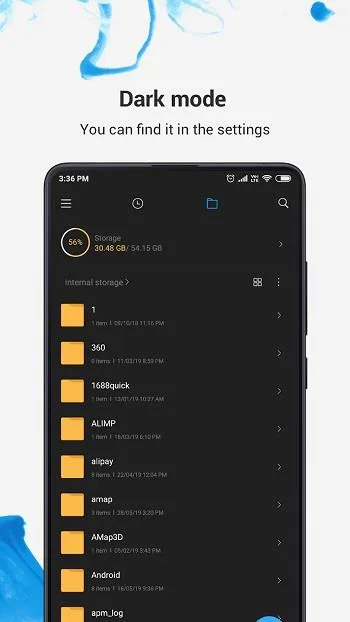
Storage Display: ES File Manager APK will show you the available memory categories of your device. Starting from the internal memory, the SD card, other connected external hardware, the cloud, and the like are included in this. It will first display some main information about these. If you want more information about the space consumption of each of these memories, you can use the ES File Explorer Apk to get in touch with that as well.
File Organization: File organization in the app includes moving files from one location to another, copying or duplicating files to another location or to the same, deleting unwanted files, renaming files with more suitable names, sharing files with other devices or via social media, and performing other related actions. All these are presented to your fingertips in the ES File Explorer Apk interface once you select a file. The functions are easy to identify and work with, and what needs to be done next will be displayed on the screen.
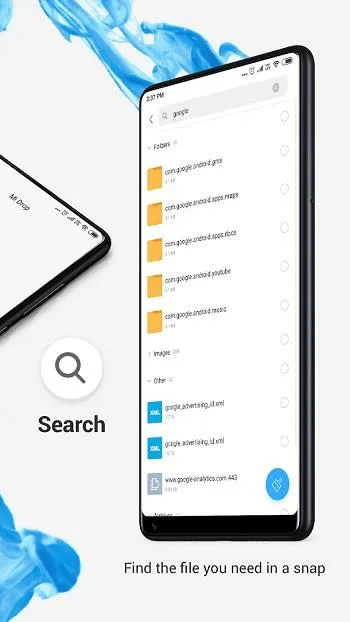
File Analysis: ES File Explorer Apk can analyze files by giving you information about their usage and performance. If you find that a particular is not being used much and realize that it is not needed, you can delete these files. The Explorer can also show you the least used files and the most used files separately. This analyzing technique is an extensive one and provides you with all the details that you need to know about a file or a folder. If there is corruptible content in a file or if a certain file that you cannot open, the app will notify you about it.
Compressed Files: ES File Explorer supports compressed file formats and will give you the opportunity to extract them then and there. This is very helpful because when you download some files from the internet, they could be compressed formats. So you need not bother, as this app can release you from stressing about that. You can also form compressed files from the available files you have in your memory as well. The compressed or extracted files can then be opened on their chosen or default running application.
Cloud Storage Support: Another wonderful benefit of the ES File Explorer Apk is that it can expand your cloud storage. It supports cloud storage in many ways and this can allow you to upload content to the cloud via the app. All you need to do this is an uninterrupted internet connection and the files will be safer and accessible on many other platforms as well.
Highlights:
Innovative Interface With Smooth Interaction: The application’s overview interface has an eye-catching and modern design, combined with a flexible and comfortable feeling for users to master all the features quickly. The categories or features are also clearly categorized, and you’ll have plenty of exceptional support to get you off to a good start in making the most of the app. The theme will also regularly introduce new features or updates on the homepage, helping you catch many interesting changes in design or useful features.
Organize Your Files With The Least Effort: The application’s main feature is to help you manage the memory and all the files on the device. Although it is not organized, the visibility is outstanding. You can also conveniently name, change, and arrange file structures through a refined interface that supports various viewing modes. The management also includes a multi-file analysis and repair system, allowing you to find or optimize the best memory, manually or automatically, through the application.
Interact With Downloaded Files Easily: Dynamically interacting with files is an outstanding feature of the application, and it will help you to view compressed files in multiple formats or install multiple files. Multi-format support saves you time, eliminates the need for third-party software, and is even ready to unzip or organize files into specified folders. Document files will also be redirected to similar applications, allowing you to view the content inside as quickly as possible after downloading.
Massive Cloud Storage For Support: The application will support all users with huge cloud storage along with accounts to link, allowing them to expand their storage and store more things. You can also automatically back up or upload a lot of content to storage to save physical memory or for security purposes because it is solid and reliable. Cloud storage can also be accessed anywhere and has extensive interoperability with many other platforms to save you the time needed to interact with files.
Strategies:
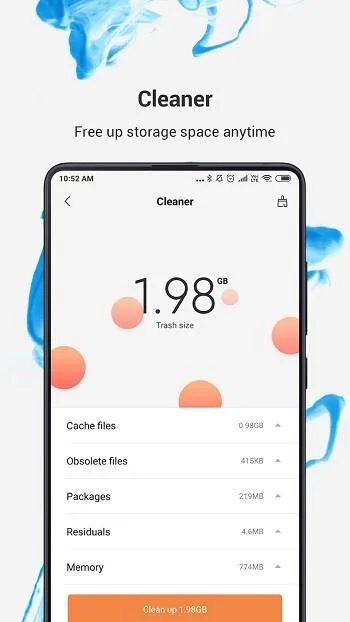
Regularly Clean Files: Use the built-in cleaning feature to keep your device clutter-free and to maintain optimal performance.
Organize Files: Creating a folder system will help in easily locating and managing files.
Backup Important Data: Schedule regular backups of essential files to prevent data loss in case of device malfunction.
Utilize Cloud Services: Integrate various cloud storage options to access files anytime and from multiple devices.
User Reviews:
This app is useless without downloading ability, it was a great app for downloading and storing files but now it's useless.another thing that made this app useful was because it works on old phones and I used it for my iPhone 5 and it is very useful but now without downloading ability it's useless and I hope they fix it.i always hoped that they design the PDF reader of this app just like iPhone iBook app (with search engine and iPhone review downside page)! Thanks.
The music player is completely fine, until it finishes the song you first started playing or you skip it. If you skip it, the same song will play through again with the next song’s description. If you don’t skip it/ after you skip it, it will play through two whole times and play the song AFTER the song that was next. It will repeat this, so you hear only every other song on the list, two times.
Bought this about a year ago. Used the free version years ago in older iPhone. It's improved so much. It makes it so easy to move files into your iPhone. It plays most all video formats with its own video player. Haven't run into any issue with watching movies. I haven't tried using the server access tabs because I don't have an servers but it looks promising. You can transfer files without it. Either by wifi or thru iTunes.
Like another reviewer here, I had another app I was using to transfer files between my Apple devices and other devices. After that app no longer worked, I searched around for alternatives. I tried this app, and it worked like a charm… Even better than my previous app. I really appreciate this developer, allowing people to try for free and then purchasing the lifetime purchase after testing it. This is what I did, and I am also appreciative that there is no ongoing subscription. Thank you, and hats off to this developer!
Summary:
Tracking the device is necessary, such as changes in storage, applications, files, and more, to keep the device stable and not overloaded. Therefore, the application is designed to ensure that and promises to bring users many interesting and unique features to help them manage their devices more flexibly. Additionally, the memory analysis capabilities are superior, with impressive capabilities to regularly protect the device and even optimize the system. You can also easily find many different files with just a few simple taps, and there are multiple corresponding actions to handle different file types with agility. An extraordinary file explorer like this is needed, and you will need it for many other valuable purposes to keep your device tidy and personalized in the most efficient way.








