
Sonos is a beloved music software that boasts a vast music library and can connect to Sonos devices to play high-quality music, catering to individual user needs. Users can easily find music by entering keywords and adjust the sound quality and effects to their liking. Paired with compatible Sonos devices, users can immerse themselves in a cinematic music experience. The software is also continuously updated, adding more fun features to provide an even more comfortable user experience.
Click to load YouTube / 点击加载视频
YouTube ↗Features:
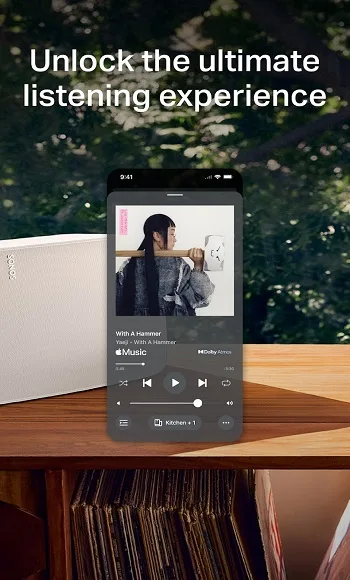
The Home screen puts all your content and controls right at your fingertips. Quickly jump back into your recent favorites, discover new music, and fill your home with Sonos sound.
Browse, search, and play content from all your services with a single app, including Spotify, Apple Music, Amazon Music, Pandora, TIDAL, Audible, Deezer, iHeartRadio, and SiriusXM.
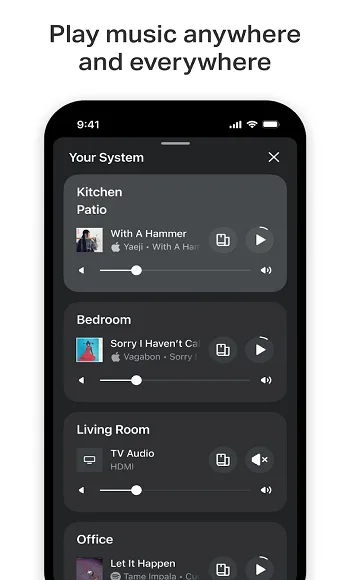
Play something different in every part of your home or the same thing everywhere. The Sonos app gives you complete control of your Sonos products and listening experience from any room.
Enable Sonos Voice Control to play music and control your system with hands-free ease and unheard-of privacy.* Explore helpful tips and recommendations in your Message Center.
Create your ultimate music library by saving go-to artists, albums, playlists, and stations to Sonos Favorites. Fine-tune products for your space with Trueplay. And adjust settings for your needs and preferences.
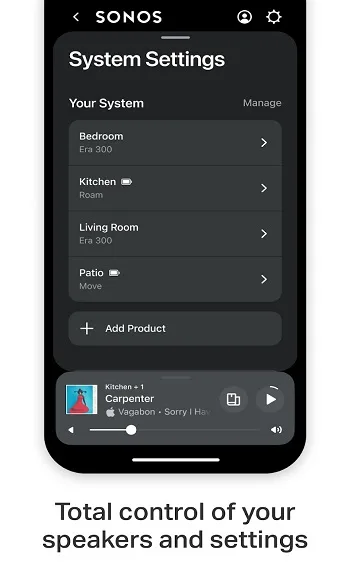
The app automatically detects your Sonos products, then it’s only a few taps to incredible sound. Easily set up a stereo pair, create a cinematic surround sound system, and add speakers to more rooms.
Highlights:
Trueplay and room tuning: Sonos’ tuning tools optimize audio for room acoustics; microphone access is required for the best results and availability can depend on your mobile device.
Local inputs and Bluetooth: line-in is supported on devices with analog inputs; Bluetooth streaming is available on portable Sonos models for direct playback when away from Wi‑Fi.
Account and privacy: a Sonos account is required for full app functionality and service linking; privacy and data handling details are documented on Sonos’ support pages.
Unified streaming: browse and play music from Spotify, Apple Music, Amazon Music, TIDAL and hundreds of other services without switching apps.
Multi-room playback: group speakers for synchronized audio across rooms, create stereo pairs or assign surround channels for home theater setups.
System setup and maintenance: add new speakers, run updates automatically and use on-screen guidance to get devices online quickly.
Useful Tips:
Utilize Sonos Voice Control for hands-free music playing and system regulation. Make sure you have a voice-enabled Sonos product for this feature.
Explore the Message Center for useful tips and suggestions to enhance your Sonos experience.
Use the system view to control all available outputs in your Sonos system and manage active content streams effectively.
FAQs:
What can l do with the Sonos app?
With the Sonos app, you can set up your Sonos products, group and ungrouprooms, control music playback, and more.
What's the difference between the Sonos app and the webapp?
The web app is designed for playback and grouping control only. With theSonos mobile app, you can add or remove products from your system.confiaure home theater setup, create alarms and preset aroups, and more
What is the Sonos web app?
The Sonos web app is a web-based version of the Sonos app, letting youeasily control playback and grouping from the browser of a desktop or tablet
How do l update to get the newest version of the Sonosapp?
You can update by going to System > System Updates. While you're thereturn on Automatic Updates to receive future versions automatically.
Conclusion:
Sonos is a mobile utility app built for folks who want full control of their home audio setup without juggling ten different remotes or apps. It’s like your personal command center for managing music, podcasts, and more across Sonos devices from your living room speaker to the kitchen soundbar and even your bathroom vibes. This isn’t some random controller app with basic skip/pause buttons. Sonos is designed for seamless audio flow, multi room syncing, and real-time adjustments that turn your house into a well orchestrated sound system no matter what services you’re streaming from.