ChatOn - AI is a highly anticipated and beloved intelligent assistant tool designed to help users achieve greater efficiency in both work and life. It provides professional answers and text to address various user questions, meeting personalized usage needs. ChatOn - AI utilizes the latest AI models; users simply input their questions and commands to search the entire internet and generate relevant videos or text, becoming the best assistant in their work. ChatOn - AI is continuously being updated, iterating and optimizing its AI models, adding more popular new tools, and bringing users the most comfortable user experience.
Click to load YouTube / 点击加载视频
YouTube ↗Features:
Various Trigger Settings: ChatOn AI offers flexibility with trigger settings, allowing users to choose when and how the extension activates – whether always, manually, or triggered by a question mark.We experimented with different trigger settings to assess responsiveness and user control. Manually triggering the extension and setting it to respond only when a question mark was present provided a tailored user experience. The variety of trigger settings accommodated different user preferences, offering a personalized interaction with ChatGPT.
Dark Theme: Recognizing the importance of user preferences, ChatOn AI includes a dark theme option for users who prefer a darker interface. Our team explored the dark theme setting under various lighting conditions to evaluate its visual appeal and readability. The extension seamlessly adapted to different environments. The dark theme proved to be a thoughtful addition, enhancing user experience and accommodating the preferences of users who prefer darker interfaces.
Popup and Standalone Interface: ChatOn AI provides users with the option of interacting through a popup or a standalone interface, catering to diverse user preferences. We assessed both interface options for usability, convenience, and responsiveness. Users could seamlessly transition between the popup and standalone modes based on their preferences. The dual interface options added versatility to the user experience, allowing users to choose the mode that best suited their workflow.
Allows Input from Anywhere: The extension enables users to input queries and interact with ChatGPT from anywhere, further enhancing the accessibility of natural language responses.We tested the extension's ability to accept input from various sources, including external websites and documents. ChatOn AI consistently recognized and processed queries from diverse platforms. The tool's capability to accept input from anywhere facilitated a seamless integration into users' existing workflows, promoting accessibility and convenience.
Send Selected Text as Prompt: ChatOn AI streamlines the process of generating prompts by allowing users to send selected text directly to ChatGPT. Our team selected text from different sources, including articles, emails, and online forums, and seamlessly transferred it to ChatGPT. We evaluated the accuracy and relevance of ChatGPT's responses based on the selected text. The "Send Selected Text as Prompt" feature proved efficient, offering a quick and direct method to generate responses based on specific content.
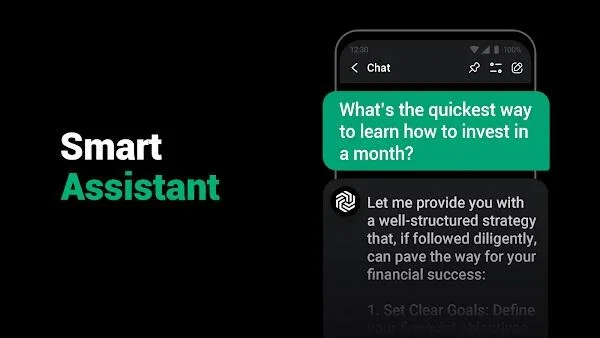
Functions:
Multimedia Sharing: Easily share photos, videos, documents, and other media files with your friends and family, enhancing the overall communication experience.
Group Chats: Create and participate in group conversations, allowing you to stay connected with multiple people simultaneously.
Voice and Video Calls: Engage in high-quality voice and video calls with your contacts, enabling face-to-face interactions from the comfort of your Android device.
Encryption and Privacy: ChatOn employs advanced encryption protocols to protect your messages and data, ensuring your conversations remain secure and confidential.
Offline Messaging: Continue sending and receiving messages even when you’re offline, with the app automatically syncing your conversations when you regain internet connectivity.
Customizable Themes: Personalize your ChatOn experience by choosing from a variety of visually appealing themes and customization options.
Stickers and Emojis: Express yourself with a wide selection of stickers and emojis, adding a fun and expressive element to your conversations.
Strategies:
To get the most out of ChatOn – AI, try these tips:
Be Specific with Commands: Provide clear, concise instructions to avoid overloading the AI and get accurate results.
Explore Voice Features: Use voice-to-text for quick note-taking or text-to-speech for multitasking.
Leverage Summarization: Upload PDFs or YouTube links to quickly extract key information.
Customize Outputs: Adjust tone and length settings to tailor content for specific audiences.
Download Safely: Always download from trusted sources to avoid malware or corrupted files.
Comparison:
When comparing ChatOn AI to other leading apps in the AI assistant space, such as ChatGPT by OpenAI, AI Chatbot Nova, and Bing AI, several distinctions become apparent. ChatOn AI offers a unique suite of features like the AI Writing Assistant and Document Master, which are tailored more toward professional and academic users looking for comprehensive document management tools. This sets it apart in terms of functionality aimed at productivity.
In terms of usability, ChatOn AI boasts an intuitive interface that is often considered easier to navigate compared to the more data-heavy approach of Bing AI or the broader conversational capabilities of ChatGPT by OpenAI. This makes ChatOn AI particularly appealing to those new to AI technology or those who prefer a more structured user experience.
Pricing is another crucial aspect where ChatOn AI stands out. While ChatGPT by OpenAI and AI Chatbot Nova offer tiered pricing models, ChatOn AI provides a significant amount of its core functionality for free, which can be a major draw for users looking to get maximum value without upfront investment.
These factors collectively highlight why ChatOn AI remains a competitive choice among apps in the AI assistant market, balancing advanced features with user-friendly design and cost-effectiveness.
Final Thoughts:
From generating original content to providing writing support and even transforming ideas into captivating visuals, ChatOn streamlines the writing process and boosts creativity. With its advanced capabilities and user-friendly interface, ChatOn – AI Chat Bot Assistant Mod is the perfect tool for individuals looking to improve their writing skills and increase their productivity. Download ChatOn now and experience the power of AI in your writing journey.