

Kiwi Browser is a browser tool for Android. This application boasts a user-friendly interface and provides a smooth user experience thanks to its translation and pop-up blocking features. With Kiwi Browser, you can smoothly access various websites, ensuring a stable browsing experience whether reading news or watching videos. Furthermore, this application offers website management, resource downloading, and other functions, allowing you to enjoy smooth network speeds and say goodbye to annoying pop-up ads. Download Kiwi Browser now and enjoy a smooth browsing experience.
Click to load YouTube / 点击加载视频
YouTube ↗Features:
Customize the home screen
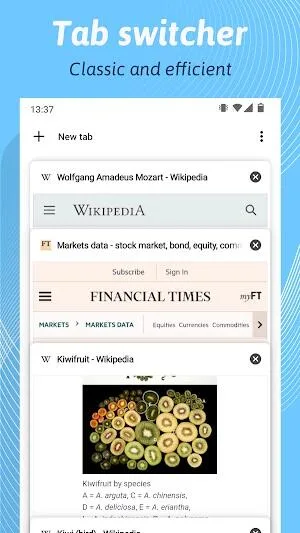
When you open Kiwi Browser, you can see the most relevant news from your chosen country, with an algorithm that adapts to your tastes. You can also choose which web pages appear at the top for quick access, or keep previously opened tabs open for quicker access.
Block ads and pop-up windows
One of Kiwi Browser's best features is its ad blocker and pop-up blocker. This feature blocks intrusive and annoying content as you browse, displaying only neutral ads that do not force you to interact with them or that are not displayed on top of the content you want to see.
Support for Chrome extensions
Kiwi Browser is compatible with most Chrome extensions, allowing you to tailor your browsing experience to your needs. You can install your favorite add-ons directly from the Chrome Web Store, or even add them in CRX or unzipped format.
Customizable night mode
To make reading in low-light environments easier, Kiwi Browser offers a customizable night mode where dark mode is forced on the entire browser and on the web pages you browse, even if the page does not natively have a dark mode. You can choose between several dark modes, including a high contrast mode, and a mode optimized for AMOLED displays.
Place the address bar wherever you prefer
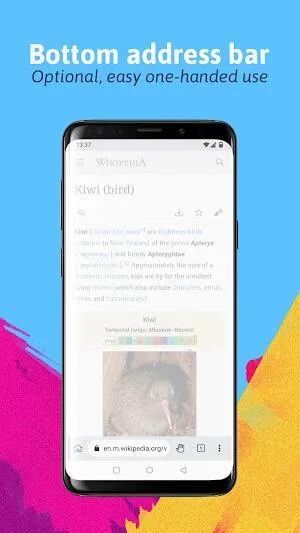
With ergonomics and ease of use in mind, Kiwi Browser allows the address bar to be placed at the bottom of the screen. This option makes it easier to access the browser's main functions, especially on devices with large screens. You no longer have to stretch or use both hands to open or close tabs.
Protection against cryptojacking and incognito mode
Kiwi Browser incorporates various security measures to protect you against cryptojacking, preventing malicious websites from using your device's resources to mine cryptocurrencies without your consent. Finally, Kiwi Browser includes an incognito mode that allows you to browse privately and anonymously. In this mode your browsing history, cookies and site data are not stored.
Tips for Users:
Enable Ad-Blocker for an Enjoyable Browsing Experience
Make sure to enable the built-in ad-blocker in the app to get rid of annoying ads. Simply go to the settings and toggle the ad-blocker feature on. This will significantly enhance your browsing experience by eliminating distractions.
Explore Customization Options
Take advantage of Kiwi Browser's customization options to enhance your browsing experience. From changing the theme to adjusting font size, you can personalize the browser according to your preferences. Experiment with different settings to find what works best for you.
Install Useful Extensions
To make the most out of the app, consider installing useful extensions that cater to your needs. Whether it's a password manager, a translation tool, or a privacy-focused extension, these add-ons can enhance your browsing experience and make tasks easier.
Speed and stability:
If you're an avid user of Google's Chrome browser on your device, then Kiwi Browser - Fast & Quiet will be a familiar sight to you. It features the same clean and minimalistic UI design that gets out of your way and helps you start browsing right away. Being built on top of the Chromium engine also means that it is able to load webpages faster and consume less data.
This browser also boasts a built-in pop-up blocker, which works quite well in dealing with various ads while browsing. One minor but thoughtful design element is its bottom address bar that makes it easier to navigate pages and settings on today's large screens. You can even import bookmarks to help simplify the transition and setup process if you're coming from a different browser.
More important is support for extensions, a feature that you would typically find on popular desktop-based options from Google or Mozilla. You can check some out directly from the Chrome Web Store as it's fully compatible with it. Having said that, though, be aware that not all are guaranteed to work, but it will be a simple matter of updates from devs to address this.
FAQs:
Does Kiwi Browser support Chrome extensions on mobile?
Yes, it supports most Chrome desktop extensions.
How does Kiwi ensure user privacy?
By blocking ads, trackers, and disabling screenshots in Incognito mode.
Is Kiwi Browser free and frequently updated?
Yes, it is free with regular updates for performance and security.
Conclusion:
Kiwi Browser is a lightweight Android browser that offers fast internet surfing while consuming minimal device memory. It is developed using Chromium and WebKit, resulting in quick content loading times. What sets Kiwi Browser apart is its support for a wide range of extensions, including ad-blockers and grid view for Google Meet. It also includes a highly acclaimed night mode and additional security features. Users have the flexibility to manage and customize the websites displayed on their homescreen. With Kiwi Browser, users can comfortably browse multiple websites on their smartphones and experience faster file downloads.








