
AccuBattery is a professional mobile phone battery management tool designed to help users optimize their phone's battery for a longer lifespan. As users use the phone over time, AccuBattery gradually generates real-time battery capacity data, total charging time, temperature, and optimization suggestions to improve battery life and help users better understand their devices. AccuBattery is also continuously updated, adding more useful tools and fixing various bugs. Interested users can download AccuBattery from this site!
Click to load YouTube / 点击加载视频
YouTube ↗Features:
Know the battery status information: Battery status on Android mobile devices will constantly change from time to time. Therefore, you need to monitor the health of your battery to better understand the conditions that the battery is experiencing. From there, it is easy to control the battery power and overcome some problems such as charging the battery or the battery bottle effectively and in a timely manner. All you need to do is simply drag the screen down to the bottom interface. Here, battery-related information will display in detail on the screen.
Check battery charging speed: Proper battery charging is one of the most effective battery improvement factors at the present time. AccuBattery understands that. This application supports users who can check the battery charging speed through the input current. From there you will know exactly how fast your device is charging even when the screen is on and off. If the charging speed is too fast or too slow, this app will notify your Android device immediately. This means that you should find a better charging cable to protect the device’s battery optimally.
Always protect battery health: AccuBattery works even when the user’s device is turned off to ensure optimal battery protection. Notifications will be sent to your device continuously to ensure that you do not miss any important details during charging and battery usage. Accordingly, this application will actively work to provide an ideal battery charging efficiency of 80%. This is really helpful in preserving the battery on Android mobile devices. Besides, new algorithms will be continuously added to bring greater efficiency when using this application.
Change battery icon: As you probably already know, the battery icon on Android mobile devices is defaulted by the manufacturer and cannot be changed around. But with the arrival of AccuBattery, everything becomes simpler than ever. This application provides a library of battery icons with many different themes for users to choose from. Accordingly, the number of icons will also increase continuously to satisfy all types of users. Besides, changing the battery icon through this application will not affect the device’s performance and battery draining speed.
Highlights:
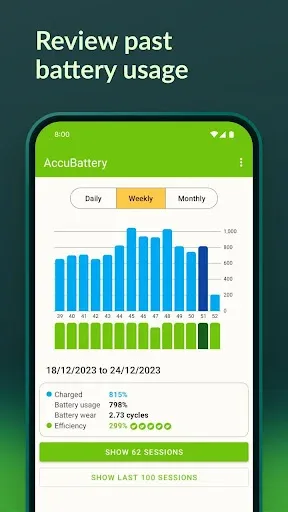
Battery health: With each charge cycle, batteries tend to wear out, reducing their overall capacity. Accubattery helps you keep track of your battery wear by providing information about the amount of wear endured during each charge session. Additionally, the app offers a charge alarm feature that reminds you to unplug your charger, preventing overcharging and unnecessary battery wear.
Battery use monitoring: Accubattery measures actual battery usage by gathering information from the battery charge controller. It provides detailed insights into battery consumption per app, allowing you to identify power-hungry applications and make informed decisions to optimize battery life. You can also monitor how much battery your device is using during active or standby mode.
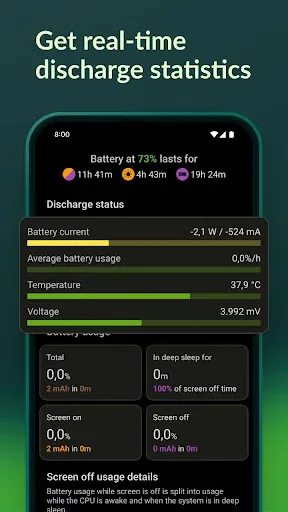
Detailed battery statistics: Accubattery provides comprehensive battery statistics directly in the notification area, giving you quick access to essential information. From real-time battery capacity measurements in milliampere-hours (mAh) to discharge speed and app-specific battery consumption, you can monitor your battery’s performance with ease.
Charge speed optimization: Wondering which charger and USB cable deliver the fastest charging speed for your device? Accubattery has got you covered. By measuring the charging current in milliamperes (mA), the app helps you find the most efficient charging setup. You can also check the charging speed when the screen is on or off, as well as the estimated time required to fully charge your phone.
Strategies:
Optimize Background Apps: To preserve battery life, close unnecessary apps running in the background. This reduces the strain on your device’s battery and ensures that power is allocated efficiently to essential tasks.
Enable Battery Saver Mode: Most smartphones offer a battery-saving mode that limits background activity and reduces screen brightness. Enable this mode to extend your device’s battery life when running low.
Monitor Screen Brightness: Lowering your device’s screen brightness can significantly reduce battery consumption. Adjust the brightness level according to your surroundings to conserve power without compromising visibility.
Update Apps Regularly: Developers often release updates to optimize app performance and minimize battery drain. Keep your apps updated to ensure they run efficiently and do not drain unnecessary power.
Use Airplane Mode Wisely: Activating airplane mode in an area with poor reception can help conserve battery life by preventing your device from constantly searching for a signal. Use this feature strategically to preserve power when needed.
Conclusion:
AccuBattery is a powerful tool designed to help you maximize the battery life of your mobile device. With each charge, your battery loses capacity, but by charging only up to 80%, research shows you can extend its life by up to 200%. This app accurately measures your battery usage by analyzing the data provided by your device's charging controller. By combining this information with details about the apps running on your phone, AccuBattery can help you pinpoint which apps are draining your battery the most. Plus, it can even help you find the fastest charger and USB cable for your specific phone model.








