GameGuardian is a popular mobile game modding tool that allows users to unlock various currencies and skins in games, creating a variety of fun mods to enhance their gaming experience and easily dominate the game. GameGuardian provides professional tutorials and FAQs, and users can also contact customer service at any time for assistance. GameGuardian is constantly being updated, adding more practical features to bring users a more comfortable gaming experience.
Click to load YouTube / 点击加载视频
YouTube ↗Features:
Adjust your in-game speed: To the modifications, you’ll first have the option to adjust your in-game speed using the provided customizations. Feel free to speed up your slow it down using the different options that’re available on the app. Enjoy the desired experiences on your mobile devices with just a few simple tweaks.
Perform multiple changes to your games: The app also allows users to make multiple changes to their game by dumping old memories or copying new memories. Therefore, completely change your Android games. Moreover, for those who wish to enjoy a more personalized gameplay, you can easily change your games’ UI using the customizations that’re available in the app.
Enjoy the game in your preferred languages: For those who preferred to play the games in their native languages, you’re also allowed to choose between multiple app locale options. With more than 50 different available languages, you can easily perform simple game localizations on Game Guardian. Feel free to play your favorite games in your preferred languages.
Can use on emulators as well: Moreover, the app also works on game emulators such as PPSSPP, ePSXe, GameBoy, and more. Hence, you’ll be able to mess with the emulated games on your Android system, which is quite tempting. Change your Pokemon games, perform speed hacks, modify the UI, and more. Multiple options are available for you to pick up.
Frequent updates with polished and optimized features: In addition, the app offers frequent updates with the latest bug fixes and new features. Hence, you’ll be in for plenty of new surprises with each new update of Game Guardian. Not to mention that these updates will also ensure that the app runs properly on your system.
Highlights:
GameGuardian is an advanced app with many features and variables that allow you to modify the supported game. Here, we are going to discuss the most prominent features:
Compatible with a Variety of Devices: The app is fully compatible with various devices and runs without issues on x64, x86, and ARM devices.
Works with Emulators: The game modifying app is optimized and designed to operate and run on emulators.
Root Requirements: The app requires an Android device with root access due to how the app is designed to work.
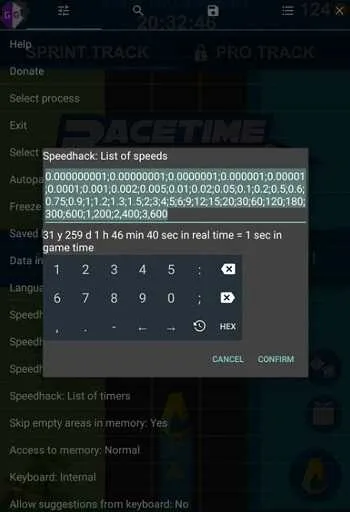
Game Speed Hack: Modify the speed of the game. You can accelerate and decelerate the game based on your needs and requirements.
Lua Script Support: Offers native support for Lua scripts and lets you run and customize them for each compatible game.
Customizable UI: The user interface is friendly and highly customizable, allowing you to enable and disable the features and let you relocate them according to the game.
Strategies:
To ensure a positive experience while using the app, consider the following tips:
Use Offline Mode: Whenever possible, use the tool in offline mode to avoid detection by game servers.
Backup Your Data: Always back up your game data before making any modifications to prevent loss.
Research Scripts: Before using any scripts shared by the community, research their safety and effectiveness.
Stay Updated: Regularly check for updates to the GG app to ensure compatibility with the latest games and features.
FAQs:
Where does speedhack work?
Speedhack may not work on x86 devices / emulators for games that do not have x86 libraries.
Also for an ART environment, speedhack does not work with Java timers. If the game uses them and you have an ART environment (usually Android 5 and above), then speedhack will not work.
GameGuardian as a whole works for me, but in some games I'm getting the PTRACE_ATTACH error. Why and what to do about it?
This game is equipped with protection against debugging by the type of SecNeo protection. GameGuardian can not bypass this protection. Through it, you can not hack this game.
Why does the application have such a strange package name? Why is the application not updated, but every time install separately? Why does each version have a different package name?
To prevent detection by anti-cheats by package name.
In some games, when changing speed (speedhack), they stop responding to clicks. Is it game protection or program error?
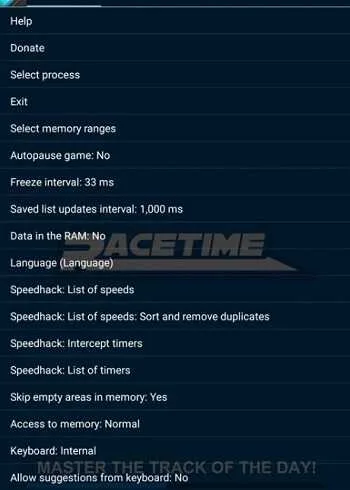
This means that your speedhacking intercepts the input queue timers and it dies. It is necessary to select green checkmarks in the list of timers (in the settings of GameGuardian) so that this does not happen.
Why does it issue a comma separated list of errors?
Because the delimiter of numbers is a semicolon (";").
How do I perform multiple searches at the same time?
At the moment, the application does not allow this, but you can install the application several times and run the copies together if there is enough memory and disk space.
Do I need to update the application if there is nothing significant in the changes?
It is suggested. Support is only for the latest version.
What are the symbols "!" and "#", before the process name?
This marks the traced processes.
"#" - before the process means that it is traced by some other process.
"!" - before the process, this process is traced some other process.
Tracing is typical for debugging or hacking. Also it is used in some protections. Typically, a process with a "#" sign is a protected process.
Final Thoughts:
GG Gameguardian Mod the most popular and best application tool for game on Android. GG can run in Android using virtual or emulator like VMOS, Sandbox, etc.Once GG is installed, you can leave it in the background with a semi-transparent icon that can be seen at any time on the screen. When starting the game, you can open GG and select the application process you want to mod. For example, if you have a specified number of lives in a game, you can search for that number and replace it with the number you want.Another GG feature is the ability to change its own internal clock and device to quickly fix games that normally take a long time to build a building or recharge.