

Tubular is a free tool designed for video enthusiasts. It not only allows you to freely download and play your favorite YouTube videos, but also automatically blocks ads and pop-ups, creating a clean viewing environment. Tubular is small in size, can be installed and used on most mobile phone models, and can download and play videos without an internet connection. Users who want a brand new video viewing experience shouldn't miss Tubular!
Features:
Use the app without using your YouTube account: Many people don't like to enter their personal data in third-party apps, and, luckily, you won't have to with Tubular. You'll be able to use the app easily, without having to enter your details or sign in with your user account. However, this doesn't mean that you can't follow your favorite channels. You can subscribe to any channel from the app itself. This way, every time one of your favorite channels releases a new video, you can find out just as quickly as if you were using the official YouTube app.
Download YouTube videos easily: One of the standout features of Tubular is that you can download videos to watch offline without an Internet connection. You can choose between 144p, 240p, 360p, 480p, 720p and 1080p for both playback and download. All videos will be downloaded in MPEG-4 format and, before starting the download, you'll be able to see the estimated file size. Of course, if you prefer, you can also download only the audio, choosing between two formats (OPUS and M4A) in half a dozen different qualities.
Play videos in the background: Tubular also allows you to watch any video in the background. This means you can keep listening to content, whether it's a video, podcast or music, even if you're using another app or have the device screen locked. Also, it is important to note that when playing in the background, the app only downloads the content audio to save data. And, if you prefer, you can also play any video in a pop-up thumbnail window that draws over other apps.
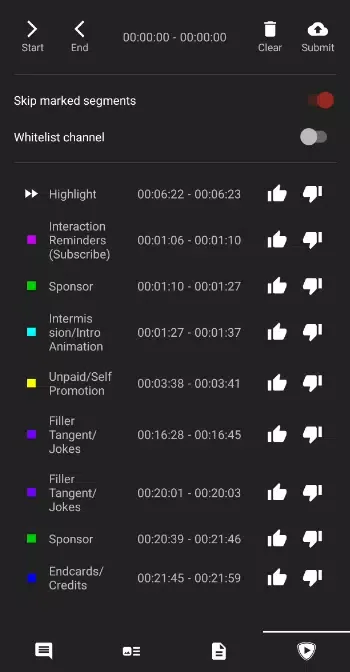
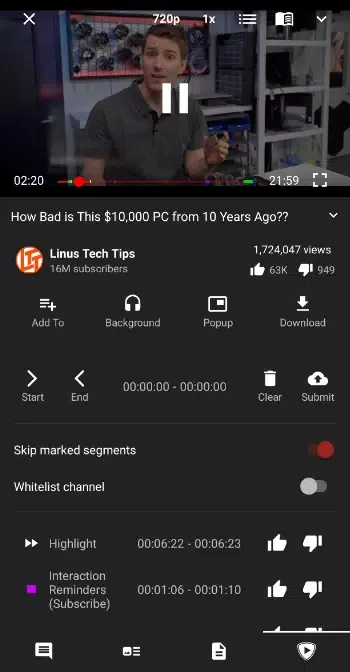
Free of ads and sponsored content: With Tubular, you won't have to worry about watching ads every few minutes, as the app automatically blocks all video ads. In addition to this, thanks to SponsorBlock, it will also block all sponsored content segments by default. However, if you like a channel, you can add it to the whitelist. This way you'll continue to see that channel's sponsored content to support its creators.

Highlights:
Free and unlimited video and audio playback from different streaming platforms.
It integrates five multimedia content platforms: YouTube, SoundCloud, media.ccc.de, FramaTube, and Bandcamp.
No ads or sponsored content thanks to SponsorBlock.
It implements ReturnYouTubeDislike to let you see the number of “dislikes” on YouTube videos.
It is a NewPipe fork with stability improvements and new features.
Background playback function.
Function to download videos and audio in different formats and qualities.
Minimal and customizable interface with intuitive design and advanced options.
Open-source app under constant development.
FAQs:
Setting up NewPipe to work on Android Auto?
NewPipe works on Android Auto, as described here! You will need to perform these manual steps to make it appear in the car interface (or you can take a look at this video):
Go to the Android system settings
Navigate to Connected devices > Connection preferences > Android Auto (you can also find it by inserting "Android Auto" in the search box)
Scroll to the bottom until you find "Version"
Click multiple times on "Version" to activate developer settings
Press "OK" in the activation dialog
After activation, click on the 3-dot menu in the top-right and go to "Developer settings"
Scroll down until you find "Unknown sources" and tick the checkbox
Restart your phone
You should now be able to use NewPipe in the car interface!
We remind you to use NewPipe on Android Auto only when it is safe: avoid getting distracted!
YouTube / Google login?
NewPipe's goal is to as effectively as possible protect its users' privacy. This means, the app only sends information to external servers which is needed to access content like videos or search results.
Having said this, the developers of NewPipe hope it is understandable that they will not implement any form of authentication which might allow tracking users.
Background player notification doesn't appear on MIUI!
Try force-closing NewPipe, then setting Settings > Notifications > Control center > Lock screen > Format to either "Show notifications but hide content" or "Show notifications and content." See https://github.com/TeamNewPipe/website/issues/288.
If this doesn't fix the issue, please get in touch.
Play offline content in-app?
In order to play streams offline, you need to use an external video player.
The team has considered implementing this directly into NewPipe. This idea was dropped due to the following reasons:
A phone is usually shipped with an audio and video player.
There are other apps available that deal with offline playback, in case the phone doesn't have one.
One option that could reduce friction between using NewPipe and an external player is Just Video Player, available on F-Droid, which is also based on ExoPlayer like NewPipe's player.
NewPipe is not designed to be an all-around video player.
A huge additional maintenance effort would be required to make this work.
Read YouTube Comments?
Team NewPipe has received several requests to enable posting comments on videos, not just reading them.
Since NewPipe's goal is to protect its users' privacy, this feature is not implemented. This is because an account is required to publish comments on all supported services. Logging in with e.g. a Google account would allow the service to track you.
Final Verdict:
Tubular is a fork of NewPipe. It comes with all the privacy features of NewPipe, but also adds features from SponsorBlock and ReturnYouTubeDislike. Like NewPipe, it does not use any Google framework libraries, or the YouTube API. It only parses the website in order to gain the information it needs. Therefore this app can be used on devices without Google Services installed. Also, you don't need a YouTube account to use Tubular, and it's FLOSS.








