

File Miner is a powerful file recovery application. It employs a deep scanning algorithm to delve into hidden folders, cache folders, and temporary folders, aiming to help users find and recover files that may have been permanently deleted by the phone's operating system or other applications. With File Miner, you can scan and attempt to recover accidentally deleted files, providing security for potentially lost important data. Furthermore, this application boasts a powerful scanning engine that helps users perform deep scans of internal storage.
Click to load YouTube / 点击加载视频
YouTube ↗Highlights:
Retrieve photos, videos, and audio: Whether it's recent holiday snaps or vital media for a project, stand out features include restoring such data smoothly.
Recover various file formats: Versatility extends beyond media to include documents, spreadsheets, PDFs, and other essential data formats.
Search and share with ease: After data recovery, an intuitive search function allows for quick file location, with sharing capabilities making it easy to distribute restored files across multiple platforms.
One-tap recovery ensures a quick and secure process to recover data.
A user-friendly interface enhances the experience, making operations straightforward.
Multilingual support caters to a broad user base, adding to its accessibility.
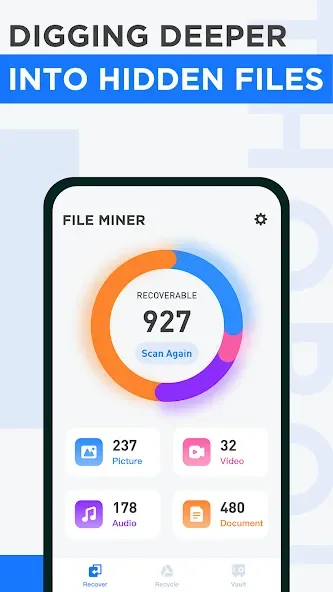
Features:
Deep scan. Find out files from hidden folder , cache folder, temp folder ...
Smart file recognition. All commonly used documents, photos, videos and audios can be recognized to recognize various file formats, leaving temporarily deleted files nowhere to hide
Privacy protection. Preview and select deleted photos, videos and audios for recovery
Easily recover deleted photos, videos, audios or documents
View recovered files and support exporting to external public directories
File vault, put your important files here and won't be easily deleted

Scan and recover:
As you use your smartphone daily for all types of uses, its internal storage will eventually fill up, and the only way to free up space again would be to delete some files. However, that process can oftentimes become confusing and result in accidental deletions. It's in these situations that data recovery apps come into play. File Miner is one of them that features some nice extra included.
When you first open this app, you can immediately run a Deep Scan of your device's internal storage. Afterward, it will display the number of recoverable files, with a breakdown into four categories, namely Picture, Video, Audio, and Document. Pick one to go directly to a simple built-in file manager to preview and choose which ones you want to recover on the list.
One handy feature included is the File Vault wherein you can put important files inside to avoid getting deleted. You will be alerted if you accidentally selected them for deletion next time around. Just be aware that depending on multiple factors, some files can no longer be found and recovered. Also, since it's free, there are ads included and they can be a little intrusive at times.

Conclusion:
Presented as a complete, user-friendly solution for data recovery needs, File Miner is entirely free, highlighting its commitment to accessibility for all users. Feedback and support requests are welcome, ensuring continuous improvement in performance and user experience. With its comprehensive features and dedicated support, File Miner positions itself as an essential tool for safeguarding digital data.








