

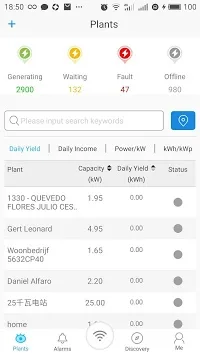
SEMS Portal is an outstanding solar system application that provides users with a wealth of professional-grade features for monitoring, managing, and demonstrating solar systems. Designed for solar system owners, operators, installers, and service personnel, it helps you save money and time. SEMS Portal presents a user-friendly and comprehensive solar system monitoring portal platform, allowing users to easily view crucial data about their solar installations, including current power generation, power consumption, and grid-connected power. SEMS Portal helps users easily understand their energy consumption and performance metrics, optimizing their energy use.
Click to load YouTube / 点击加载视频
YouTube ↗Wonderful Features of SEMS Portal
Unified Dashboard
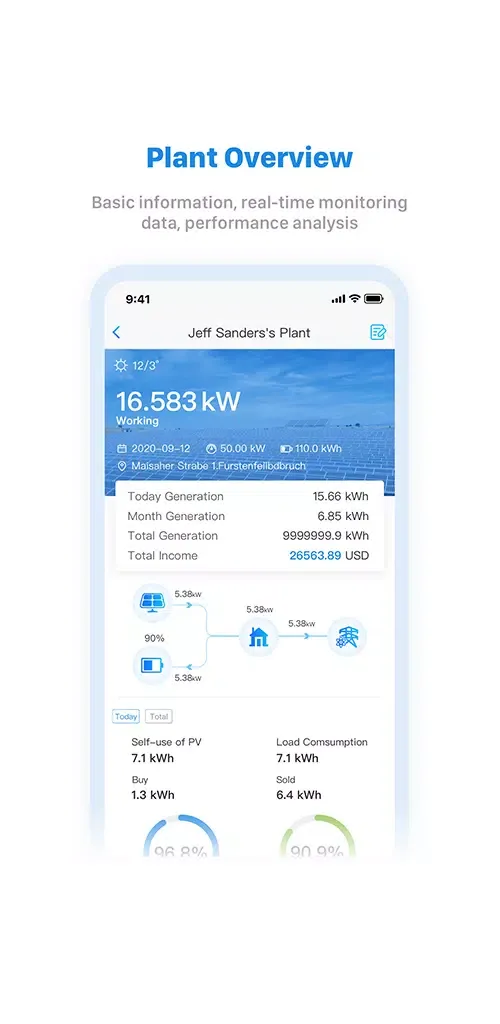
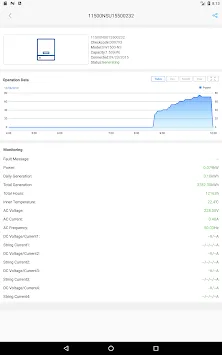
The SEMS Portal dashboard is the heart of the application, providing a clear overview of all key data. Users can view daily power generation data directly on the main screen, and access detailed inverter data by simply tapping the "Inverter" section. The application also offers enhanced charts in landscape mode, making it easier for users to analyze trends and performance metrics.
Intuitive User Experience
SEMS Portal may require a learning curve to set up, but it runs smoothly once configured. While the application lacks built-in instructions, simply connecting the inverter to your home Wi-Fi and entering the necessary details (such as the serial number and verification code) is all it takes to get started. The platform's local currency settings and export tariff functionality further enhance the user experience.
Real-time Monitoring and Notifications
The SEMS portal is expected to become even more useful in the future with the addition of features such as notifications for important events. As some users have suggested, adding alerts for system shutdowns or errors would ensure users don't miss any critical updates. Until then, regular manual checks are recommended to ensure everything is functioning correctly.
Graphical Insights
Charts and visualizations play a vital role in the SEMS portal. Users can view detailed power generation trends and energy flow metrics to better understand their energy consumption. However, some users may find the font too small. Ensuring all important data is clear and legible will greatly improve the user experience.
Gripping Performance of SEMS Portal
The GoodWe SEMS portal provides accurate technical data, while the Solarfox display transforms this data into a clear and aesthetically pleasing visual presentation. The combination of the two elevates monitoring to a new level. The integration of different systems and components enables complete solutions from a single source, bringing numerous benefits to PV operators. Energy flow becomes transparent, easy to understand, and visible to everyone.
The GoodWe SEMS portal can be added as a data source through the Solarfox online portal. Compatible with over 70 interfaces, it fully demonstrates the platform's power. Once connected, current performance data, daily power generation, and CO2 emission reductions are automatically displayed on the screen. Users can also add their own content, such as sustainability projects, pictures, or comments. The final result is a dynamic and engaging dashboard that clearly shows the actual operation of the solar system.
The collaboration between GoodWe and Solarfox is not only technically efficient but also a powerful communication tool. It effectively raises energy awareness and sustainability concepts both inside and outside the company. Whether displayed in company lobbies, schools, or municipal buildings, this energy visualization inspires people to rethink their energy usage.
Exclusive Characteristics of SEMS Portal
The GoodWe SEMS portal provides accurate data, while the Solarfox display makes this data intuitive for everyone to view. These large screens transform technical information into easy-to-understand graphics, displaying real-time energy production, consumption, and savings. Users can also view data on different devices through the application, ensuring they stay up-to-date.
Users can instantly see the system's operational status and its contribution to environmental protection without having to read tables. Visitors, employees, and customers can quickly understand the meaning of these figures. This makes energy consumption not only quantifiable but also intuitive and engaging.
Frequently Asked Questions of SEMS Portal
Can I receive system problem notifications?
Currently, the SEMS Portal does not offer system problem notifications. However, you can manually check to stay updated until this feature is added in a future update.
Why is some of my data displaying incorrectly?
Any discrepancies in daily power generation data or unit measurements may be due to minor bugs or version updates. Please check for updates regularly and report any issues for faster resolution.
How can I more easily read data on the SEMS Portal?
We recommend viewing the application in landscape mode for clearer chart viewing. We suggest you provide feedback to the developers on any reading issues (such as small font size) so that improvements can be made in future updates.
Summarize
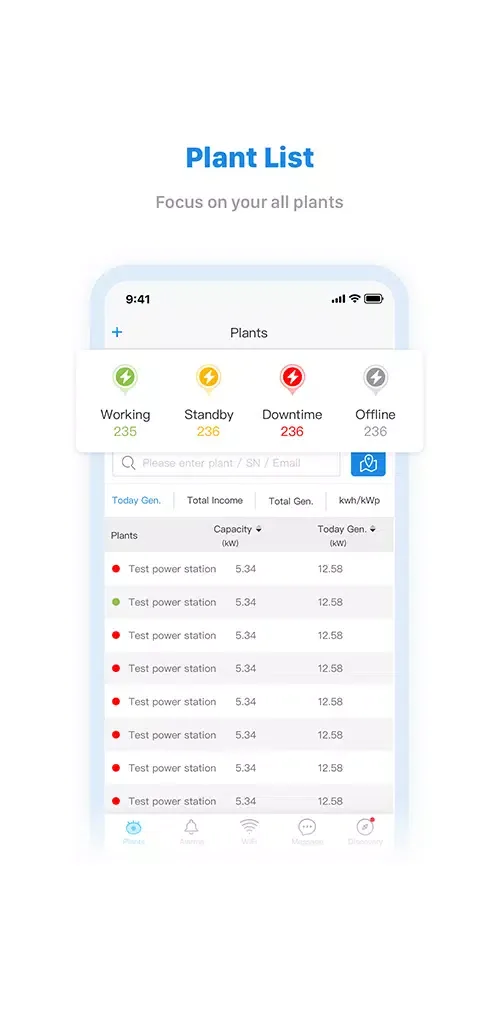
SEMS Portal is a comprehensive and high-performing energy system management and monitoring tool. While there is still room for improvement, its existing features make it a valuable resource for users to understand their energy consumption and performance metrics. Whether it's real-time data or historical trends, SEMS Portal strives to provide clear and detailed analysis to help users optimize their energy use.








