

Virtual Master is a tool specifically designed for mobile devices. With simple operations, it allows you to create an independent system on your device, enabling you to log in to different apps and games simultaneously using different accounts. It employs multiple protection technologies to safeguard your important information and sensitive activities, ensuring safe and secure use. The software also supports game acceleration, helping games run more smoothly and with stable frame rates to meet users' gaming needs. The software is constantly being updated, releasing more new features and optimizations, so stay tuned!
Click to load YouTube / 点击加载视频
YouTube ↗Features of Virtual Master:
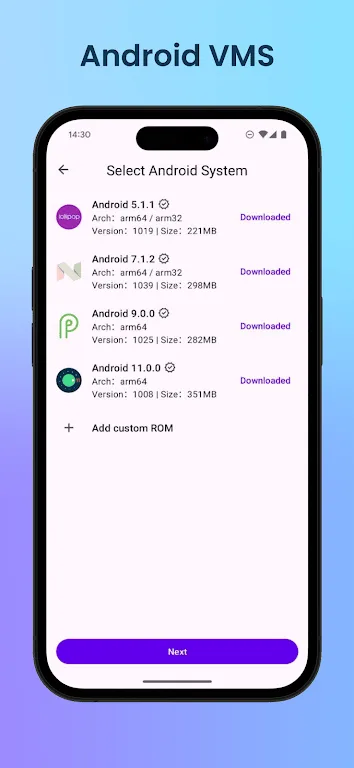
Create a complete virtual operating system: Users can clone multiple separate Android operating systems, install applications, log in to accounts, and use them as if on a real device without affecting the main system.
High data security: Data in the virtual environment will be completely isolated, preventing the main application from accessing information from virtual accounts and vice versa.
Supports running demanding games: Optimizes performance to play high-configuration games in the virtual space without slowing down the main device.
No root required: Operates stably on most Android phones without requiring deep system modifications.
Hidden and protected mode: Can hide application icons, set a password or fingerprint to protect the virtual space from unauthorized access.
Run multiple accounts simultaneously: Supports opening multiple Facebook, Zalo, TikTok, online game, banking, or other application accounts at the same time without needing to log out or log in repeatedly.
Highlights of Virtual Master:
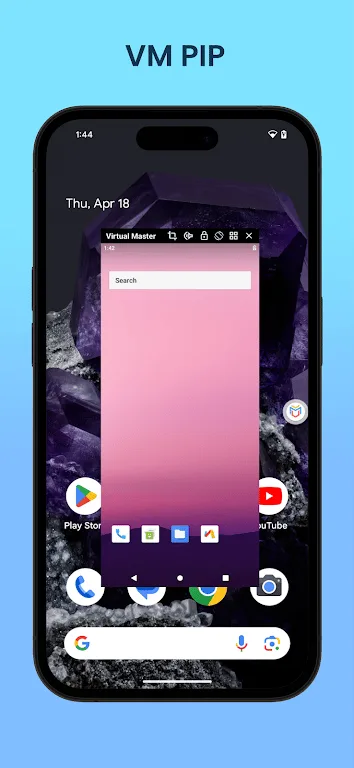
Enhanced Multitasking Capabilities: Virtual Master is designed for multitasking, allowing you to run various apps or games in parallel. The virtual environment supports background operations, meaning that you can engage in a gaming session within the virtual system while simultaneously watching videos or using other applications on your main device. This multitasking capability brings efficiency to your digital life, enabling enjoyment and productivity concurrently.
Top-notch Gaming Experience with Vulkan Support: For gamers, Virtual Master elevates the gaming experience by providing support for Vulkan, a leading high-performance rendering API. This means that many high-end games can be executed smoothly, providing rich graphics and immersive experiences just like on dedicated gaming systems. Users can dive into intense gaming sessions without experiencing lag, ensuring that performance remains a priority while gaming on their devices.
Privacy Protection at Its Core: Privacy concerns are rampant in today’s digital environment. Virtual Master addresses these worries by operating in a secure virtual space that isolates apps and their data from your primary device. When applications and games run within this environment, they cannot access any sensitive information, such as contacts, SMS, or device identifiers. This feature effectively transforms the virtual space into a privacy sanctuary, where users can install and operate sensitive applications without fear of data leaks.
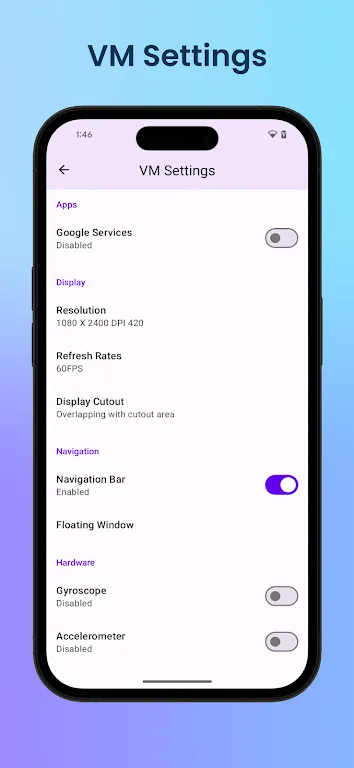
Troubleshooting Boot Issues: In the event that Virtual Master fails to boot properly, it is typically due to corrupted system files. Common solutions include verifying that there is adequate disk space available, force-closing the application, and rebooting the device. If these steps do not remedy the situation, users have the option to access the 'Repair VM' function located in the virtual machine settings. In persistent cases of malfunction, uninstalling and reinstalling the application may be necessary to restore functionality.
How to Use Virtual Master:
Install and Launch the App: Once Virtual Master is installed on your device, open it to access the main interface. The app will create a virtual workspace where you can manage all your cloned applications separately from your main system.
Add Applications to Clone: Tap the “Add App” or “+” icon within Virtual Master to view the list of installed apps on your device. Select the ones you want to duplicate. For instance, you can clone your favorite social media or game app to log in with another account.
Customize Each Clone: After cloning, you can rename or change the icon of the duplicated app for easier identification. This helps you distinguish between personal, work, or secondary game accounts while keeping your virtual workspace organized.
Launch and Log In: Tap on the cloned app inside the Virtual Master interface to open it. The cloned version will behave just like the original app, but with a separate login session. You can now log in using a different account without affecting the original app on your device.
Manage and Switch Accounts Easily: Virtual Master makes it easy to switch between cloned apps. You can minimize or close one app and immediately open another within the virtual space. This smooth multitasking ensures you stay productive and connected across all your accounts.
Enable Privacy and Security Settings: Within Virtual Master, you can enable privacy options like app lock, data separation, or password protection for sensitive accounts. This ensures that your private apps and personal information remain protected even when using shared devices.
Backup Data When Needed: If you want to keep your cloned app data safe, use the backup feature. Virtual Master allows you to save all cloned app settings and progress. When switching devices or reinstalling the app, simply restore your backup to continue where you left off.
Optimize Performance: To maintain device performance, clear unused apps or cache files inside Virtual Master regularly. The app includes tools to help manage storage and battery usage efficiently, ensuring smooth operation even with multiple apps running simultaneously.
FAQs of Virtual Master:
Q: What is the app?
A: It is an app that allows users to create an isolated Android system for multitasking and privacy.
Q: Can I install apps in the virtual system?
A: You can install and manage apps independently in the virtual system.
Q: Is the app ad-free?
A: Yes, the app version is entirely ad-free.
Q: Does it work offline?
A: It operates locally on your device without an internet connection.
Conclusion:
If you're looking for a way to be able to run multiple app and game accounts on a single device, Virtual Master - Android Clone is a solid option worth checking out. It supports various versions of Android and its self-contained virtual environment ensures your personal data is safe. Once its issue with crashes gets fixed, the experience will only get better from there.








