

APKMirror Installer is an installation assistance tool. Users can easily install older or specific versions of applications, which is extremely useful for users who prefer specific app versions or want to perform compatibility tests. With APKMirror Installer, you can install various types of APK files, and even application package files with extensions such as .apkm, .xapk, and .apks. Furthermore, this application provides detailed analysis capabilities, allowing you to immediately view any problems during the installation process and find possible solutions.
Feature:
Ability to install complex application package formats
This is the core and most important feature that makes APKMirror Installer exist. In the modern Android environment, Google has moved to the Android App Bundle format, resulting in the distribution of apps as Split APKs (split APK files).
Instead of a single APK file containing all the resources (like language, ARM/x86 chip architecture, screen density), an app is now split into multiple pieces. When users download apps from external sources (like APKMirror), they often receive packages like .apkm, .xapk, or .apks.
However, the default APK installer on Android cannot handle merging these Split APK files together properly. That’s why APKMirror Installer was born to do this job. The app scans the package files, identifies all the necessary components, then recreates the complete app package and performs the installation process into the system.
Full support for external app package file formats
APKMirror Installer is designed to be a one-stop solution for installing apps from unofficial sources. This is reflected in its wide support for many popular package file formats used by app stores other than Google Play. Specifically, it can handle .apkm files, .xapk files, and .apks files.
In addition, the app still works well as an installer for traditional single APK files. This brings great convenience to users. They do not need to look for many different tools to handle each type of downloaded file format; APKMirror Installer integrates all of these capabilities into a single app.
Furthermore, this wide range of format support affirms the app’s position as an essential tool, helping to simplify the manual installation process and ensure maximum compatibility with most of the app packages shared in the Android community.
Detailed installation error diagnosis and warning feature
One of the most important and useful features of APKMirror Installer is the in-depth diagnosis of installation problems. When users attempt to install an APK file or app package but the installation fails, the default Android installers show a generic and confusing error message. However, APKMirror Installer goes a step further and gives the user the exact and specific cause of the error.
For instance, it may notify that this APK it’s installing is incompatible with the device chip architecture (e.g. installing an x86 APK on an ARM device) or that the app version is outdated, or that the app was previously installed with another signature. By saving time and preventing frustration, it significantly assists the user.
Friendly interface
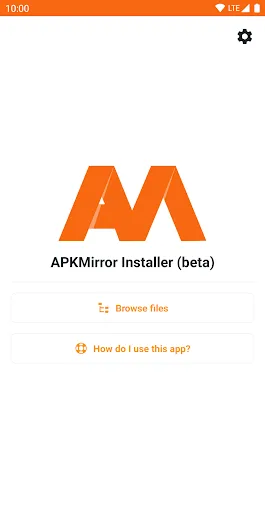
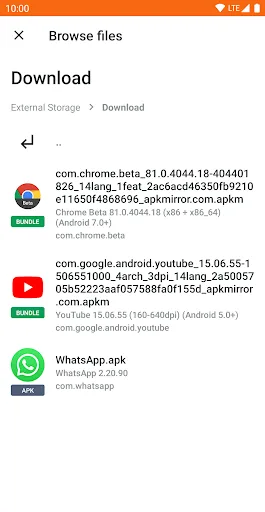
The interface of the APKMirror Installer is minimalistic and fully functional. The app is simple and effective, without any cute embellishments. While opening the app, the user will see a clean screen, mainly showing a list of application package files (.apkm, .xapk, .apks) which the app has checked.
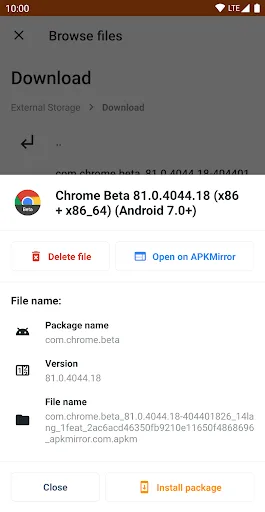
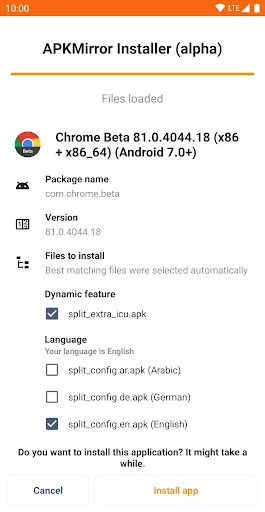
The interaction process is extremely intuitive: just tap on the package file you want to install, the app will immediately switch to the analysis screen. This screen will show the details of the Split APKs components that are about to be bundled and installed, confirming to the user exactly what is going on. Also, when something goes wrong, the diagnostic interface is clearly presented, with error messages in simple language instead of complex technical error codes.
Benefits:
Install many file types
You cannot download every apk file to use. Sometimes, they will come in different forms and require specialized tools. APKMirror Installer APK 998 allows our devices to install these unique files. The list will include .apkm, .xapk, .apks, and other common files. So you can download any version of the application. Install it on the device to be able to use it normally. You will see that this tool creates enormous opportunities for us. Helps us master any file right on our beloved device.
Works with any app
APKMirror Installer can work well with all applications on the market, from updates to files and applications needed to upgrade resources. Sometimes, update files will be corrupted due to the developer’s shortcomings. The only way to solve this is to download and install the individual files. Although it takes a little more time, it will ensure the application works normally. Helps you enjoy using it without encountering any errors. You can install upgrades for Chrome, YouTube, WhatsApp,… These applications must often be upgraded to ensure they meet the requirements.
Change the look
Users can change the application’s interface easily. This is how developers best care for users. That means you can switch back and forth between dark and normal mode. Dark mode will help us reduce harmful types of light. Switch to a dark background colour that resembles nighttime. Helps you protect your eyes while using. This is a very good method for users to stick with the application long. Helps you comfortably use it in any condition. Just a small feature, but it also helps users feel shared.
Pros & Cons:
Pros
This app is completely free to use.
You can get a wide variety of content.
Download movies to watch them later.
This app provides a user-friendly interface.
Get regular updates to access newly released content.
Cons
Provides copyrighted kinds of stuff.
Sometimes, the video quality is poor.
Services are not available in certain regions.
Like many other apps, it also contains ads.
This app can cause security risks.
Conclusion:
All in all, APKMirror Installer is one for the fans of the popular download portal site, allowing them to get their favorite apps and games directly into their smartphones and tablets. If you're one of them, you'll be pleased to hear this. While it's not much to look at visually, the core experience is there is well worth a look. Recommended.








