

Phoenix Browser is a secure and high-speed browser that allows users to smoothly access various websites using its built-in VPN, easily watch movies, and download files of various formats to their devices. The software supports incognito mode, ensuring that no browsing history or cached information is left behind. It also employs diverse protection technologies to safeguard user accounts and privacy. Furthermore, the software automatically blocks various pop-up ads and checks the safety of downloaded installation packages, allowing users to use it with peace of mind.
Click to load YouTube / 点击加载视频
YouTube ↗Features of Phoenix Browser:
The app's browsing capabilities are notable for their speed; Phoenix claims to load web pages twice as fast as many other browsers. This is particularly beneficial for users with slower internet connections, as the browser optimizes data usage and allows for smooth navigation even in challenging network conditions. Data savings are a core component, as Phoenix can compress data usage, enabling users to browse more while consuming less cellular data.
Downloading content is straightforward and efficient with Phoenix. The browser includes a smart video downloader that can automatically detect videos on various websites, allowing users to download them with a single click. This feature supports a wide range of formats, ensuring that users can save videos from social media platforms like Facebook and Instagram. The built-in video player further enhances this experience, providing an integrated solution for watching downloaded content without needing to exit the app.
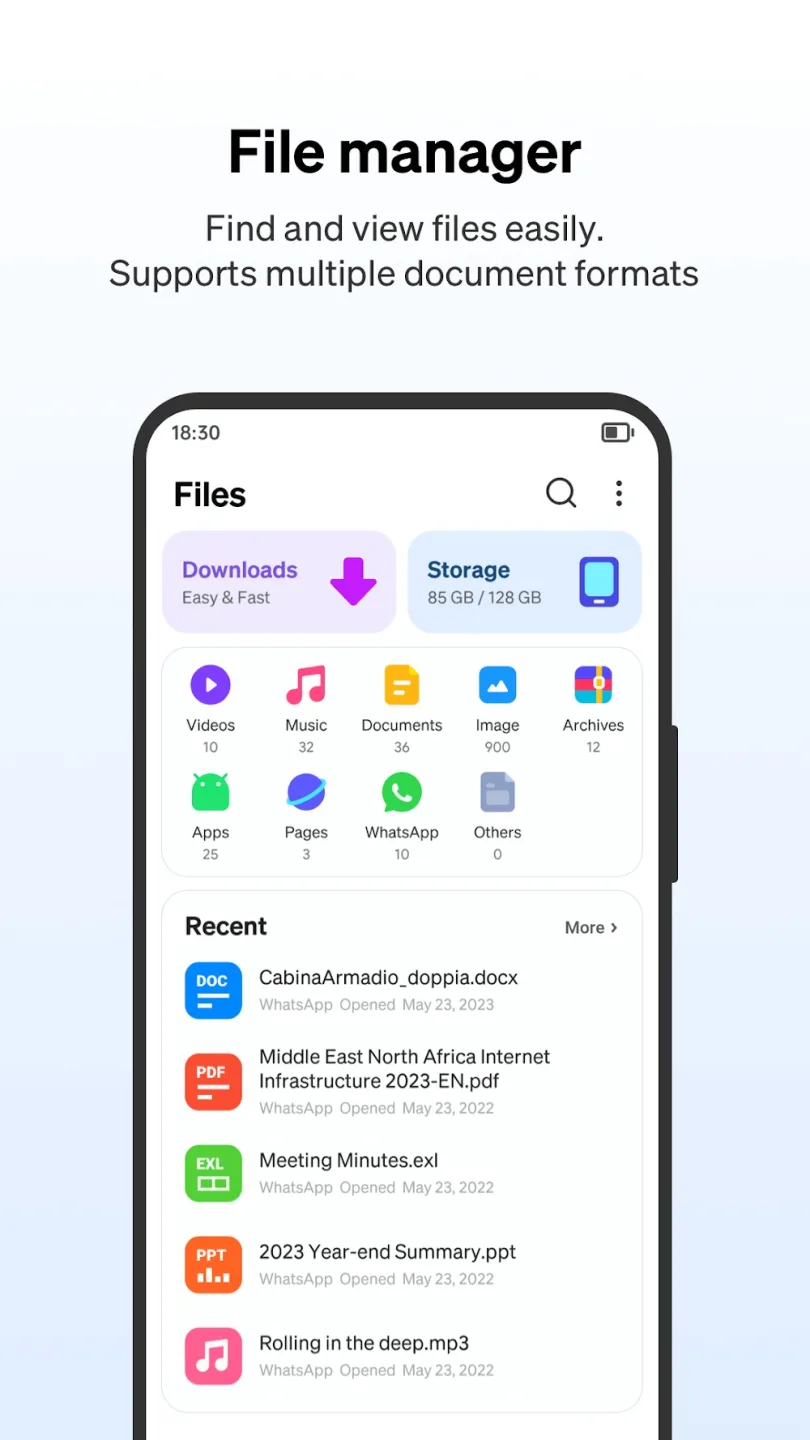
For users who frequently share content on WhatsApp, the app includes a WhatsApp Status Saver plugin. This feature allows individuals to save their friends' statuses easily and securely, streamlining the process of sharing and saving media. Additionally, Phoenix boasts a powerful file manager that supports over 50 file formats, including documents like Word, Excel, and PDF, making it versatile for various file handling tasks.
The application also offers a robust bookmarking system, enabling users to save their favorite websites for quick access. This feature enhances navigation efficiency, as users can easily revisit sites they frequently use. A history list is also available, allowing for easy recollection of previously visited pages.

Strengths of Phoenix Browser:
Explore various websites: Individuals will have the opportunity to explore various websites to locate information and subsequently download it to their devices, guaranteeing an entirely optimal experience. The primary objective of this optimization is to eliminate any aspects that may hinder your web browsing experience or introduce delays, even if only for a few seconds. Merely observe and insert the specified file into the designated target, and it will undoubtedly manifest on your device. The length of the waiting period is solely dictated by the downloading process, rather than the viewing of advertisements.
Generate summary of files: It is feasible to generate a summary of the files you hold while participating in online browsing activities. Moreover, these files are located in the download folder of your device. The application will designate specific file storage locations, each assigned a unique number. Insight into the material stored on the device can be obtained by accessing this information, which is accessible to anyone interested in the numerical data. If the quantity of data surpasses your expectations, it is essential to acknowledge the necessity of either retaining them or deleting them from the device to prevent the unnecessary use of storage space by unused files.
Block ads and manage your tabs: Phoenix Browser also includes an integrated ad blocker to keep annoying advertising interruptions at bay. This makes browsing any website a smooth experience. You can even tap on the shield icon, located at the top of the interface, to see the number of ads that have been blocked as you browse.
Activate dark mode and download at full speed: To enhance the user experience, Phoenix Browser allows you to activate a dark mode to modify the color tones of the interface quickly. Moreover, the browser also has a specific section where you can access your downloads. In this section, you can soon consult all the items you have downloaded while browsing and sort each list of items as you wish.
User Reviews of Phoenix Browser:
It blocks ads well, super clean layout with a lot of screen real estate, really solid UX. Themajor flaw is that it doesn't seem that you can set it as your default browser which is...weird? I've seen even less popular, more indie browser apps have the feature so I'm notreally sure if it was just an oversight or it's not possible for whatever reason. Literally theonly thing that's keeping me from being able to switch completely away from both Braveand Safari.
My usual browser is DuckDuckGo but some search results are limited but Idef recommend having that as a back up and you can set it for defaultbrowser on this app anyways. You get free vpn which is honestly the fastestfree vpn I've downloaded so far. All in all it's a nice browser and the settingslet you personalize it pretty much how you would want.
I'm totally blind and use this with voiceover. I've found it to be pretty accessible, and Ilove that whenever there is an ad, it isn't a video ad and the close button is always easyto find. I cannot seem to ad things to my reading list, which is unfortunate. Also, it wouldbe awesome if there were notifications so that I can know if a download is done if I amnot sitting on the app. I also wish there was one price I could pay for a lifetimemembership, because I really don't want to have to pay monthly or yearly, which is whyas of now, I am choosing not to pay. Keep up the good work.
Final Verdict:
Looking for a fast and safe web browser for your Android device? Look no further than Phoenix Browser! With features like fast browsing and downloads, free VPN, news browsing, and immersive video watching, this app has everything you need for a great browsing experience.Phoenix Browser is designed to load your webpages 2x faster, save 90% of your data, and enable smooth browsing in a slow network.








