
NREGA Mobile Monitoring System is an innovative mobile application primarily used to monitor and optimize the implementation of Mahatma Gandhi's National Rural Employment Guarantee Law, enhancing the transparency of rural projects. It tracks worker attendance and locates worker positions, promoting the development of public welfare programs. NREGA Mobile Monitoring System boasts a clean and user-friendly interface, ensuring an intuitive user experience. Security is also ensured, as it employs One-Time Password (OTP) authentication and two-factor authentication to effectively protect data. Furthermore, it generates attendance reports to confirm program implementation.
Usage
Step 1: Download and Install the Application
First, you need to download the NREGA Mobile Monitoring System APK application from the app store on your Android or iOS device.
After downloading, follow the on-screen instructions to install the application.
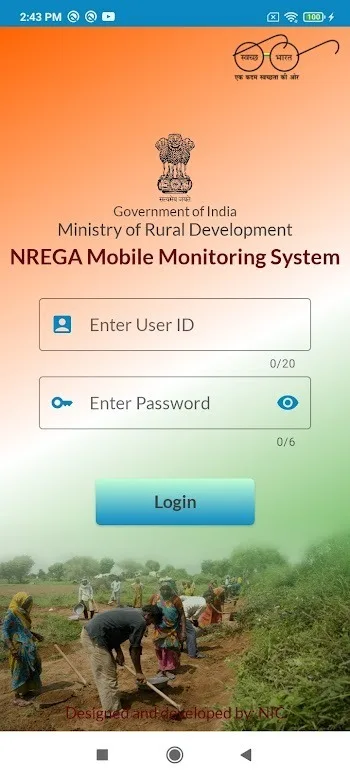
Step 2: Login and Authentication
Open the application after installation.
Log in to the application using your account or credentials. After logging in or creating an account, you can authenticate using a One-Time Password (OTP).
Step 3: Using Basic Functions
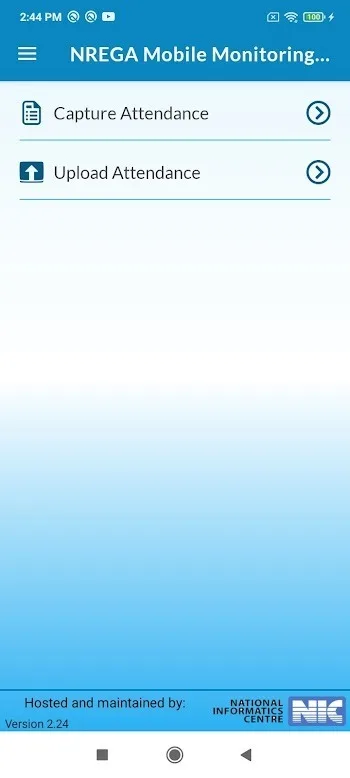
After successful login, you will enter the application's main interface. Here are the basic functions of the NREGA Mobile Monitoring System APK:
View Published Episode List: You can view a list of published episodes within the application.
View Uploaded Attendance Records: You can view attendance records uploaded to the village committee over the past month.
Edit Attendance: If necessary, you can edit or update attendance information before uploading.
Create Attendance PDF: If you are unable to upload due to technical reasons, you can create an attendance PDF and send it to the department.
Download and Upload Data: Track your download and upload progress using the progress bar.
Step 4: Manage Collection Cards
The application allows you to download preset collection cards and retain them during the application's validity period. You can download additional collection cards as needed.
Please note that the application will automatically delete the roll call list and attendance information when the roll call time expires.
Step 5: Display Version, Date, and Time
Now, the application version, date, and time are displayed on all screens so you can understand the application version and update information.
Advantages and Disadvantages
Advantages: Photos with geotags and timestamps reduce tampering and fake entries.
Visibility of the public portal facilitates auditing and citizen oversight.
Printing and exporting Excel files makes record keeping and sharing convenient.
Mandatory use improves consistency across states.
Multilingual browsing aids local auditing processes.
Disadvantages:
Network connectivity issues may result in unregistered attendance.
Reliance on GPS-enabled smartphones places a burden on field staff.
Some teams require training to use reliably.
Recommendations
Understand the basic functions: Before using this application, ensure you understand its basic functions. This includes how to verify information, track in real time, view attendance lists and records, edit attendance records, and create PDF files.
Authentication and security: Protect your login information and one-time password (OTP). Do not share this information with others and ensure you perform authentication correctly.
Regular checks: Regularly check the application to see progress, verify attendance information, and download data.
Please note assembly times: After the assembly roll call ends, the application will automatically delete the assembly list and attendance information. Be sure to download and save necessary data before it expires.
Please use the attendance editing function with caution: If you need to edit attendance information, please operate carefully and accurately to avoid errors.
Report errors: If you encounter any errors or technical problems while using the application, please report them to support or the administrator so they can assist in fixing the errors.
Comply with regulations and guidelines: When using this application, ensure that you comply with the regulations and guidelines of the Indian government and relevant agencies. This helps ensure transparency and accountability in the MGNREGS implementation process.
Learn how to use the application effectively: For managers and officials, learn how to use the application to track work progress and ensure that information is updated correctly.
Maintain accurate records: Ensure that all information and records related to the implementation of MGNREGS are recorded accurately and completely to avoid errors and disputes.
FAQs
What is the NREGA Mobile Monitoring System?
The NREGA Mobile Monitoring System is an application designed to track and manage worker attendance under the Mahatma Gandhi National Rural Employment Guarantee Act (MGNREGA). It provides transparency and real-time updates through GPS and geotagging.
How does NREGA Mobile improve transparency in rural employment?
The application promotes accountability in the MGNREGA implementation process by ensuring workers provide verifiable data at their designated work locations through geotagged photos and GPS-based location tracking.
What security measures does NREGA Mobile have?
The application employs OTP-based authentication, two-factor authentication, and password protection to ensure secure access and protect sensitive data.
Can NREGA Mobile be used by both administrators and workers?
Yes, the application is designed for both employees and administrators. Employees can track and upload attendance records, while administrators can access, view, and generate detailed attendance reports.
Is the NREGA mobile application easy to use?
The application promotes accountability in the MGNREGA implementation process by ensuring workers provide verifiable data at their designated work locations through geotagged photos and GPS-based location tracking.
Summary
The NREGA mobile monitoring system has received positive feedback from users, many of whom praised its ease of use, readily available data, and efficient reporting capabilities. Administrators' workload has been reduced, while workers appreciate the transparency and fairness advocated by the application. Through continuous updates and user feedback, the NREGA mobile application is constantly evolving, offering more features designed to enhance user experience and improve digital literacy in rural India. With its long-term vision of promoting digitalization, the application is expected to become a cornerstone of India's rural development initiatives.








