

CLT Panel FF is a game assistant tool that helps you better experience Free Fire. CLT Panel FF is powerful, helping you improve shooting accuracy, auto-aim, and become a close-range combat master. Having trouble pinpointing enemy locations by sound? No problem, CLT Panel FF provides superior perception, helping you detect enemy positions and increasing your chances of survival! In addition, CLT Panel FF allows you to unlock many valuable game items and skins without spending real money. If you love Free Fire but don't have time to practice your shooting skills, CLT Panel FF will give you a better experience!
Features
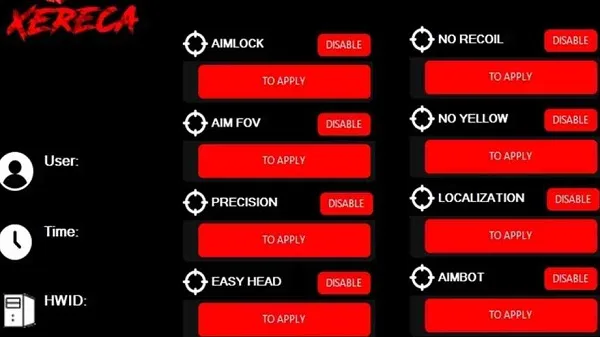
- Auto Headshot
One of CLT Panel's most outstanding features is its auto-headshot function. It significantly improves shooting accuracy by automatically aiming bullets at the enemy's head. This gives players a huge advantage, especially in close-quarters combat.
Increased kill rate
Improved ranking
Perfect for aggressive playstyles
- Auto-Aim and Auto-Lock
For players who want to improve shooting accuracy, auto-aim and lock-on aiming tools are essential. CLT Panel comes pre-integrated with these features:
Automatic enemy tracking
Target locking
Support for multiple firearms, including submachine guns, assault rifles, and sniper rifles
- ESP Cheat (Lines, Boxes, Names)
ESP stands for Extrasensory Perception, a suite of tools that provides visual insight into enemy positions and activities.
ESP Line: Draw a line from your character to a nearby enemy.
ESP Box: Highlight the enemy's movement trajectory with a bounding box.
ESP Name: Display the usernames of nearby players.
These hacks are highly effective at identifying enemy positions, ambush points, and snipers.
- Wallhack Cheat
Wallhacks allow players to see or shoot through walls and obstacles. While controversial, this feature is loved by many players who want to dominate the game.
Provides tactical visibility
Helps avoid traps
Supports easy navigation within buildings.
- Anti-Lag Mode
The performance of Free Fire is often affected by mobile device hardware limitations or poor network connections. The CLT panel includes a built-in anti-latency script that can:
Optimize memory usage
Reduce network latency spikes
Clean up background applications
Improve device responsiveness
- Skin and Outfit Unlocker
Skins not only provide a visual advantage but also have a psychological impact on opponents. The CLT panel offers unlocking tools for:
Legendary Outfits
Rare Weapon Skins
Elite Pass Outfits
Emoticons and Accessories
It allows players to flaunt high-end cosmetics without spending real money.
- Recoil-Free, Fast Reload
To ensure more accurate shooting, the CLT panel includes:
Smooth bullet trajectory, no recoil script
Fast reload mechanism to reduce weapon reload time
These features are invaluable in intense gunfights or when using light machine guns.
Advantages
Faster visual judgment speed may slightly improve reaction time when encountering sudden enemies.
Clearer overlays can sometimes help players identify movement directions in complex terrain.
Now, sensitivity adjustments can help achieve more stable aiming when quickly switching targets.
Today, well-organized controls reduce the time spent navigating menus during practice and adjustments.
Casual players can enjoy experimenting with various tools without expecting them to guarantee improved competitive performance.
Competitive players typically prioritize training and strategy over tool configuration for success.
Balanced settings allow many users to feel more comfortable during extended use.
Installation
First, you need to visit a secure website to download the tool.
After downloading, go to the download directory and install the tool on your device.
If you encounter problems during installation, go to Settings and enable the "Allow installation of unknown apps" option.
After completing these steps, the tool will appear on your device's home screen. Now experience a whole new level of gaming fun!
FAQs
What is CLT Painel FF?
Painel CLT FF is a mobile utility application for Android devices designed to help Free Fire players adjust sensitivity, optimize performance, and customize in-game controls.
Is CLT PainelFF safe to use on all Android phones?
Most modern Android devices can run Painel CLTFF, but older phones may not support all the features or settings tweaks offered by the app.
Can CLT Painel FF improve latency and frame drops?
Yes, the app includes tools to minimize background processes and adjust system behavior, thus reducing latency and stabilizing frame rates during gameplay.
Does CLT Painel FF require technical skills?
Not really. The interface is clean and intuitive, suitable for users of all levels, although new users may need a few minutes to find the settings that best suit them.
Does CLT Painel FF modify the actual files of the Free Fire game?
No, it doesn't directly modify the game files. It tweaks the phone's settings to improve game performance, making the gaming experience smoother.
Summary
Painel CLTFF is suitable for both professional players looking to improve their competitive skills and casual players who simply want a smoother gaming experience. Whether you want to win more matches or simply want your game to run more smoothly on your phone, this app lets you flexibly create your own unique gaming style.








