

KingRoot is an application designed for managing root permissions. If you're unfamiliar with this, it will provide the best help. KingRoot supports one-click rooting; all the tedious operations run in the background, allowing you to experience one-click rooting! Older phones not supported by major developers? KingRoot works! Even the oldest phones can be rooted by KingRoot in a very short time. Furthermore, KingRoot has a very high success rate when performing root operations, so you don't have to worry about data loss or corruption! KingRoot was launched solely to better manage phone permissions!
Click to load YouTube / 点击加载视频
YouTube ↗Features
One-Click Root
Rooting is a cumbersome process for most Android smartphones. Because it involves technical commands and computer operations, many people try to avoid rooting their devices. Fortunately, the Kingroot APK for Android 6.0 is a one-click root application. This means that with just one click, the application can complete the rooting process in seconds. By performing all the necessary technical steps in the background, the application provides a one-click rooting experience for smartphone users with limited technical experience.
High Compatibility
Older smartphones are no longer supported by major developers such as Facebook, Microsoft, and even Google. If you're using an older phone, there's no need to worry. The good news is that Kingroot APK works with almost all Android smartphones. It's compatible with everything from early versions of Android to the latest. Whether your phone is running Android 4.0 or the latest Android Q, the latest version of Kingroot APK can root your device in seconds.
Root Access Without a Computer
When you search for smartphone rooting tutorials, most require a computer. But not everyone has a computer. Therefore, obtaining root access without a computer is the wise choice. Thanks to Kingroot APK version 5.4.0, we can obtain root access without a computer. You don't need to send ADB commands to your smartphone using a computer, nor do you need to manually obtain root access. The application automatically completes all the operations in the background, obtaining root access in minutes.
Perfect Performance
There are many one-click root apps for Android smartphones on the market. However, not all apps are effective at rooting all models. Most apps may brick your phone, requiring a re-flashing of the official system to restore the device. Fortunately, Kingroot APK for Android has an extremely high success rate. No matter which phone you use, this app can automatically identify the best rooting method. This method has a high success rate for almost all Android smartphones. Only the success rate is slightly lower for newer phones, but rooting itself is risk-free.
100% Free and Safe
Obtaining root access is a risky process that can lead to data loss or even bricking your device. Fortunately, older versions of the Kingroot APK are virtually risk-free. When using the Kingroot APK 4.4.2 download version, you don't need to worry about any issues. The app boasts a high rooting success rate, so you can smoothly obtain root access. Even in the rare case where the app fails to root, you won't face any data loss or device bricking problems. For this reason, many professional Android developers recommend using the free downloadable Kingroot APK to obtain root access for your smartphone.
Advantages
- Custom ROM Installation
After rooting your Android device, you can install a custom ROM (a modified Android operating system), giving your device a completely new look and experience. Custom ROMs often include advanced features not available in the stock Android system.
- Performance Boost
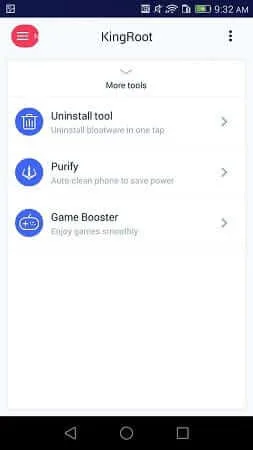
Rooting your device allows you to remove unnecessary pre-installed software (apps you don't use), freeing up system resources and improving performance. Root access also allows users to install performance-enhancing apps that optimize CPU, memory, and battery usage.
- Remove Pre-installed Apps
Many Android devices come pre-installed with apps that cannot be uninstalled. Using KingRoot to gain root access allows users to remove these unwanted apps, freeing up valuable storage space.
- Install Root-Required Apps
Many apps in the Google Play Store are designed specifically for rooted devices. These apps often allow you to modify system settings, adjust performance, and automate tasks that were otherwise impossible.
- Extend Battery Life
Rooted devices can utilize dedicated applications to control background processes and system settings, extending battery life. You can even lower the processor frequency to save power or overclock the processor for better performance.
- Advanced Customization
Rooting an Android phone allows for deeper customization, such as adjusting the user interface, installing custom themes, modifying system files, and adding new features not available on unrooted devices.
- Enhanced Backup and Restore
Rooted devices can use a dedicated backup application to create a full system backup, meaning you can easily restore your device to its previous state if problems occur. Furthermore, root access makes recovering data from a bricked device much easier.
Installation
Download the Kingroot APK file to your Android device.
Install and open the application, then accept the terms of service.
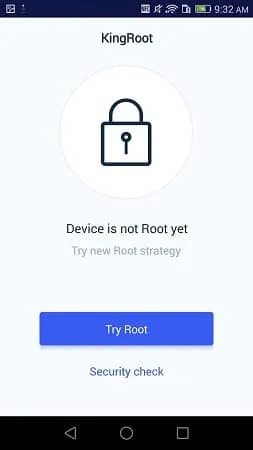
Tap the large blue "Try Now" or "Try Root" button.
Please allow all ADB pop-up permission prompts with caution.
Wait 1-3 minutes for the rooting process to complete completely.
Confirm success and allow the system to reboot automatically.
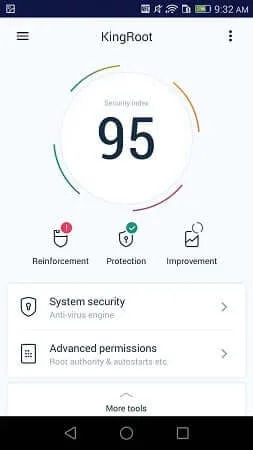
After installing and enabling Kingroot, a purple congratulatory message will appear, indicating that your Android device has obtained full root access.
Afterwards, verify that you have full administrator privileges by:
Looking for the green circle indicator in the Kingroot app.
Alternatively, running a dedicated root verification tool.
If the problem persists, please refer to the Kingroot User Guide.
FAQs
How much storage space is required to install KingRoot?
Please reserve at least 12.5 MB of space. After installation, for smooth updates and cache management, please reserve an additional 100-500 MB of space.
What are the system requirements for KingRoot?
Your device's system version should be Android 2.3.2 or higher (first released around 2010-2012). If your phone does not meet the requirements, you can download an older version of the application.
How long will the download take?
The KingRoot installation package is 12.5 MB in size. Download time may vary depending on your network connection. Typical speeds are as follows: - 4G: 30-100 MB/s - 5G: 170-400 MB/s - Wi-Fi: 50-500 MB/s Poor network conditions? Please use the APKPure app to speed up the installation.
Why can't I download or install?
Common reasons for download or installation failures include: 1. Insufficient device storage space; 2. Device incompatibility; 3. Poor network connection.
Summary
KingRoot APK is a powerful yet easy-to-use tool for any user who wants to gain root access to their Android device. It offers a one-click root solution, broad compatibility, and a wealth of additional features, making it an excellent choice for users looking to fully unleash the potential of their Android devices.








