

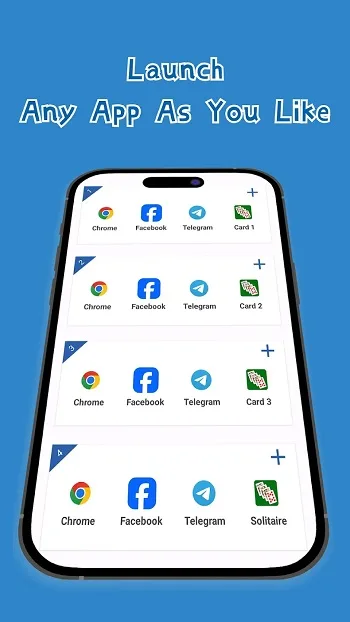
Having multiple game accounts but can't play them all at once? Multi can help! This app focuses on dual-space functionality, allowing you to clone popular apps and games freely, such as playing two Clash of Clans accounts simultaneously or opening two Facebook accounts. This is extremely useful for those who play time-consuming games or manage multiple data sets. Both spaces operate independently, ensuring data privacy. In addition, Multi includes privacy tools and customization options to personalize your icons and reduce the possibility of confusion!
Supported Apps
Social Media Apps:
WhatsApp (Supports dual account login)
Messenger
Telegram
Snapchat
Line
Game Apps:
Clash of Clans
Esports
PUBG Mobile
Mobile Legends
Freefire
Features
Clone Popular Apps and Games
First, the multi-app feature allows you to run a second account for your frequently used social and communication tools. Users often create multiple accounts for apps like WhatsApp, Messenger, Facebook, Line, Telegram, Instagram, Snapchat, and WeChat. It also supports parallel progress in games like Clash of Clans, eFootball, and Mobile Legends, so you can create a new account without affecting your existing game progress.
Isolated Dual Spaces
Secondly, each space remains independent to avoid cross-account interference. Multi-App functionality ensures that the cloned app's data is independent of the main app's data, preventing accidental mixing of messages, media, or game progress. This architecture makes handling sensitive work chats and private conversations more secure.
Quick Switching Between Work and Personal Use
Furthermore, Multi-App functionality focuses on quick start-up and easy switching. You can switch between different spaces without having to log in again each time, reducing friction during busy work sessions. This mode is especially effective when you need to check work channels and reply to private messages instantly.
Extensive Compatibility and Unlimited Spaces
In addition, Multi-App is designed to support most Android apps and has extensive version coverage. Users can clone any number of spaces as needed, allowing multiple user profiles to coexist on the same phone. This flexibility is extremely useful when managing multiple communities or gaming guilds simultaneously.
Privacy Controls and Customization
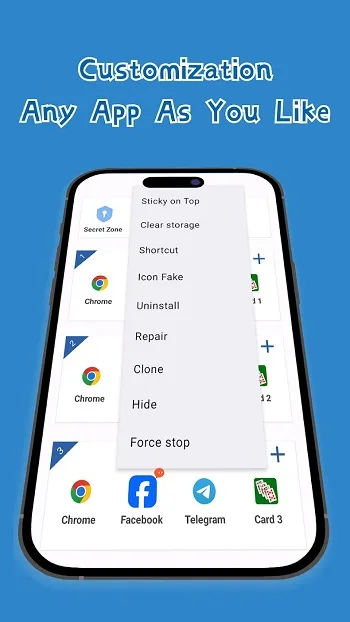
Finally, Multi App includes privacy tools to help protect the privacy of sensitive activities. You can hide cloned apps, set security locks, and use private areas for private operations. Icon and label customization makes each cloned app easily identifiable, reducing errors caused by opening the wrong account.
Pros and Cons
Pros
Free app cloning tool that can run multiple accounts on the same device.
Supports dual spaces to separate work and personal apps.
Account data and notifications are isolated and do not overlap.
Compatible with Android 8-15 and many popular social, communication, and gaming apps.
Includes privacy features such as hidden apps, security locks, and secret areas.
Customizable icons and labels help distinguish different accounts.
Simple and user-friendly interface, suitable for beginners, and fast app launch speed.
Can clone multiple instances of supported applications with no fixed limit.
Cons
Reports indicate that the latest version cannot open cloned apps and crashes frequently.
Some users still experience persistent "network error" issues even with a stable network connection.
Intrusive pop-up ads disrupt user experience.
Critical vulnerabilities appear to remain unresolved for a long time, impacting trust and reliability.
FAQs
Why does the "Get this app from the Play Store" message appear after downloading?
Because the app developer has restricted installation to the official Google Play Store, usually for security, licensing, or regional reasons. Click here for more details.
How much storage space does Multi App: Dual Space require?
Please reserve at least 37.5 MB of space. After installation, reserve an additional 100-500 MB for smooth updates and cache management.
What are the system requirements for Multi App: Dual Space?
Your device should be running Android 8.0 or later (first released around August 2017). If your phone does not meet the requirements, you can download an older version of the app.
Is Multi App: Dual Space safe to download?
Yes, VirusTotal has verified that Multi App: Dual Space's signature is secure and reliable. You can view details by clicking the "Trusted Apps" tab on the app details page.
How long will the download take?
The Multi App: Dual Space installer is 37.5 MB in size. Download time may vary depending on your network connection. Typical speeds are as follows: - 4G: 30-100 MB/s - 5G: 170-400 MB/s - Wi-Fi: 50-500 MB/s Poor network connection? Use the APKPure app to speed up the installation.
Summary
The core of Multi App is flexibility and control. It's not fancy, nor does it try to be an all-in-one app manager. It simply focuses on doing one thing well: letting you easily run multiple instances of the same app. If you need to manage multiple accounts or profiles, then this app is definitely worth your screen space.








