

Want to enhance your gaming experience? X8 Speeder offers various cheating methods to give you an edge in different games. You can enable picture-in-picture mode to adjust parameters directly in the game without switching apps. X8 Speeder requires no root access, making it easy to use even for those unfamiliar with the technology. Furthermore, X8 Speeder has built-in anti-cheat features to ensure your device runs safely and smoothly!
Tips
First, explore: Before fully accelerating, explore your chosen game. Gradually adjust the speed and observe the game's response. This helps find a balance that doesn't overload your device or distort the game's inherent dynamics.
Closely monitor device performance: Continuously monitor your device's temperature and power consumption. If you notice abnormal overheating or a sudden increase in power consumption, adjust the speed settings or pause the game.
Continuous updates for optimal performance: Regularly update the X8 Speeder app. Frequent enhancements not only introduce new features and improve compatibility but also fine-tune the app to ensure perfect compatibility with modern devices and operating systems.
Continuous updates for optimal performance: Please update the X8 Speeder app regularly. Frequent enhancements not only introduce new features and improve compatibility but also fine-tune the app to ensure perfect compatibility with modern devices and operating systems. Personalize settings for each game: Note that different games may react differently to speed adjustments. Tailor your settings to each game to ensure the best gaming experience.
Try different speed settings: Don't hesitate to experiment with different speed parameters. Some games may offer a better experience at higher speeds, while others may require slower speeds.
Use with caution in multiplayer arenas: Use X8 Speeder with caution in multiplayer scenarios, as it may violate the game rules.
Learn from the collective wisdom: Actively participate in forums and communities surrounding X8 Speeder. Insights and strategies shared by other users can be crucial, especially when fine-tuning settings for specific games.
Features
Simple
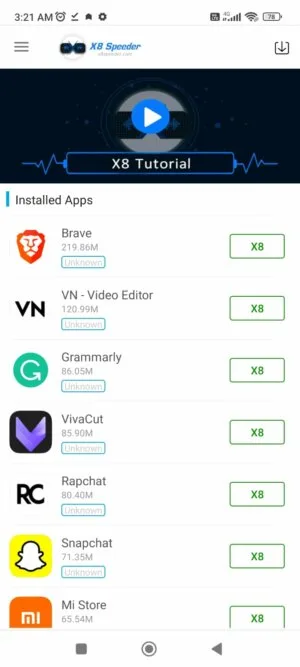
X8 Speeder is an excellent application with a clean and easy-to-use interface. Users don't need to configure anything; it runs automatically in the background and runs smoothly even when playing games like PUBG.
Multiple cheating methods
This application has multiple built-in cheating functions. It offers various cheat modes such as high-speed running and slow running, allowing you to easily gain an unfair advantage in any game. One highlight is the controller option for PUBG Mobile, allowing you to connect your mouse and keyboard to your phone for easy gameplay. It's very similar to apps like Lucky Patcher, LuluBox 64-bit, and Xmodgames.
Picture-in-Picture Mode
When Picture-in-Picture mode is enabled, the app interface pops up while you're playing any game. Picture-in-Picture mode gives you easier access to the app's control panel and allows you to adjust the game speed. For example, in PUBG, it can enable a fast-track mode; for other games, it can speed up the entire game process, avoiding wasted time. This is undoubtedly an extremely convenient feature for players who want to control the app during gameplay but don't want to exit the game.
No Root Access Required
Unlike other similar apps, X8 Speeder requires no root privileges. Even if your phone is rooted, it won't request any root permissions to access game exploits and provide cheat functions. This ensures the app's security, as it doesn't access the root directory and cause any problems.
Completely Safe
Built-in anti-cheat and anti-ban protection ensures your safety on your smartphone. Furthermore, the app requires no root access to function safely on your device. It does not access any personal data and operates normally on your smartphone without requiring any unnecessary permissions.
Advantages and Disadvantages
Advantages:
Enhanced Gaming Experience: X8 Speeder helps users speed up games, improving the gaming experience and making it easier to complete levels and tasks.
User-Friendly Interface: The application boasts a clean and intuitive interface, allowing users to easily navigate and adjust game speed.
Preset Speed Options: X8 Speeder provides several preset speed options, allowing for easy and quick adjustment of game speed without manually adjusting sliders.
Floating Button: The application features a floating button for adjusting game speed while playing, providing convenient and easy access.
Ad-Free Experience: X8 Speeder offers an ad-free experience, ensuring users can use the application without any interruptions.
Disadvantages:
Compatibility Issues: The app may not be compatible with all games, which could limit its usability for some users.
Malware Risk: Downloading and installing third-party applications like X8 Speeder may expose your device to malware or other security threats.
Limited Functionality: X8 Speeder only allows users to adjust game speed and does not offer any other advanced features.
Game Data Loss Risk: Improper use of X8 Speeder may result in game data loss or corruption.
Installation
Click here to download the APK file.
Install it.
Open the application; you should see a list of installed applications.
Select the game you want to speed up or slow down, and then click the "Activate" button next to it.
After activation, it will prompt you to reinstall the game for it to function properly.
That's all you need to do, and you can start playing now.
To adjust the speed, simply tap the circle on the screen and pause to speed up or slow down.
Summary
X8 Speeder APK is an excellent tool for users who want to optimize their Android devices and improve their performance. It offers a variety of features to help users maximize device performance, from speed boosts to optimized battery life.








