

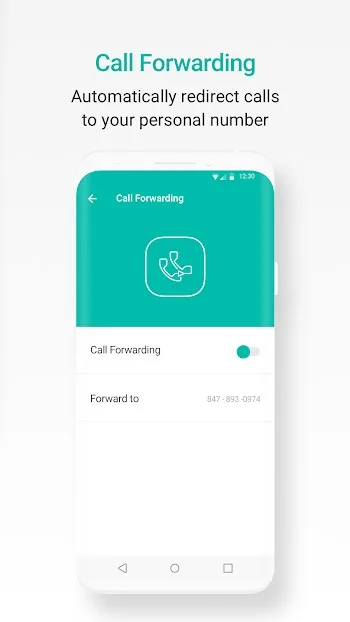
2ndLine is a music app for calls and texts. It lets you get a number and make calls and send texts without any restrictions! Tired of just making calls? 2ndLine also lets you send emojis, stickers, or documents, just like a real social networking app! In addition, 2ndLine offers voicemail functionality, allowing you to send and receive messages anytime, anywhere. You can also forward calls if needed for convenience!
Use
Open 2ndLine and follow the on-screen instructions. Then select a US country code to view available numbers.
Select your new number and ensure your internet connection is active before making a test call or sending a text message.
If you want all incoming calls to go through 2ndLine, set it as your default dialer for contact speed dial.
Configure caller ID, ringtone, background, and quick reply in the settings, and add a home screen widget for faster access.
Before making international calls, check the destination rates in the app to ensure the cost is acceptable.
Features
Local Phone Numbers
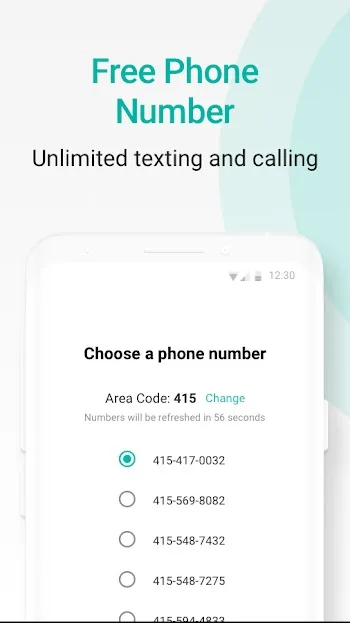
When you decide to install the 2ndLine APK, you'll be prompted to select a phone number from the list of available numbers provided by the application. These numbers are automatically associated with your area code. Furthermore, the application allows you to change the area code as needed.
Caller ID
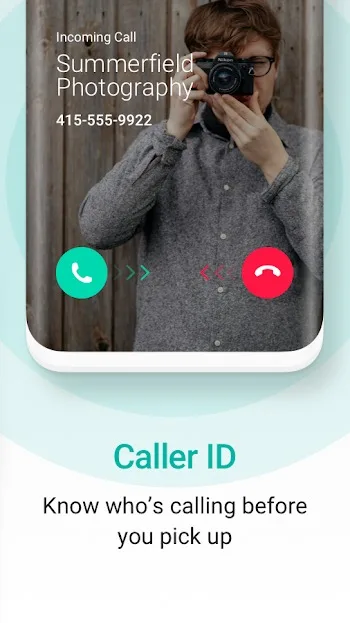
If you like to filter calls, only answering calls from people you know, or if you want to know the caller's identity before answering, then the 2ndLine APK is perfect for you.
The 2ndLine APK displays the caller ID when a call comes in, allowing you to know who is calling before answering. This way, you can avoid answering calls from certain people and only answer important calls.
Picture and Video Messages
With the 2ndLine APK, you can send and receive any number of pictures and videos. The biggest advantage of this video and picture communication tool is that communication with US and Canadian numbers is completely free. When sending or receiving pictures and videos through 2ndLine, you can also save these pictures to your device.
Customizable Ringtones, SMS Alert Tones, Vibration Patterns, and Backgrounds
2ndLine allows users to customize their experience in multiple ways. If you have a number/account on 2ndLine, you can customize your ringtone by setting specific ringtones for specific numbers.
The 2ndLine app lets you set vibration patterns for incoming calls. You can also set different SMS ringtones for different numbers, so you know who's sending the message before receiving it. Additionally, users can customize contact backgrounds.
Low-Cost International Calls
The 2ndLine APK is free for users in the US and Canada, so users in these countries can make free calls and send free texts to others within their respective countries.
However, calling international numbers (such as those outside of Canada and the US) incurs a charge. Making international calls via the 2ndLine APK is significantly cheaper than the average cost of international long-distance calls. You can top up your account with 2ndLine or earn free funds by completing certain tasks; you can use these earned or top-up funds to make international calls to countries outside the US and Canada at a low cost.
Pros and Cons
Pros: Free calls and texts within the US and Canada
Customizable hues and backgrounds
No need for your contacts to install the app.
No charges on mobile plans.
Cons: Only available in a few countries
Frequent login issues.
Download
First, use the download button to download the 2ndLine APK file.
Please save it to your device, as you will need it later.
Next, open Android Settings -> Security Settings.
Find the "Device Management" section.
Use the toggle button to enable the "Unknown sources" option.
Return to the "Downloads" folder and click the downloaded APK file.
Click the "Install" button and wait for the installation process to complete.
Once complete, open the application using the shortcut you created, and you're ready to use it.
Summary
2ndline: Second Phone Number APK is an extremely useful tool for anyone who needs a second phone number for work. This app allows you to enjoy the convenience of using two phones on one device. Furthermore, it allows you to use any Android tablet as a phone. This means you can also make calls and send text messages through your tablet.








