

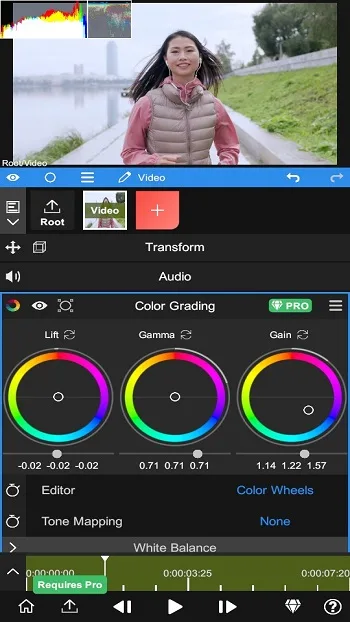
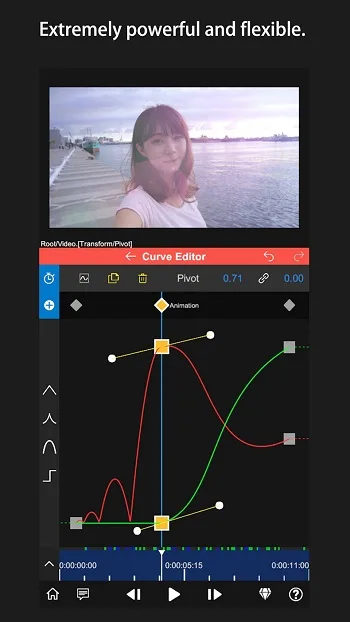
Node Video MOD is a video editing application where you can find numerous advanced video editing tools, including layered timelines, visual properties, and offline functionality, allowing you to create and edit videos anytime, anywhere! It's precise and convenient, with features far surpassing your phone's built-in video editor. Keyframe creation, tracking, interpolation, and other motion processing tools bring more refined effects to your videos! Furthermore, it reduces the need for file transfers between devices, offering immense creative freedom. It's like having a small studio here, capable of handling almost all your video work!
Tools
Blending Modes
Motion Blur
Brightness
Fade In/Out - Lens
Halo - Fractal Noise
Time Remapping
Basic Color Correction (Exposure, Contrast, White Balance, etc.)
Emboss
4-Color Gradient
Channel Offset -
Invert
Camera Lens Blur
Gaussian Blur
Cross Blur - Direction
Features
3D Camera Tracking
Node Video can analyze motion in video clips and allow you to add text or graphics synchronized with the scene. Select a shot with clear motion, run camera tracking, then add layers and place them in a plane or space. As video clips play, layers follow the camera's movement. This is incredibly useful for labels, titles, and simple visual elements that need to be held steady in the frame.
Optical Flow Frame Interpolation
For slow-motion or choppy footage, Node Video offers optical flow interpolation. It estimates inter-frame motion, resulting in smoother motion as you change speed. After adjusting the clip speed, enable optical flow and preview the results to ensure the motion looks natural. This method helps reduce choppy shots and improves sharpness when shooting handheld.
All-in-One Editing on Your Phone
Node Video is designed for complex video workflows on the Android platform, allowing all operations to be done within the same project. You can manage multiple clips, apply effects, and adjust settings without switching apps. This keeps editing workflows organized, especially when building longer sequences or reusing a style across multiple shots. As projects grow, this structure reduces switching back and forth, saving time.
Privacy First, Offline Workspace
Node Video runs offline, collects no data, and has an ad-free workspace. Your projects, previews, and exported files are all saved on your device, which is helpful for handling sensitive content or client-commissioned work. Since these tools can be used without logging in, you can edit on airplanes, while traveling, or in areas with weak network connections. This also avoids being interrupted by network prompts while working.
Free Plans and Upgrade Options
Most of Node Video's features are free to use. By design, most tools are open, allowing users to complete common tasks without paying. Some advanced features may require upgrades, ensuring ease of use of the main workflow while providing room for future feature expansion. You can test and learn before deciding whether to use any additional features.
Pros and Cons
Pros
Powerful layer-based editing with advanced effects
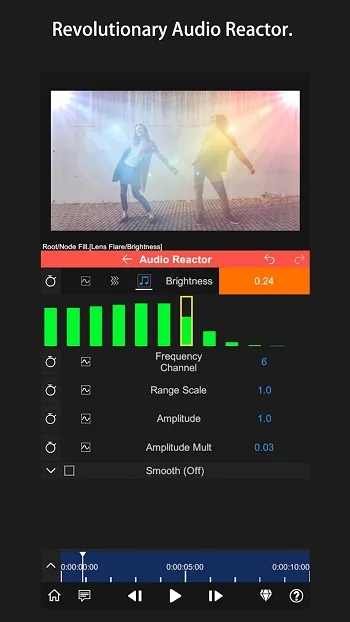
Audio Reactor associates sound with any visual parameter
AI real-time human-background separation
Fast rendering speed relative to project complexity
3D mapping adds depth to titles and graphics.
Cons
The interface feels outdated and cluttered.
Steep learning curve for new users
Playback may malfunction when playing large musical pieces.
While the effects library is already quite comprehensive, there's still room for further expansion.
FAQs
What is Node Video MOD?
Node Video MOD is a modified version of the NodeVideo mobile editing application, designed to create and edit videos with layering tools, effects, motion control, and offline access.
What is Node Video MOD used for?
It's used for editing short videos, dynamic clips, social media content, fan edits, and creative projects that require more control than a basic mobile video editor.
What are some useful features of Node Video MOD?
Users typically care about layered editing, keyframes, visual effects, motion tools, tracking support, and the ability to work directly on their phones without a computer.
Are there any drawbacks to Node Video MOD?
Yes. Managing complex projects on a small screen can feel more difficult, some devices may slow down when running large effects, and the stability and security of MOD versions may vary.
Who should use the Node Video MOD APK?
It's ideal for creators, editors, and general users who want a more powerful mobile editing tool for quickly creating content, making travel clips, or producing short videos.
Summary
Node Video MOD APK is suitable for creators who need portable editing capabilities that go beyond basic cutting and trimming tools. It's ideal for short video makers, editing enthusiasts, video editing experts, and users who like to test effects without opening their laptops. It's most useful when speed, flexibility, and portability are more important than a large screen or a full desktop workflow.








