

FilmoraGo is a mobile video editing app. You can use it to edit videos on your phone and publish them to social networks with a single click. No professional editing skills? No problem! FilmoraGo provides users with numerous video templates and editing tools, allowing you to easily output high-quality videos, saving time and effort. FilmoraGo's many basic editing tools can meet almost all video editing needs, whether it's cutting, merging videos, or inserting clips. In more advanced settings, you can also add effects, backgrounds, and more to make your videos even better.
Use
Open Filmora and create a new project, then choose an aspect ratio suitable for TikTok, Instagram, or YouTube.
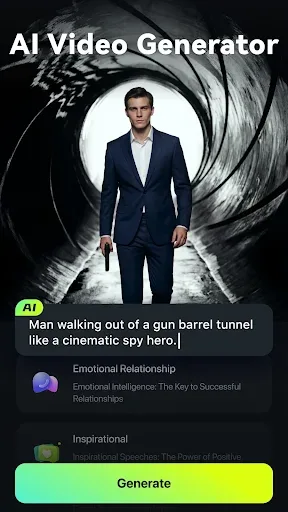
Import video clips or photos and add them to the timeline. If starting with the prompts, use the "Image to Video" or "Text to Video" features to build a basic sequence.
Trim, split, and merge video clips. Add dynamic captions (with automatic speech-to-text support), then record or generate text-to-speech narration and set audio levels.
Apply filters, stickers, text, or emojis. Use picture-in-picture or smart tracking as needed, and adjust speed or keyframes to control motion. Preview your edits, choose vertical or horizontal export settings, and then share using platform options for TikTok, Instagram, or YouTube.
Features
A suite of video editing tools from basic to advanced
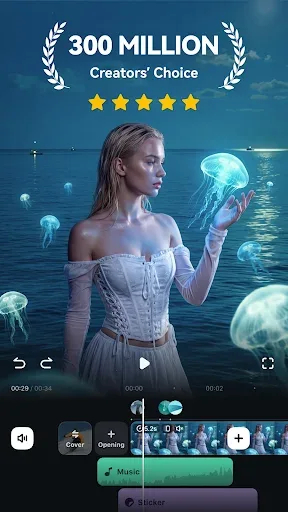
FilmoraGo's basic tools include cutting and merging videos, as well as inserting text, stickers, or music clips available on your device.
In more advanced settings, you can add effects, backgrounds, blur effects, adjust brightness, or add filters to enrich your videos. FilmoraGo currently offers four filter themes to choose from: presets, landscapes, cyberpunk, and black and white. Most of these filters are free and available to use.
Templates for quick video editing
No need to edit every detail using the advanced basic tools mentioned above. This app saves you time and effort while still allowing you to create beautiful and unique videos. Every minute of video editing is crucial for those who frequently post live videos or create videos on social networks.
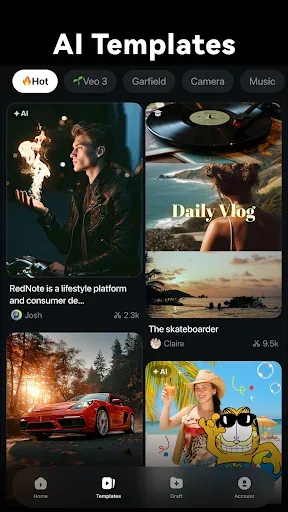
FilmoraGo's template feature makes everything simpler. These templates are pre-designed by the developers and built into the app. Over 30 templates are available for you to choose from. You can surprise your friends with a "Happy Birthday" themed template, or capture unforgettable moments and unique experiences with a "Travel" themed template!
These templates are also categorized by theme. Therefore, you can find themes popular on popular social media platforms like TikTok, Instagram, or Music Beats.
Export High-Resolution Edited Videos
Often, adding too many effects and editing multiple times can degrade the final video quality, making it blurry and less smooth than the original. This is because adding filters or effects significantly reduces the video's resolution.
Editing videos is about enhancing visuals, not sacrificing image quality, right? Don't worry, with FilmoraGo, whether you quickly edit using ready-made templates, manually customize each video element, or perform multiple edits, the final video maintains its original image quality, ensuring optimal clarity at all times.
Download
Download the APK file of this excellent video editor application on your device.
Then, tap the APK file and select "Install" to begin installation.
The installation process only takes a few seconds, please be patient.
Once completed, you will see a success message. Click "Open" to get started.
FAQs
What is Filmora used for?
Filmora is a mobile video editing application that uses AI tools such as voice cloning, automatic editing, and dynamic text editing to help users create beautiful videos.
Can Filmora automatically sync music with video?
Yes, Filmora features AIBeats, which matches the rhythm of video clips to the selected soundtrack for a smoother, more immersive experience.
Does Filmora offer text-to-speech or voice-over functionality?
Absolutely. You can convert your scripts into realistic voice-overs, or even use the AI voice cloning tool to generate your own voice.
Is Filmora beginner-friendly?
Absolutely. Filora offers templates, one-click tools, and a clean interface—perfect for beginners—while also providing advanced users with deeper control options.
Summary
Whether you're documenting your daily life, building a fan base, or simply creating content for entertainment, Filmora gives you easy access to powerful video creation features. It doesn't claim to be minimalist—it's actually fully functional, but its design won't hinder your creativity.








