
File Manager is a mobile file management application. You can easily organize and collect files with it. Whether deleting or moving files, you can always complete the operation instantly. What if you delete too many files too quickly? File Manager has an instant file recovery function. All your deleted items are in the recycle bin. If you accidentally delete something, you can retrieve it from the recycle bin. Only when deleted again from the recycle bin will the file be truly gone. In addition, File Manager supports reading multiple file formats and can handle almost all common file formats, making it easy to manage all your files.
Use
Download the latest version of the File Manager APK file from this website. Install the application on your Android device.
Open File Manager from the app drawer and grant storage permissions when prompted.
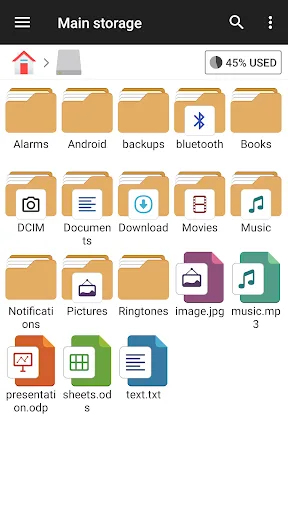
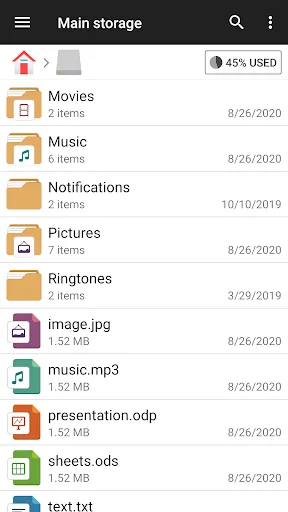
Browse the main storage or SD card, then tap and hold an item to copy, move, delete, or rename.
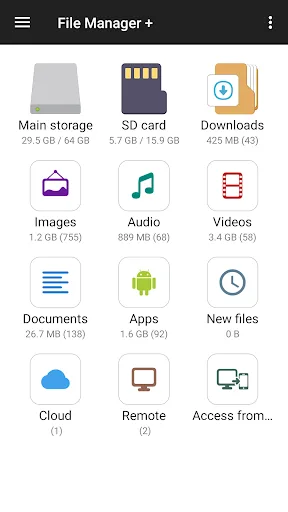
Afterwards, open the "Categories" section to view pictures, videos, audio, documents, apps, or downloads with one click.
Then go to "Cloud" or "Remote" to add Google Drive, OneDrive, Dropbox, Box, Yandex, FTP, SMB, or NAS, and log in to manage your files.
This allows you to free up space. Click "Clean Up" or "Analyze Storage" to see large and duplicate items and confirm which files to delete.
Features
Ultimate File Management
File management is a strong point of this file manager, just like its name. Like a file explorer on your computer, moving, renaming, or deleting files is done instantly.
If you haven't used a file manager on your phone in a long time, when you first download this app, you'll see a jumble of files, photos, videos, and more—more cluttered than a battlefield after a storm. To clean up these files, this app lets you move files between folders like playing Tetris, putting them back in their correct positions. You can also copy files so you have a backup in case you accidentally delete them.
Using the delete function, you can easily remove unnecessary files with a single tap, like blowing dust off a table. But if you're still hesitant, worried about accidentally deleting important files, don't worry, the file manager has an instant file recovery function. They will only truly "disappear" when you delete them again from the file manager's recycle bin.
Supports Multiple File Types
The file manager can help you read various types of files. The most obvious example is its support for all file formats, including images, videos, audio, documents, and even some file formats you've never heard of. Even better, you don't need to download other applications to open these "exotic" files, because the file manager already covers all these functions. It's time to say goodbye to those junk applications that you only use once and then leave unused.
Hidden Files
No one can deny the usefulness of this feature, especially when you want to keep certain files or folders secret. The file manager can help you hide important files or folders to prevent others from peeking. Don't worry, as long as you remember where you hid them, you can still access them through the application. Married people reading this article will feel like they've discovered a treasure, immediately having a fantastic tool to hide "important" files from their wives.
Compressing and Decompressing Files
File Manager also helps you easily compress and decompress files. Want to send a bunch of photos but worried about the file size? Simply compress them into .zip or .rar files and send them. Since it can compress, it naturally needs decompression, right? That's right, File Manager lets you quickly open compressed files sent by others without downloading other apps. From now on, you no longer need to transfer compressed files for decompression; just import them into File Manager, and let it handle the rest!
Viewing Photos and Videos
Okay, now let's talk about how to view photos and videos in File Manager. Don't think this is just a boring file management application with only letters and numbers! File Manager can also meet your entertainment needs; after all, life isn't just about work, right?
Therefore, you no longer need to drag out the default photo viewing application, select the file, and then open it. In File Manager, with just a tap, photos appear as if they were in your photo album. Furthermore, the video viewing function is also excellent. Have you ever had this experience: finding an interesting video, wanting to open it to watch, but having to wait for the video playback application to slowly load before seeing the content? Now, all that is in the past! With File Manager, videos play instantly with a single tap, no waiting required. It's incredibly convenient!
Memory Management
Speaking of the "main" features, we must mention File Manager's storage management capabilities. This app helps you view your remaining storage space and junk files that are taking up valuable space on your device. With just a few taps, you can clean up unnecessary files, freeing up space and making your device run faster. From now on, you no longer need to worry about running out of storage space every time you take a photo or download a file.
Pros and Cons
Pros: Supports multiple file formats
Automatically categorizes files
Supports access to cloud storage
Identifies and cleans up redundant files
Cons: Cannot sort files by number from smallest to largest.
Dark mode requires payment.
FAQs
Which Android version is required to install File Manager?
File Manager requires Android 4.1 Jelly Bean or higher to install and run. This ensures that File Manager is compatible with the game's functionality and performance requirements. To check your device's Android version, go to Settings > About phone > Software information. If your device is running an earlier version, please consider updating your system to meet the game's requirements.
Why can't I install the File Manager app on my Android device?
File Manager installation failure may be due to insufficient storage space, a poor network connection, or incompatibility with your Android device. To resolve this issue, ensure your device meets the minimum system requirements before attempting installation again.
How large is File Manager?
File Manager uses approximately 17.66 MB (18,522,443 bytes) of storage space.
Summary
Experience the ultimate file management app on the Android platform with File Manager, taking control of your files like never before. Download File Manager - File Browser now and unlock endless possibilities for file organization!








