

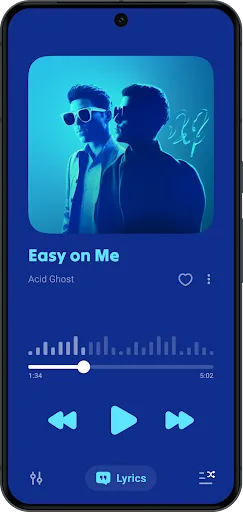
Lark Player is a mobile music player. Discover the latest music freely, and it's incredibly easy! The app organizes all the latest and hottest music into a single "Hot" section; just tap to find them! Lark Player provides a platform for offline music listening, allowing you to enjoy music anytime, anywhere. Furthermore, Lark Player boasts a clean design, smooth operation, and customizable settings.
Usage
Open Lark Player and grant media permissions so the app can detect songs and videos on your device.
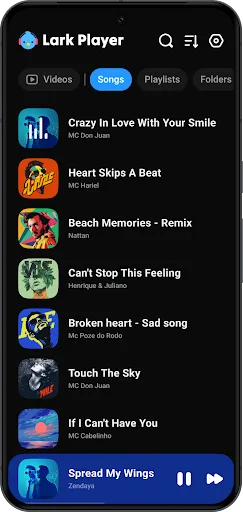
Next, browse by album, artist, genre, or folder, then tap a track or video to start playback.
Then, open the equalizer from the player screen, select a preset, and adjust the volume booster if needed.
Afterward, create playlists from your music library, add songs, and if necessary, convert videos to MP3 or set tracks as ringtones.
Finally, enable a floating window or background playback for multitasking, and set a sleep timer to automatically stop playback when needed.
Features
From Beginner to Advanced, Customize Every Music Experience
No matter what genre of music you listen to, or what file format it is, Lark Player elevates your music experience to the highest level with its detailed audio customization features.
Specifically, Lark Player includes multiple modes and a suite of sophisticated sound adjustment tools. These two parts are similar to automatic or manual audio finishing.
Manual Mode: By changing the indicators in each control bar within each component, you can easily personalize the song you're listening to and enjoy it in the best way possible.
While most of us in other applications only have access to a few basic sound effect options, Lark Player's customization features include many details. These affect the sound in different ways, resulting in a higher level of customization.
Automatic Tuning: Preset modes also offer rich customization options crafted by audio professionals, saving time and easily achieving your ideal sound quality without the need for fine-tuning. Currently, the app offers options including: Standard, Classical, Dance, Folk, Metallica, Hip Hop/Jazz, Pop, and Rock… You can choose the appropriate mode based on the type of music you're listening to, or try different presets to experience the changes in sound quality. Handles All Music File Formats
Another major advantage of Lark Player is its extensive compatibility. This app supports opening and playing music in most modern audio formats, such as MP3, MIDI, WAV, FLAC, AC3, AAC, WMA, and AAC…
With this breadth, no music file or music video will be missed in your playlists. Simply install the app, select the review function, import all your music files into the app, and you'll automatically have an offline music library every time you open Lark Player.
Manage and Organize Music Files
Don't let your music be scattered everywhere. Lark Player centralizes everything in one place, making it easy to store, manage, and browse your music.
Lark Player automatically filters and collects all music files on your device to the app store, where you can browse your music and filter by time, status, artist, album, genre, and other criteria. File naming, switching to other categories, and sorting are also very intuitive and easy to use.
Starting from the presentation setup stage, you can create your own playlists based on themes and your mood, so you can listen to them anytime.
Displays lyrics and other features
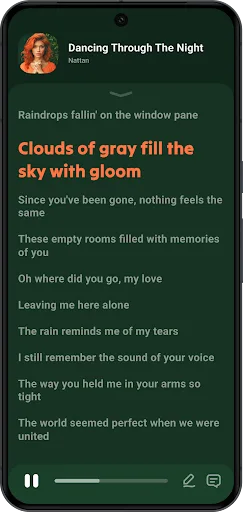
Lark Player can automatically match lyrics to the song playing on your phone while you listen to music offline, allowing you to hum along as usual. Currently, the app supports multiple lyric formats, such as LRC and TXT.
When you're listening to music offline within the app and want to perform other tasks on your device, you can freely adjust the size and position of the app window. This is a very useful feature for busy people.
Even if you want to share offline music on your device with friends, you can do it quickly with Lark Player. With a single click of the share function and Bluetooth support, you can instantly share music to popular social networking sites like Facebook, WhatsApp, and Twitter, and even online messaging apps.
If you fall in love with a song while listening, Lark Player also allows you to set it as your ringtone, so you can hear your favorite melody every time someone calls.
Eye Protection
Lark Player supports day and night modes and offers beautiful themes to help you concentrate. When listening to music at night, you can use it in conjunction with the sleep timer mode. Simply set a timer, and the app will automatically shrink and close when the time is up, helping you fall asleep easily.
Highlights
Preset Audio Modes for Different Music Genres: The app provides multiple sound sets for each different music genre based on the original sound, allowing for precise customization.
Customizable Equalizer: Using the 10/20 equalizer, you'll get a smoother, more vibrant sound experience and create the feeling of listening to a new song.
Audio Effects: The app offers a range of fun sound effects, such as bass boost, virtual channels, reverb, and more, helping you add a fresh twist to your music. We are constantly enriching the sound effects for users to choose from.
Supports Playback of Multiple Common Audio Formats: The app supports playback of multiple audio formats, such as MP3, WAV, FLAC, AAC, etc.
Supports Common Video Formats: Video quality is significantly improved, and the app also supports multiple different video formats, such as MP4, MOV, MKV, WEBM, etc.
No Conversion Required: The fact that no file or format conversion is needed is one of the advantages that users can easily see in this app.
Pros and Cons
Pros: Intuitive interface; Manage your saved music by category; Floating video and music player functionality; Share to various social media platforms
Cons: Annoying video ads
Summary
Lark Player revolutionizes your Android audio and video experience. More than just a player, it's a fully-featured entertainment hub designed to simplify media management and enhance your auditory and visual enjoyment. With its intuitive interface and powerful features, Lark Player transforms your device into a portable entertainment center, offering unparalleled control and customization options.








