

Scene6 is a highly praised system software utility that helps users deeply optimize their phones, giving you a clearer understanding of your device's operating status and allowing you to proactively identify potential performance defects and security vulnerabilities. The application presents a powerful yet lightweight phone performance testing program for a wide range of users. Users can easily switch working modes in an intuitive and clear interface, trying out excellent services such as notification blocking, automatic switching, button blocking, focused settings, and performance monitoring. The application presents an intuitive visual interface to help users comprehensively understand their device's status.
Click to load YouTube / 点击加载视频
YouTube ↗Wonderful Performance of Scene6
Optimized Temperature Control Configuration: The latest version of Scene6 adjusts the MIUI temperature control configuration, better resolving severe lag issues caused by overheating during gameplay. For processors such as Snapdragon 855/865/888, strict mode optimization has been performed, improving game smoothness.
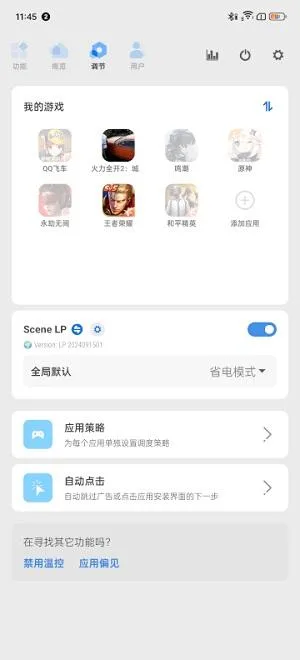
Expanded Scene Modes: Several new scene modes have been added, such as notification blocking (do not disturb games), automatic GPS switching, button blocking, independent screen brightness, and special permission management. These scene modes can be customized according to user needs, improving the phone's usability and convenience.
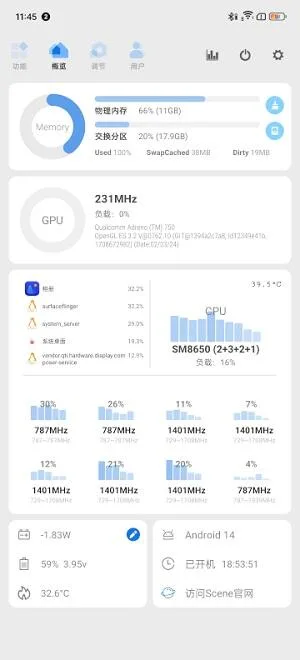
Performance Monitor: A performance monitor is provided on the homepage, allowing users to view the phone's performance status in real time, including CPU usage, memory consumption, and temperature. This helps users understand the phone's operating status and make corresponding optimizations.
Backup and Restore Function: A backup and restore function has been added, allowing users to back up various information on their phone and view it synchronously across different devices. This provides a guarantee for user data security.
Personalization Settings: More personalization options are provided, such as theme color switching, icon and font adjustments, etc. Users can customize the phone interface according to their preferences, enhancing the user experience.
Amazing Features of Scene6
Main Interface and Function Layout Rearrangement
This part mainly improves convenience and aesthetics, and most of the major changes were already reflected in the previously released Alpha 1.
Underlying Restructuring
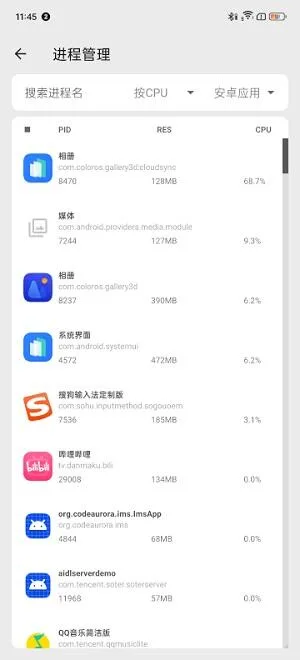
This part of the work accounted for almost half of the development time of Scene6's first public beta. The most obvious manifestation is the addition of a basic mode and ADB mode. Even users without root access can now experience some convenient small functions (such as frame rate statistics, process management, application management, and performance monitor). Secondly, the completely redesigned Scene 6 will no longer occasionally display "Root access granted" prompts during operation.
Optimizations and Fixes
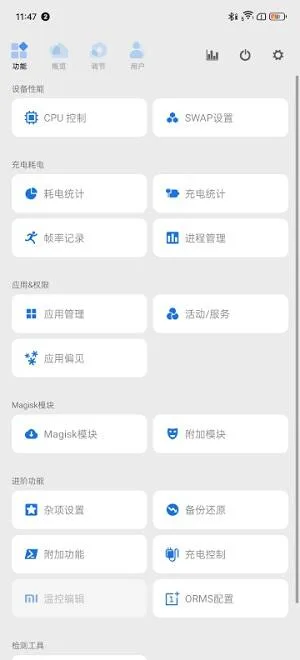
Scene 6 has restructured and optimized some existing functions, including new automatic tasks (original system scenes), application bias, charging statistics, power consumption statistics, and frame rate statistics.
New Features
New features mainly include screen testing (detecting green screen artifacts on your new device), Appops, and the addition of the Magisk module. The latter two are still in their early stages and will be improved in future updates.
Excellent Highlights of Scene6
Provides simple and convenient game graphics modification functions, allowing users to freely set and improve game graphics.
The tools are meticulously designed, easy to operate, and user-friendly, meeting various user needs and providing an excellent user experience.
Mobile software is categorized, including various types of detailed tools, allowing users to better organize and manage their mobile tools.
Fantastic Benefits of Scene6
An essential tool for gamers, providing different types of tools to meet their various needs.
Offers convenient game features, allowing players to freely adjust various game parameters and enjoy greater convenience.
Users can easily use various functions, eliminating tedious operation steps and easily enjoying the convenience brought by the software.
Summarize
A very classic and essential toolbox software for mobile phone users, which you are probably already familiar with. Whether you want to improve your phone's performance or explore more hidden gameplay, it can help you. It has many practical tools that can help you solve various mobile phone problems. If you are also interested, download and try it out!








