

VLLO is a video editing application. Here you can easily change video backgrounds and add animations, as well as perform operations such as cropping, copying, and merging. Changing the entire style of a video is also no problem; you can use the application's built-in filters for color correction, and then modify various parameters to easily transform the original video and create a completely new visual effect. Of course, you can also use the application's included advanced video editing tools to change the video quality, upscaling it to 4K without any flaws.
Usage
Create a new project and then select the aspect ratio suitable for your target platform. After confirming, open the timeline.
Import videos and photos, then drag to adjust their order. Use the trim and split functions to shorten clips and remove errors.
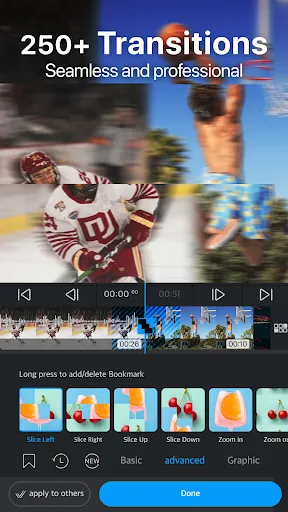
To quickly create titles and transitions, add templates. Add text or stickers, and apply face tracking or background removal functions as needed.
Open the audio tool, add music from the built-in music library, or record narration. Generate automatic captions or use AI voice, then adjust the volume and fade-in/fade-out effects.
Preview the full edit, make final adjustments to color or speed, and then choose the export resolution. Save your files to your device and share them via social apps.
Features
A suite of video editing features on mobile devices.
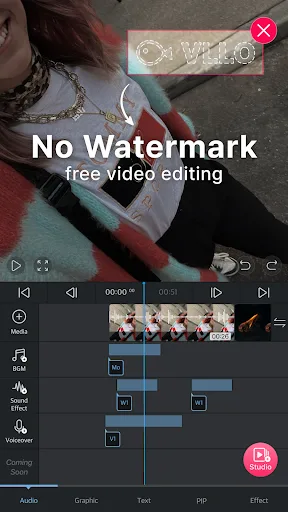
After recording or uploading a video with VLLO, you can immediately begin customizing many details of your video.
Pinch or spread two fingers to zoom in or out on the video on your screen. You can also further customize the background color of your video using the provided color filters. Additionally, you can add more animation to important frames or use picture-in-picture (PIP) technology to add animated effects, creating highlights in your video.
Next are more detailed post-production steps, including cropping, copying, splitting, and merging fragmented video clips. Alternatively, you can quickly adjust playback speed, reverse playback order, insert more images, or add specific segments in the middle of the video—all in just one or two steps. These operations are displayed directly on the application's main screen as selection buttons, rather than hidden in a hidden toolbar, so you can always edit your video in the most intuitive way.
To change the color and style of your entire video, you can use built-in filters for color correction or customize filters based on parameters such as brightness, contrast, saturation, and shadows. Every change, however subtle, produces a visual effect distinct from the original video. You can apply these customizations to the entire video or specific frames within it as needed.
Even if the original video quality is low, VLLO's post-production can help you upscale your video to 4K. The final product will be free of cracks, distortions, or blurring, making it suitable for viewing on tablet screens and smaller screens.
Add Audio and Music to Your Videos
VLLO also offers a wide selection of free, copyright-licensed background music in various styles and formats, which you can freely insert into your videos without worrying about copyright infringement reports.
If you're still not satisfied with your existing sound system and music, you can upload music from your device to the app's favorites list and reuse it when needed.
When inserting audio and music into videos or video clips, you can easily customize the start and end positions and combine them with fade-in and fade-out effects to help the sound blend seamlessly into the video's rhythm.
VLLO also boasts over 450 different sound effects. Users can also record voiceovers during image editing, making almost all features readily available and incredibly convenient to use.
The more images, the more detail.
Images can be text, images, animations, or stickers. VLLO boasts over 2200 different types of stickers, clearly categorized and updated quarterly. Shapes and text are vector-based, ensuring clear image quality even when zoomed in or out.
With this, users can pin, paste, annotate, color, and edit their videos to create vibrant and engaging vlogs filled with memorable clips.
Review
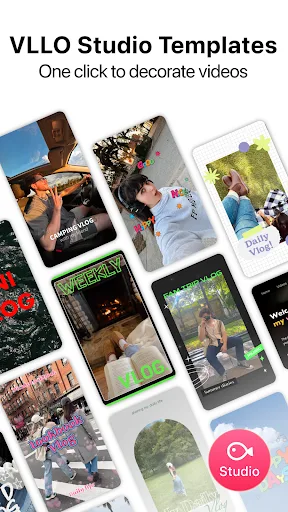
This is the best vlog editing app! VLLO Studio's templates make video enhancement so easy.
Even with a heavy university workload, this app helped me stay focused on editing.
The background music is actually top-tier! There are so many high-quality tracks that are perfect for my YouTube videos. Seriously, I've tried so many apps, but I always come back to this one. The convenience is on another level. As a busy preschool teacher, it's so quick and easy to turn my kids' cute moments into amazing videos. Total lifesaver!
FAQs
Is VLLO free?
VLLO is a freemium app, meaning some features require payment, while others are free. You can download it for free.
Is VLLO a Chinese app?
No. VLLO is developed by the Korean developer Vimsoft. Therefore, installing this app is safe because they do not infringe on user privacy.
Can VLLO run on a PC?
Yes. You can easily run the original VLLO APK on your computer using Bluestacks or other emulators. You cannot run it directly on your computer; you must use an emulator.
Summary
VLLO is the world's best video editing application, boasting user-friendly yet powerful editing tools suitable for both beginners and professionals. It allows you to create videos in seconds and post them to social media without watermarks.








