

ZArchiver Pro is a file management application that helps you easily manage large numbers of files on your phone. Android devices often struggle to decompress various files, but ZArchiver Pro allows you to easily compress and extract various files, automatically categorizing them by type, so you can always easily find the files you just compressed. It supports most compressed file formats, including 7Z, zip, rar, and even some less common ones like Gzip, Lz4, and ZST. If you frequently need to handle such files, it will provide a completely different file management experience.
Features
- Wide Compressible Format Support
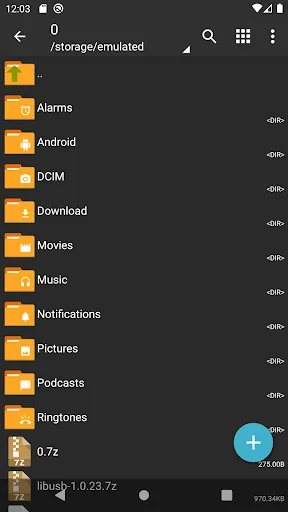
ZArchiver Pro supports almost all compression formats, including 7z, ZIP, RAR, BZIP2, TAR, GZIP, XZ, ISO, etc. You can easily compress or decompress files without using multiple different applications.
- Strong Encryption and Password Protection
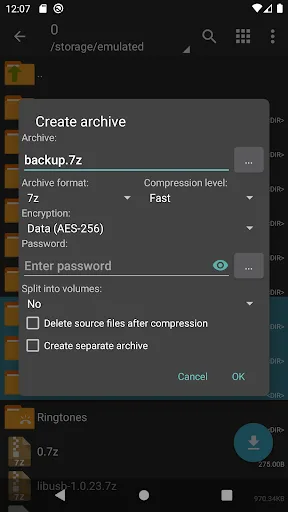
Security is one of its biggest advantages. You can create password-protected compressed files and use advanced encryption methods to protect your sensitive files from unauthorized access.
- Fast Compression and Extraction
This app uses optimized processing technology for fast compression and decompression, even of large files. Performance can be further improved if your device supports multi-threading.
- View and Edit Without Extraction
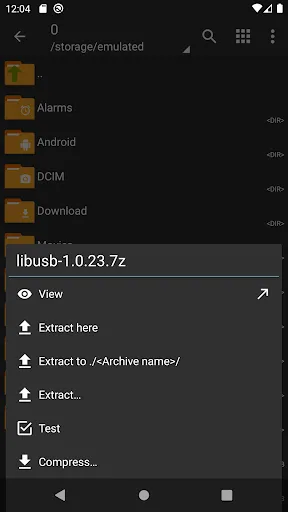
A very useful feature is that you can directly view and edit the contents of compressed archives without first decompressing them. This saves time and avoids storage space being occupied by extra temporary files.
- Multi-Part Archive Processing
If you have split archives like .part1, .part2, etc., ZArchiver Donate can automatically find and extract them all at once, eliminating the need for manual operation.
- File Type Compatibility
This app supports standard compressed file formats as well as image formats such as ISO, BIN, and NRG. You can directly extract and view these files on your Android device.
- Simple and Intuitive Interface
Even with its comprehensive features, this app remains lightweight and easy to use. Its simple and customizable layout makes it easy for both beginners and advanced users to get started.
- Lightweight and Offline Use
ZArchiver Donate is completely offline, so you can compress or decompress files without an internet connection. It takes up very little storage space and won't drain your battery.
Highlights
Directly Modify Compressed File Contents: No need to recreate files from scratch; you can delete them directly within the compressed file.
Save Time: You won't feel tired because you don't need to create new files again.
Interact with Installation Files: You can reliably run APK or OBB files on your device.
Direct Installation: Installation is streamlined with the app, eliminating multiple steps.
Easy Backup: Support for backup methods of various file types is a major highlight of this application.
Pros and Cons
Pros:
Supports multiple file formats.
Ad-free, clean interface.
Create password-protected archives.
Edit compressed files without decompression.
Supports multi-threading for faster operation.
Cons:
Paid Version: Unlike the free version, ZArchiver Pro requires payment.
Complex for beginners: Some users may struggle to use all its features without assistance.
Ads in the paid version: Some users have reported seeing unwanted ads after purchasing.
No direct cloud service support: It cannot connect to cloud storage services like Google Drive or Dropbox within the app; a separate connection is required.
Limited update frequency: The app releases new features and bug fixes less frequently than some users would like.
Review
This software is excellent. You can open the data folder and modify it freely, and it's free. If you downloaded the paid version, it's likely a pirated Chinese app from the app store—uninstall it immediately! Only the Google Play Store provides the legitimate version. Regarding permissions, opinions vary; even domestic developers require permissions, which is even more annoying.
Currently, the user experience is fantastic. The new version's keyword search speed is incredibly fast! Decompression and compression are also very convenient, and other functions are very useful. There's a rather strange bug here: the extracted contents of some zip files have garbled names, even though the content itself is fine. Extracting the same file using the phone's built-in file manager results in a folder with the same name and related files inside. It's unclear what the recognition issue is (I prefer this app because the phone's built-in file manager is inconvenient). I hope this issue can be fixed. Also, I hope that renaming can be done more efficiently by selecting all and deleting the original name (meaning the name is automatically selected from the beginning so the content can be directly manipulated), instead of requiring a single click followed by a long press to select all.
This is an excellent decompression app; I even use it as a file manager now. However, I've found some inconveniences and hope you can provide some suggestions for improvement. First, I suggest changing the folder naming field to blank. Currently, I have to manually delete the default name before entering the desired name, which is tedious and pointless. Second, regarding decompression, I hope you can add options to delete the original compressed file after decompression and to use the same password for all files during batch decompression.
Summary
ZArchiver continuously improves performance and adds new features through regular updates and ongoing improvements. Its powerful functionality, ease of use, and excellent compatibility make it one of the best compression solutions for Android users. If you are looking for a reliable way to manage compressed files, ZArchiver is an excellent option worth considering.








