Adobe Scan is a document scanning application. Here you can quickly scan documents and convert them to PDF. It supports a wide range of scanning types, including whiteboards, cards, and even books. Simply select the appropriate scanning mode to obtain the corresponding document. All acquired documents are presented in PDF format, and you can also choose to convert them to other formats for convenient daily use. Adobe Scan offers multiple ways to share and receive documents. You can also choose to create a link and save the document; anyone can access it with a single click, making sharing easy.
Usage
- Save time with the fast document scanning app: Batch scan documents using high-speed scanning and convert stacks of documents to PDF in seconds.
- Create PDFs with your phone: Convert paper documents or printed photos to PDF or JPEG using mobile PDF and photo scanning apps.
- Let the AI assistant extract key points from any scan to get follow-up answers or draft emails, reports, and next steps based on the scan results.
- Use generative summaries: Extract key points from any scan with a single tap, so you can find important content and summarize your documents with AI in one click.
- Convert Images to Text: Use the image-to-text function to search and edit text in scanned documents using OCR.
- Scan Anything: Receipts, ID cards, notes, recipes, photos, business cards, whiteboards—this scanning app and PDF maker provides documents that can be processed on your phone, tablet, or computer.
Features
Scan Multiple Document Types
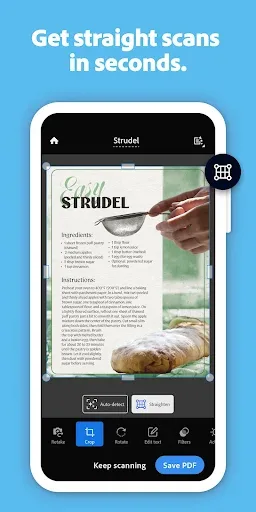
Adobe Scan can scan a variety of items, such as whiteboards, cards, and documents. Even books are scanned optimally with results exceeding expectations. You should select the appropriate scanning mode for easier document scanning and best clarity. The app's book scanning function is highly efficient, quickly generating high-quality documents with exceptional clarity.
Furthermore, the app uses automatic border detection and recognition technology to create complete documents, giving you peace of mind. This means that when you take a photo of a document with an outer border, the OCR automatic text recognition system immediately crops out all unnecessary images, leaving only your document. Therefore, you don't need to spend much time making adjustments. Simply take a well-composed photo, and Adobe Scan will handle the rest.
Scanning Modes
In addition to the standard scan mode, you can use other scanning functions such as continuous scanning and QR code scanning. While these functions are less frequently used, they are very useful when needed, helping you scan photos quickly. Therefore, publishers have integrated them into various scanning functions for your use. Furthermore, you can use the automatic brightness mode in low-light environments to make images clearer.
Save in Multiple Formats
After scanning an image, Adobe Scan will process it and convert it to PDF format. PDF format is popular because it can be displayed on almost any device, application, or operating system. PDF supports various content integrations, allowing users to easily create full versions, but with limited capacity. Additionally, you can save the image as a JPEG if needed.
Easy Sharing
Adobe Scan allows us to share documents at extremely fast speeds and offers multiple ways to receive them. You can also create shareable links, making them accessible to everyone with a single click. Furthermore, you can copy files to cloud storage for safekeeping. Change your name and add a signature so recipients know the document is your work, preventing loss or making it easy to find.
Unlock Premium Version
In addition to its fairly comprehensive basic functions, Adobe Scan allows users to unlock a premium version for a fee, which includes some special additional features you might find interesting. For files in various formats, you can export or merge multiple files to create a complete version. This is especially useful when scanning multiple documents, avoiding the need to open each file individually, saving time and preventing unnecessary clutter.
Advantages and Disadvantages
Advantages: Adobe Scan is completely free to use.
All scanned images can be edited with Adobe Acrobat Reader.
Store files in Adobe Document Cloud.
Generate high-quality PDF or JPEG files.
Disadvantages: PDF conversion takes a long time.
FAQs
How does Adobe Scan compare to other scanning applications?
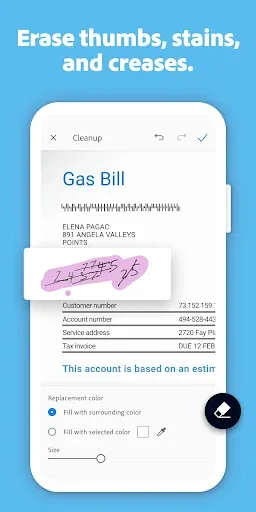
Adobe Scan offers much more than basic camera scanning. While other applications may only capture images, Adobe Scan automatically detects edges, cleans up backgrounds, and enhances text clarity. It also integrates directly with Acrobat, so your scans can be edited and searched instantly.
How do I password-protect a scanned PDF file?
After saving the scan, open it with Adobe Acrobat.
Click the three-dot menu and select "Protect PDF".
Select "Set Password", enter your desired password, and click "Apply".
Your PDF file is now protected and you can securely share it with others.
How do I export a scanned file?
Open the scanned file in Adobe Scan.
Click "Share" or open it in Acrobat.
Choose an export format—PDF, JPEG, or Word.
Save to local storage, your Adobe account, or a connected cloud service such as Dropbox or Google Drive.
Can I add annotations or markers to a scanned document?
Yes. Open the scanned PDF file in Acrobat and use the annotation or marker tools to highlight text, draw graphics, or insert notes. All changes are automatically synced across your devices.
Which devices work with Adobe Scan?
Adobe Scan is compatible with the following systems:
• iOS 15 or later
• Android 8.0 or later
You can sign in with your Adobe ID and access the same files on desktop and mobile devices via the Acrobat Web app.
Summary
In short, Adobe Scan provides a professional way to scan documents, allowing you to scan documents anytime, anywhere, and say goodbye to paper documents. Download the Adobe Scan APK for free and experience all its features.