vFlat Scan is a document scanning application. Utilizing artificial intelligence, it provides faster and more accurate scans while protecting your privacy. The app is watermark-free, ad-free, and requires no login – simply open it to enjoy scanning. It automatically detects document flaws, ensuring clear scans even if the image is slightly crooked. vFlat Scan automatically flattens documents, achieving even smooth scan borders on curved paper.
Features
Image to Text Conversion
Image-to-text conversion (OCR – Optical Character Recognition) is a standout feature of vFlat Scan and a key factor in its superior document scanning and management capabilities.
To use vFlat Scan's OCR function, you need to scan a document, select an existing image on your device, or take a new photo using your camera. Scanned or photographed documents can contain any type of text, such as books, articles, tables, or handwritten documents. After scanning or selecting an image, vFlat Scan's OCR function will analyze it.
During this process, the application recognizes characters and letters in the image and converts them into readable text. Once OCR processing is complete, the application generates a text file. This document is typically displayed on your device's screen, and you can view, edit, or share it just like any other text file.
This feature is extremely useful when you need to back up important documents. With this feature, you can scan and digitally store important documents such as personal records, contracts, or certificates, preventing loss.
Automatic Image Quality Enhancement
When scanning photos, it's difficult to achieve optimal image quality due to inherent jitter, shakiness, or blur. Therefore, vFlat Scan has developed a photo enhancement feature to generate the best scans. When scanning documents with a phone, slight shaking may occur while holding the phone. This feature automatically eliminates or minimizes dynamic edges, ensuring image clarity.
If the original document has lighting or ghosting issues, vFlat Scan can improve image quality by enhancing image sharpness. If the original document has noise, the application attempts to remove noise, thereby improving image sharpness. For color documents, the application also features automatic color balance to ensure the most accurate colors in the scanned image. Excellent Scan Quality
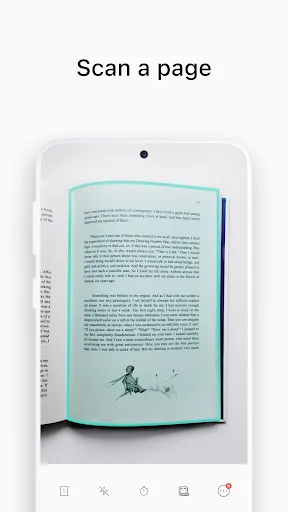
vFlat Scan utilizes automatic scanning technology to enable you to scan documents with high quality. Simply place the document on your desktop, and the application will automatically detect and accurately scan it, eliminating any distortion. This ensures that scanned documents always maintain optimal quality.
For printed documents, the application guarantees accurate recognition of all fonts. For handwritten documents, vFlat Scan will do its best, with the final result depending on the clarity and aesthetics of the handwriting.
Easy Data Sync
vFlat Scan integrates with several mainstream cloud storage services, such as Google Drive, Dropbox, and OneDrive. This means you can choose your preferred cloud storage service and easily sync your data. Any documents you scan are automatically stored in your cloud account, helping you save phone storage space.
Highlights
Maintain Image Quality in PDFs: After scanning text, the application suggests whether to save it as a new image or a PDF.
Optimize PDF File Size: The application allows you to convert this PDF file to various formats, compress the document if it is too large, and easily export it.
Flatten Curved Pages: The app aligns pages and prompts you to adjust the camera orientation so that the received PDF quality meets your goals and expectations.
Erase Fingerprints from Scans: The app allows you to erase fingerprints from book pages, remove stains from books, and create high-quality PDF files.
Pros & Cons
Pros
No watermarks or intrusive ads
Precise OCR for converting images to editable text
Finger removal and color enhancement tools
Batch mode and two-page scanning support
Accessible text-to-speech and translation features
User-friendly interface and organization options
Cons
OCR limited to 100 pages without purchasing credits or watching ads
Translation function requires separate app installation

Summary
Whether you're a student or a professional, vFlat Scan - a PDF scanner and OCR solution - is an excellent choice for scanning anytime, anywhere. With its fingerprint removal and color enhancement features, you can get crisp scans of book pages and documents. The translation function is also very useful, but unfortunately, it requires the Google Translate app. Apart from that, it has almost no drawbacks, the only limitation being that the number of pages scanned at one time is limited to 100 pages.