

1DM+ is not only an excellent browser but also a powerful file download application. Here you can easily manage multiple download files, set speed limits for each file individually, and manage the download queue. It also has a built-in browser with features like tabs, history, and incognito mode for the best web browsing experience. Of course, torrent file downloads are also included; 1DM+ allows you to directly download URLs or torrent files to your local device, sort them by type, or save them directly to your SD card.
Usage
- Many people ask how to change the language of 1DM+ on Android. After downloading and installing, the first time you run it, you will be prompted to set the language. Select "Chinese (Simp)" and click the select interface.
- Then set the download storage location.
- Click the upper right corner to open the software browser.
- Click the magnet icon to add torrent files or magnet links.
- Click the button in the lower right corner to add download links.
- It also supports creating shortcuts for the software browser on your desktop.
Features
Multiple Download Control
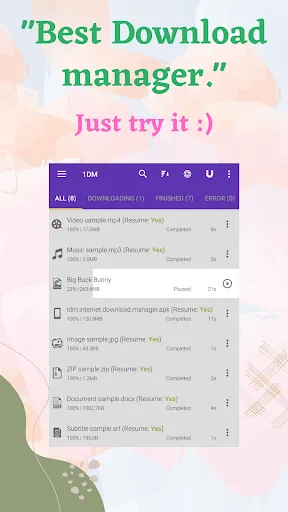
After downloading 1DM+: Browser and Video Downloader, you can run up to 30 download tasks simultaneously and split files into multiple parts. You can pause or resume tasks, set speed limits for each task or globally, and use unlimited retries with customizable delays. A simple scheduler lets you queue tasks for later processing, helping you manage data usage and battery power.
Built-in Browser and Link Capture
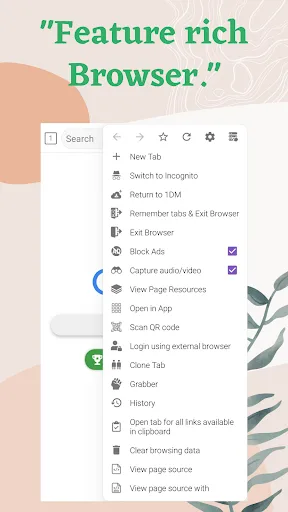
Next, 1DM+: Browser and Video Downloader. It features a built-in browser with tabs, history, and bookmarks, and offers an incognito mode for privacy. It can capture media links from multiple websites and supports HTTP live streaming pages. An automatic login function saves login credentials for protected areas. Please note that due to YouTube's terms of service, this software does not support downloading videos from YouTube.
Torrent Files and File Handling
Download torrent files via magnet links, URLs, or local torrent files.
Save directly to your SD card and sort items by name, size, date, or type.
Hide downloaded files so they cannot be accessed by other applications, and easily share or open them.
Check file integrity using MD5 and keep track of progress in extended notifications.
Use a proxy and refresh expired links when necessary.
Highlights
Additional Enhancements: The Finishing Touches
Beyond the basics, 1DM+ offers a range of advanced features. You can handle up to 30 download tasks simultaneously or split a single download task into 32 parts. Want to refresh expired links? Or download password-protected files? 1DM+ has you covered. It even comes with a speed limiter to control your download speed. It's like a well-trained butler, ensuring your downloads are smooth and uninterrupted.
Comprehensive Upgrade: A Perfect Download Experience
1DM+ isn't just the fastest and most advanced download manager; it integrates numerous features, making it your preferred browsing platform. It has a built-in web browser with multi-tab support, history, and bookmarks. Want to browse discreetly? Simply switch to incognito mode. With this app, you're a downloading expert, a browsing master, and an all-around web guru.
Access Permissions: Nothing to Hide Here
Some might think that an app requesting access to your network connection, storage space, and vibration control permissions is like a vampire asking to enter your house. But don't worry, 1DM+ is completely honest! Every permission it requests is reasonable—network access for file downloads, storage for downloaded data, vibration control for sending notifications, and wake lock to ensure your device doesn't accidentally shut down during downloads. So, just as garlic repels vampires, 1DM+'s transparency eliminates all doubts.
Notice
Due to YouTube's terms of service, 1DM does not support downloading content from YouTube. Please respect copyright and only download content you own or have licensed to use. 1DM was formerly known as IDM on Android; this is not a desktop version of IDM. This app is designed specifically for Android phones and tablets.
Summary
1DM+ is useful because it's both an excellent privacy browser and a tool for downloading various file types on mobile devices. The app itself is small in size and saves battery power. If you frequently download files, click here to download 1DM+.








