

ZArchiver Donate is a popular file management and compression application that provides users with powerful file compression and decompression capabilities. It can create and decompress various formats such as 7z, ZIP, RAR, and TAR, offering excellent compatibility. Users can directly add, delete, and replace files within compressed archives without complete decompression and can directly view ZIP format comment information for easy identification of archive contents. Furthermore, it supports creating AES encrypted archives and filename encryption, effectively protecting the privacy of sensitive files and preventing file leaks.
Click to load YouTube / 点击加载视频
YouTube ↗Features:
Archive formats and controls
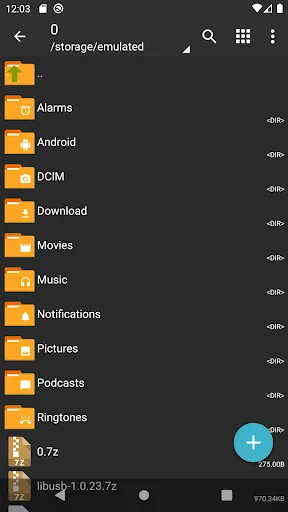
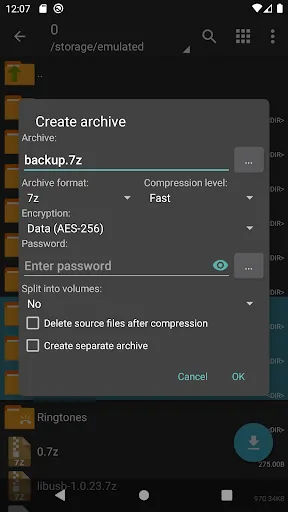
Create archives in 7z, zip, bzip2, gzip, XZ, lz4, tar, and zst.
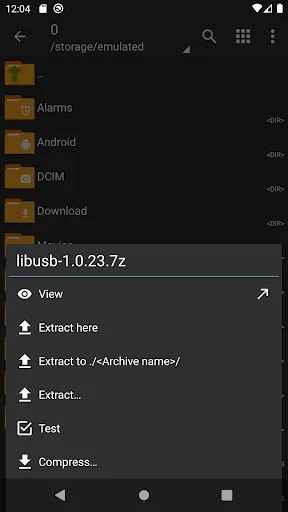
Decompress many types, including 7z, zip, rar, rar5, iso, tar, deb, rpm, dmg, wim, and others.
View archive contents without extracting.
Create and decompress password protected archives.
Work with multi part and split archives, and use partial extraction when needed.
Directly open small files on Android 9 or later when possible.
Pro additions in Donate build
Light and dark theme for comfortable viewing.
Password storage for quicker access to protected archives.
Image preview inside archives to check files faster.
Edit an archived file in another app, then update it inside the archive.
Performance, language, and privacy
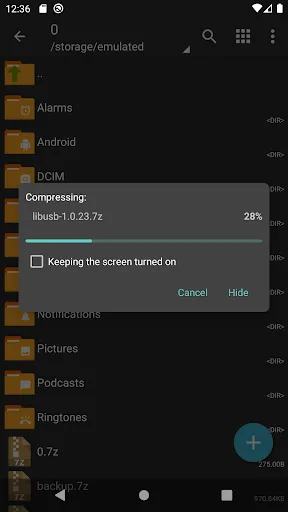
ZArchiver Donate supports multithreading to improve speed on modern devices. Filenames use UTF-8 or UTF-16, so national characters display correctly. The app can open archives from mail apps and works entirely offline because it has no internet permission. For the most stable experience, use the ZArchiver Donate latest version.
Tips:
Use Passwords Wisely: When you create encrypted archives, choose strong passwords to keep your files secure.
Avoid Over-Compression: Compressing files that are already compressed can slow things down and won’t save much space.
Regular Backups: Use ZArchiver to back up important files into compressed folders for easy storage.
Organize by Type: Put your archives, like documents, images, or ROMs, into separate folders to make them easier to find.
Pros and Cons:
Pros
Supports many formats
Creates compressed tarballs
Processes disk images
Cons
No support for Disk Copy images
Can't create RAR archives
FAQs:
Q: What is Zarchiver Donate Apk?
A: ZArchiver Donate Apk is a powerful file management tool for Android devices. It offers an easy-to-use interface, allowing users to manage their files with ease and efficiency. The app supports various archive formats such as 7zip, zip, rar and many more along with support for encrypted archives like password-protected ones.Additionally, it can also be used to extract ISO images from CDs/DVDs or mount them in the device’s virtual drive so that they can be accessed without having to burn them onto discs first. With its built-in text editor, you are even able to edit your documents directly within the application itself!
Q: Why should I donate towards this apk?
A: By donating toward this apk you will help ensure the continued development of new features which make managing your files easier than ever before – plus all donations go straight back into creating further improvements on existing functions too!Your donation could mean we add additional language options increase security measures against malicious software offer better compression rates when archiving data etc. All these things combined create a much smoother user experience overall something everyone benefits from no matter what type of task they might need to complete quickly & efficiently while using our product. So please consider making a contribution if possible today.
Summary:
All in all, ZArchiver Donate is a great upgrade to have if you enjoyed ZArchiver. Not only does it give a few cool features, but your purchase will also support the app’s active development for more features in the future. While it isn’t fully beginner-friendly, there’s more than enough documentation online to figure out what to do with the app’s interface. This is a highly recommended app to get.








