
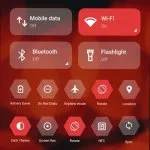
Mi Control Center is a free utility application. It's a custom quick toggles app that provides users with an alternative to how they interact and trigger quick access settings and actions on their devices. It draws inspiration from iOS and MIUI from Apple and Xiaomi, respectively for its design.Much like Quick Settings and One Shade: Custom Notification, the Mi Control Center app lets users create personalized quick toggles to meet their needs and how they use their devices. It boasts multiple layout choices that can be customized further with various visual options.
Features:
Customizable Control Center: Users can customize the layout, colors, and functionality of their control center to suit their preferences.
Quick Settings: Access to quick settings such as Wi-Fi, Bluetooth, brightness, and other essential toggles is streamlined for ease of use.
Notifications Management: The app allows users to manage notifications efficiently, with options to prioritize and categorize them.
Gestures: Users can set up custom gestures for various actions, enhancing the usability and accessibility of their device.
Media Controls: Control media playback directly from the control center, with easy access to play, pause, and skip functions.
Layout Options: Multiple layout options are available, allowing users to choose the one that best fits their style and needs.
Themes and Styles: A variety of themes and styles are available to personalize the look of the control center, including options to mimic the iOS control center.
Battery Information: The app provides detailed battery information and statistics, helping users monitor their device’s battery usage.
Quick Access to Apps: Users can add shortcuts to their favorite apps, making them accessible directly from the control center.
Regular Updates: The app receives regular updates, bringing new features and improvements based on user feedback.
NOTIFICATIONS:
In addition to allowing you to edit the interface details of your phone’s control center, our app also helps you manage the notifications sent to you and will automatically organize your spam messages sent to you as spam advertising notifications or anonymous notifications that scam you, and you can reply to messages from friends, family, and relatives right on the notification shade through our application.
Notification Management: Our application will allow you to view notifications without opening the application that sent the notification or reviewing previous notifications, and you can delete spam notifications that affect you.
Notification Grouping: In addition, we also support you in putting spam notifications from spam applications into a group so you can decide whether to delete that application or find out which application is intentionally spamming notifications.
Quick Replies: When a message notification arrives, instead of having to turn on the notification application, you can directly reply to the message through our application by replying to the message directly in the notification line that appears in the center control.
CUSTOM ACTIONS:
In addition, the application will automate tasks you frequently use quickly without you having to do them manually. You can also add shortcuts and features you love or use often to the control center.
Camera Shortcut: You can use the features you frequently use right in the control center without having to access your phone’s home screen.
App Shortcuts: The application allows you to add features you frequently use or your favorite features to shortcuts in the control center panel so you can use them quickly and conveniently.
Task Automation: The app will automate tasks you frequently use without you having to navigate menus.
Advantages:
Two different layouts: combined notifications and quick toggles, or separate with control center Similar to MIUI 12+ and iOS;
Full color customization;
Adjustable background types: Choose a solid color, live or image static blur. Change the transparency and blur amount.
Advanced custom notification bar: Get, read, snooze or dismiss it;
Advanced music: Dynamic colors based on the currently playing album artwork. You can skip to any part of the track right from the notification’s progress bar;
Quick reply: Reply to your messages as soon as you see them;
Auto bundled;
Custom background picture: pick your favorite image to be displayed in the shade.
Final verdicts
Feel free to use the app together with Ultra Volume, Control Center IOS and other useful tools for managing your devices’ layouts, as you enjoy absolute comfort with the UIs and always be able to find new elements to explore.








