

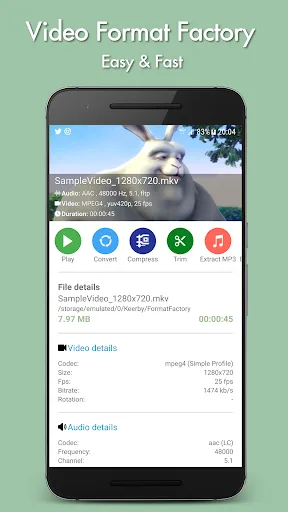
Video Format Factory is an excellent tool for converting video and audio. This powerful app allows users to change file formats, compress, cut, or extract audio, enjoying an editing experience. With Video Format Factory, you can adjust various settings, change the output format and video size, reduce the frame rate, or change the bitrate. Furthermore, you can simply download it to your device and start using it immediately; select the files you want to convert, and it will convert to most mainstream formats.
Features:
LEARN ABOUT AN ALMOST UNCOUNTABLE AMOUNT OF DIFFERENT OPTIONS FOR CONVERTING FILE FORMATS
Using Video Format Factory, you can convert any video and audio files, including MP4, FLV, WEBM, AVI, MKV, MP3, FLAC, WMA, OGG, M4A, and WAV. You won’t need to be concerned about the format using this application. In addition to that, it offers an extensive range of different conversion options. This converter can convert between various file formats, including MP3 to AAC, M4A to MP3, FLV to MP4, AVI to MP4, MP4 to FLV, and MP4 to AVI.
SAVE TIME AND SPACE BY COMPRESSING VIDEOS IN A WAY THAT IS EFFICIENT WITHOUT COMPROMISING THE VIDEO’S QUALITY
The capability of Video Format Factory to compress videos is one of the app’s most appealing features. This will help you save space on your computer and transfer video files accessible over slow networks. Say goodbye to large files and hello to videos that are less in size yet maintain their quality. You can compress your video files by bundling them up to save even more storage space. As if by some sort of miracle!
ADJUST THE OUTPUT FORMAT TO MEET THE REQUIREMENTS AND PREFERENCES UNIQUE TO YOU
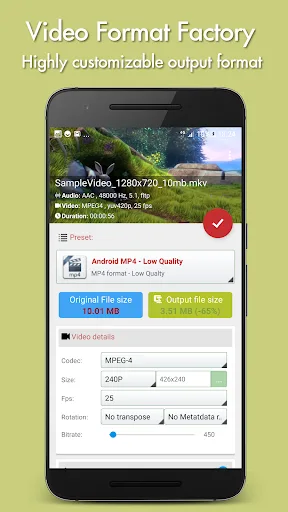
Users’ ability to customize their output’s format is one of Video Format Factory’s most vital features. In the final output format, you have control over the variables of size, codec, aspect ratio, frames per second, frequency, and bitrate, and these may all be altered to suit your preferences. Because you have this level of control, you can be sure that the videos you convert will be excellent in every way. Regardless of how experienced you are or how recently you have begun working with video as a medium, this feature will blow your mind.
DISCOVER A WHOLE NEW WORLD OF VIDEO EDITING THANKS TO THE INTUITIVE CONTROLS
It would be a mistake to ignore the video editing capabilities that Video Format Factory provides. You can break up videos with ease and extract certain pieces from them. You may trim, trim, extract MP3, rewind video, clip video without reducing quality, create GIFs from videos, remove watermarks, and perform many other things with this app. The app provides users with various editing options to create stunning videos.
Highlights:
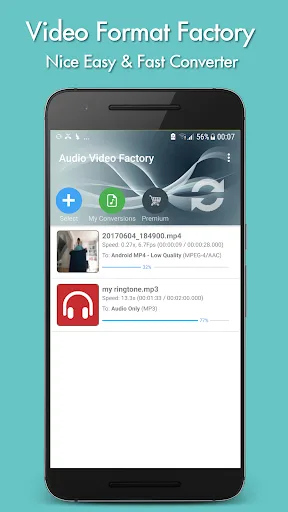
Convert all your Mp4, Flv, WebM, Avi, Mkv, Mp3, Flac, Wma, Ogg, M4a, Wav... files. All major formats supported.
Compress video to save space or to easily send it over limited internet bandwidth. Smaller size and keep quality! Zip videos to save space!
Highly Customizable output format: configure entirely the output format with customizable size, codec, aspect ratio, fps, frequency, bitrate...
Split your videos and extract some selected parts. trim, crop, extract MP3, reverse video, cut videos without loosing quality, create gif from video, remove watermark and so much more....
Share directly your converted, compressed, trimmed videos on social medias
Tips for Users:
This is a video converter, compressor, cutter, cropper, reverser, and audio converter. It's straightforward to use. You can easily compress video to save space or send it over limited internet bandwidth. It supports highly customizable output format: configure the output format with customizable size, codec, aspect ratio, fps, frequency, and bitrate.
You can split your videos and extracts some selected parts. Trim, crop, extract MP3, reverse video, cut videos without losing quality, create gifs from video, remove the watermark, and so much more.
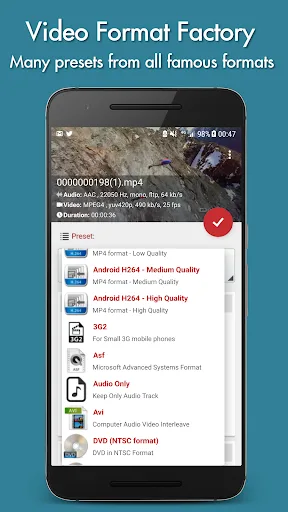
Moreover, it has automatic settings for Android MP4, Audio Only (Mp3, M4a, Aac…), Avi, DVD (NTSC and PAL format), Flv, iPad, Mp4, Mpeg2, Webm, Wmv. It is InApp Purchase to unlock the highest quality profiles.
Conclusion:
Video Format Factory is a very useful app for one very simple reason: you can very easily edit and change your audio and video files in just a few seconds. You don't need any previous experience to cut or change the format of any video or song.








