CCleaner for Android is a mobile cleaning utility software that offers a variety of functions. It easily cleans junk files and manages application status. The software can analyze application size to help users identify excessively large files, such as those that haven't been used for a long time, providing helpful suggestions. It also includes privacy features to protect application privacy and can monitor the phone's system health in real time. Users can set scheduled tasks, and the software will automatically clean junk files at the set time, saving users time and requiring no user intervention.
Click to load YouTube / 点击加载视频
YouTube ↗Highlights of CCleaner:
Get reasonable advice
Once there is a reasonable analysis, the application also suggests uninstalling some unnecessary applications.
Search for long-forgotten files: Thanks to the application, you can find files that you have forgotten and remove them quickly.
ANALYZE APPLICATIONS’ IMPACT
Battery life is also a factor that CCleaner pays close attention to with the aim of helping your battery life be maintained for as long as possible. It will always check battery status and clearly recognize factors that can affect your battery life. From there, you can influence these factors in a simple way, such as stopping operations or removing them completely. If the battery remains stable, using the device will still be smoother, and your experience will change immediately when using the application. An app is also an object that can apply commands simultaneously from the application.
CLEAN PHOTO LIBRARY
Android devices are not only a place to store information but also a library of multimedia, and this is also a clear group of reasons that affect your capacity. Of course, working with this group will sometimes take some time, but when using the application, you will be able to eliminate unnecessary things quickly. Specifically, duplicate or poor-quality images are displayed before your eyes, and you will be the one to think about whether to put them in the trash or not. In addition, you can compress unnecessary things or delete them permanently if you want.
Remove photos quickly
Photos with the same content or poor quality will be removed immediately.
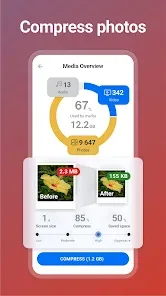
Reduce image size
The application brings together useful features to compress images and expand the space of the application.
Keep your library compact
Getting rid of junk files is the key to having a compact library that brings together important elements.
MONITOR SYSTEM USAGE
Besides software-related features, hardware testing features should also not be overlooked, as users will be able to know the status of important elements. Specifically, you can know the temperature, and the heating elements can disappear with just one touch. Factors related to the operation, such as RAM, will also be checked, and elements running in the background will be removed so that the device only focuses on the main applications being used. This device will be absolutely necessary if you own a device with not very powerful hardware.
Features of CCleaner:
Clean, Remove, and Master
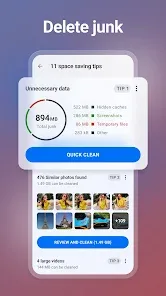
Remove unnecessary files and clean junk safely
Clean files, download folders, browser history, clipboard content, leftover data and more
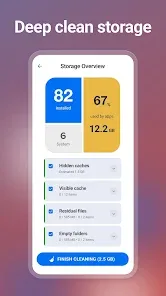
Reclaim Storage Space
Analyze valuable storage space
Quickly and easily uninstall multiple unwanted applications
Clear junk, such as obsolete and residual files
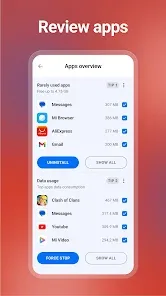
Analyze Applications’ Impact
Determine the impact of individual apps on your device
Check which apps consume your data
Find apps draining your battery
Discover unused apps with App Manager
Clean your photo library
Find and remove similar, old, and poor quality (too bright, dark, or unfocused) photos
Reduce file sizes with Low, Moderate, High, and Aggressive file compression, and move originals into cloud storage
Delete photos from private chats
Monitor your System
Check the usage of your CPU
Analyze your RAM and internal storage space
Check out your battery levels and temperature
Easy to Use
Clean your Android in just a few clicks
Simple, intuitive user interface which is easy to navigate
Choose the color theme you like most
FAQs of CCleaner:
Is CCleaner safe for regular use?
Yes, the app is designed to target only non-essential files that can be safely removed from your device. It undergoes regular updates to ensure compatibility with Android systems and maintains focus on cleaning files that don’t impact your device’s core functionality.
What makes CCleaner different from built-in cleaners?
CCleaner offers more detailed analysis and control over what gets cleaned, along with additional features like app management and system monitoring. It provides a more comprehensive approach to device maintenance compared to basic built-in tools.
How does CCleaner free up storage space?
The app identifies and removes unnecessary files like app cache, temporary files, and residual data that accumulate during normal phone use. This cleaning process reclaims storage space without affecting your personal data or essential system files.
User Reviews of CCleaner:
1.This app USED to be good. I have had CCleaner on various devices for years. However, the current android app is awful. Far too many ads that prevent any actual use of the app without closing it down and restarting twice in the hope that you get an advert with a big X in the corner so that you can close it and continue. A good app ruined and nothing here encourages me to even think about considering the remote possibility of thinking about paying for adfree.
2.I know it's easy to focus on the bad and never give credit where credit is due so I'll at least start there - I used to really love this app. It worked flawlessly for years, always cleaned my excess junk, and I really appreciated the app. This was until Jun 2nd, when I was cleaning my phone with this app, and suddenly, my phone shut off out of nowhere. I kept trying to turn it on, with no success, I became concerned. i tried everything I could but it never came back on. My phone became bricked.
3.It might be good, but I don't like the fact that I need to sift thru all the pictures/documents etc to approve what I want to /need to delete! I could've just went onto Google photos and did that myself without installing this App. Sorry, it probably is good, but I expected that it would've found duplicate pictures etc and deleted other junk, but instead it's just highlighting stuff and I need to confirm whether I'm keeping it or deleting it.
4.This app is a great deal, accept I have to tell it to clean the cache/cookies. It will ask you to pay when you first sign up push the back button, I have Android. It will then display a $ 7.00 a year charge. That I signed up for. to cancel, go to your Google subscriptions. And you can cancel your subscription. I would write down what card you put it on. And when you signed up for it and the name of the app so you can cancel it when you want to.If you want to. this is a wonderful cost for all.
Conclusion:
In summary, CCleaner APK stands as a pivotal tool for Android users seeking to enhance their device performance. With its comprehensive cleaning capabilities and user-friendly interface, it offers a practical solution for maintaining peak device operation.