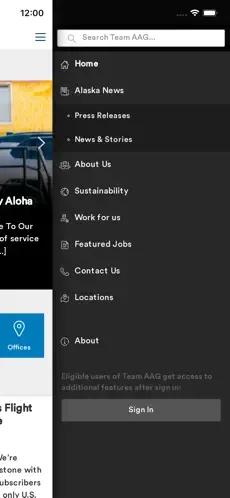
Team AAG This is an information and communication platform developed by Alaska Airlines, Horizon Airlines, and Mackey Aviation Services for teams, colleagues, and related personnel. This application centralizes official company communications on one platform. It makes it easy and convenient for users to find all the information they need to efficiently complete their work. In the event of major breaking news, it can promptly push real-time information to users. On this platform, you can also find customized information related to specific positions and locations, and stay connected with the airline group community.
How to use
Once you have downloaded the app, open it to see the list of AAG Meetings and click on the meeting to open the program of your choice. The latest is listed first.
You will need to log in to access the program. All annual meeting registrants receive an email with instructions. PLEASE NOTE: you will NOT use your own AAG password to access the mobile app, but one that AAG has chosen and shared in the instructional email.
If you have previously installed the app and you want, you may need to click on the button that reads “Exit to Meeting List” from the home screen of an old program to reach the list of all programs installed within the app. Once you are on the screen that shows the list of AAG Meetings, click the circular arrow button in the top right hand corner to update your app (this arrow button should be RED in color if it is not yet updated). After the app has been updated, click on the program you wish to browse.
Install the program by clicking the install button, then click the blue Open button to open the program.
Note: The first time you open the program, it may need to download updates. This could take a few minutes. Please install the app before attending the meeting and when you are connected to Wi-Fi to ensure the fastest initial download time. Upon opening the app for the first time, you will also be given helpful tips about where to find information in the app. Click Next after reading these tips. There will also be a button available to click if you no longer wish to receive these types of tips.

Features
For those app users who want to explore every inch of what the AAG Mobile App has to offer, this section includes additional features of the app beyond the basics. In this section, learn how to create a personal profile and add friends, use multiple devices, read the front matter of the AAG Program and other essentials, read conference abstracts, see lists of presenters and attendees, take notes, read daily Geograms, find your current location, browse a list of exhibitors, and view social media feeds.
It is possible on the AAG Mobile App to create a personal profile such as what you might find on LinkedIN or Facebook. This profile can then be made publicly available to everyone using the AAG Mobile App or used to connect to friends and colleagues. There are multiple ways to set up your personal profile. Either click on the three diagonal lines on the upper left side of the app to open the Message Center and then click at the top to set up a profile or click on the gear icon on the upper right hand side of the app to open the settings and select “MyProfile.” Once in your profile, add your name and any other information you wish. If it is easier, the icon with the arrow in a circle in the top right allows you to import a profile from another site such as LinkedIN. If you would like your profile to be publicly available to others using the AAG Mobile App, make sure that the box is checked next to the phrase: “Tap here to publish your profile to the Attendees list to engage with others users of the app.”
To see who else has created a profile in the AAG Mobile App, select the icon on the Home screen labeled Attendees that has a picture of the two human profiles. This gives you an option to browse all the attendees who have made a profile or to browse attendees by type of attendee (First Timer, Session Chair, Session Organizer, or Student). Connect with people by selecting their name and hitting the “Request Friend” button. After the person you requested to be your friend approves your request, you can send them a message, share your calendar, share notes, or request a meeting all through the app! Simply hit the three diagonal lines in the upper left corner of the app Home screen to open the Message Center and view your list of friends. Click on a friend to open their profile and view the options at the left: envelope (send message), paper and pencil (share notes), calendar (see their schedule after it has been shared with you), ID card (add to address book), trash can (delete friend), hand shake (invite to a meeting), or question mark (help screen).
FAQS
How many times has Team AAG been downloaded?
Team AAG has been downloaded 6.3 thousand times. In the last 30 days, the app was downloaded 200 times.
What is the rating of Team AAG?
Team AAG is rated 4.14 out of 5 stars, based on 7 ratings.
Is Team AAG free?
Team AAG is free to download. The last update was on September 8, 2025.
What are the requirements for Team AAG?
The app has a content rating of Everyone. The app has been available on Google Play May 2023.

Conclusion
With LDPlayer, you can download and run Team AAG on PC, simultaneously managing multiple apps and multiple accounts. Become a master of time management, balancing work and entertainment effortlessly.