
KeepVid is a video downloader software that can automatically parse and download links from various media software or websites. It allows you to freely choose the resolution, has a built-in browser for quickly opening links, and rapidly determines if the content to be downloaded matches the link. This version also optimizes download speed, supports multi-file conversion, and features a simple, quick, and easy-to-use interface. It supports multiple platforms, includes a built-in tutorial, and allows you to customize the save path. It's a multi-functional download software; if you need this, try it out!

Function
Download videos from different portals, including YouTube, Facebook, Instagram, SoundCloud, Dailymotion, Vimeo, and Twitter.
Download music from streaming portals like SoundCloud or rip music from videos with 320 kbps quality.
Download files in batches or complete playlists.
Optimized for the fastest file download speed.
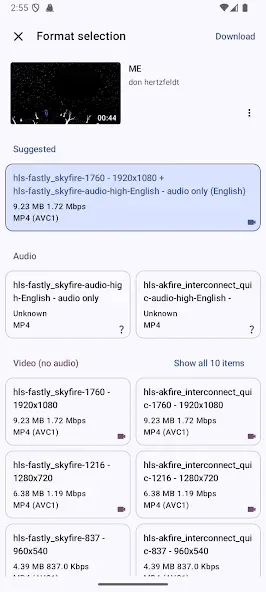
Support for HD video in 2K, 4K, HD, and UHD quality.
Integrated web browser to access each portal directly from the interface.
After finding the video to download, simply click the arrow and choose the desired quality to launch the download.
Design with a good visual finish that makes it intuitive and pleasing to the eye.
Features
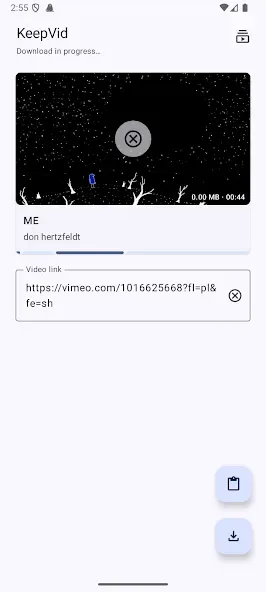
Easy Video Downloading: Simply copy the video URL and hit the download button.
Platform Support: Compatible with Twitter, Facebook, Instagram, and VK.
Download Tutorials: Access short tutorials for each social network to understand the downloading process.
Custom Download Directory: Adjust where your videos are saved on your device.
WiFi Mode: Option to disable downloads while on mobile data, protecting your data plan.
Advantages and disadvantages
Pros:
Fast and easy video download process.
Supports multiple social media platforms.
User-friendly interface with straightforward tutorials.
Customizable download saving preferences.
WiFi restriction to conserve data usage.
Cons:
Does not support YouTube video downloads.
Lacks advanced features that may be available in full versions.
How to Use
To download a video, the only thing you need to do is copy the video's URL and click the download button. In fact, you can simply click a button on one of the available social networks to watch a brief introduction on how to download videos.
From the options menu, you can change the directory where downloaded videos are stored. You can also turn off video downloads when not connected to a Wi-Fi network, which is a great option for those who don't trust their mobile data usage.
Summarize
KeepVid is a one-stop-shop for keeping, maintaining, editing, and organizing video and audio from all across the Internet. If you’re worried about content being taken down, or if you simply want to download media to your local files for later viewing, KeepVid is an easy answer. Saving videos is just a download button away, with available sites including YouTube, Facebook, Vimeo, and Dailymotion.








