

PPCine Movie is a user-friendly video playback software with built-in category filtering and search functions to help users find movies and TV series of interest. Clicking on a video allows users to view information such as cast, trailers, ratings, and user reviews, helping them find high-quality content. Users can also filter by rating, release date, and popular genres to find classic films and television shows and begin their viewing journey. During viewing, users can adjust picture quality, brightness, playback speed, and other settings to create a comfortable viewing environment. Users can also add their favorite shows to their favorites for easy viewing and review later. The software's film and television resource library is constantly being updated, with more exciting films from around the world being added, bringing users more fresh content.
Click to load YouTube / 点击加载视频
YouTube ↗Features of PPCine Movie:
Massive Content Library: Dive into an endless ocean of movies and TV shows across every genre imaginable. From independent gems to mainstream blockbusters, our collection is curated for all tastes.
Offline Downloads: Take your entertainment on the go! Download your favorite episodes and films to watch later anytime, anywhere, without needing a persistent internet connection.
Intuitive User Interface: Navigate seamlessly through a clean, professional layout designed for maximum ease of use. No steep learning curves—just instant access to your favorite media.
Multiple Genres and Categories: Explore everything from long-form films and short-form entertainment to reality TV shows and live programs.
Quick Search & Smart Filters: Find exactly what you are looking for in seconds with our optimized search engine and smart categorization system.
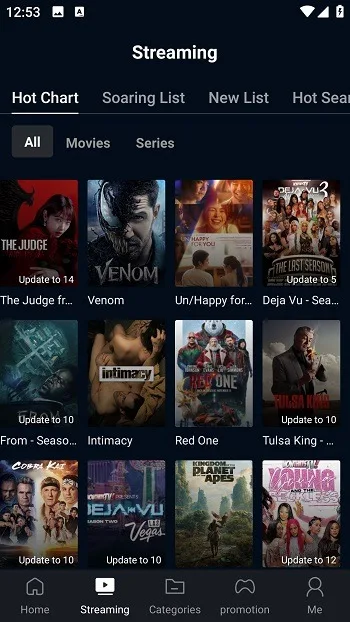
Highlights of PPCine Movie:
Personalized Suggestions: PPCine Movie has an advanced algorithm that tracks your daily activities, such as what you like the most or which genre you spend the most time in. By analyzing your taste, it will recommend most of the content on your homepage, making it easy to find your favourites and watch instantly
High-Quality Streaming: Watching movies in low-resolution and blurry quality can ruin the whole viewing experience, but that’s not the concern here. PPCine APK is committed to providing high-definition streaming for all of its content. Both downloading and streaming can be done in High-quality formats
Multi-platform Support: While the app is perfect for Android devices, it is also compatible with other devices. With the help of an emulator and Installers, you can run the APK on PC, Mac, Phone, tablets, and Android TV is aslo supported. This way, you can watch movies on bigger screens and enhance the viewing experience.
Favorites & Order List: In the “Me” Tab, you will find options like favourites and order list. The order list is designed to organize shows and movies into your customized order, helping you to make a sequence. On the other hand, the favourite option lets you add a star to the title you love, and it will be saved as your next watch.
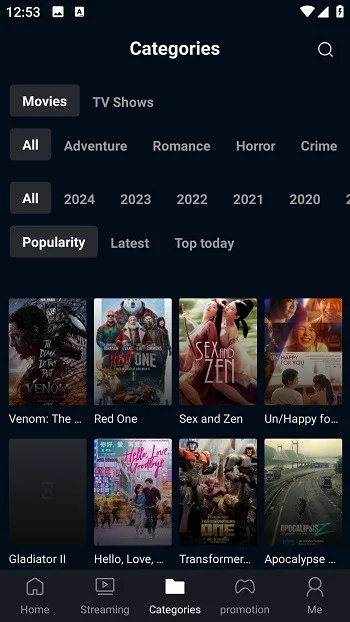
Useful Tips of PPCine Movie:
Customize the app: If the movie is not available in your desired language, you can use the feature of subtitles or audio dubbing. It will be convenient for users who belong to India, Brazil or any other country and want to enjoy content in their language. You can also add content to ‘Watch Later’ if the option is provided.
Take Advantage of Recommendations: Do not change anything in the usage habits; just keep watching as usual to make the app learn about your preferences, and soon enough, the recommendations would be pretty much according to your liking.
Clean Cache Regularly: For the better functioning of PPCine Movie and to prevent lagging issues, one must clean the app’s cache from time to time. Additionally, update PPCine application to the newest version.
Select The Proper Resolution: According to the speed of internet connection select the video resolution accordingly. For instance, use 480p on low speed WiFi and 720p/1080p at high speed WiFi.
Opt For The Offline Watching Option: Wherever downloading facility is available, make sure you have downloaded your movie before any journey. In case of “Watch ad to unlock downloading facility” or credit system, utilize it only for the content you are interested in.
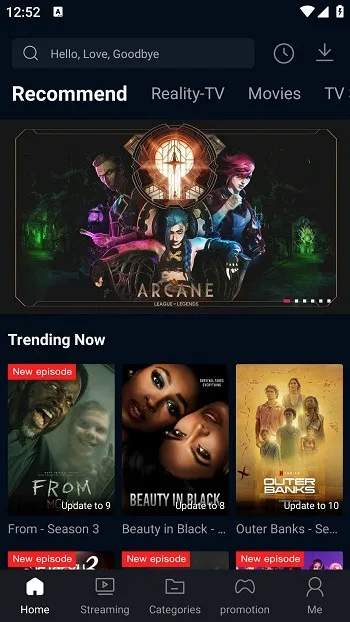
FAQs of PPCine Movie:
Does this app show ads while watching?
Not while the video is playing. You might see a short ad before downloading or unlocking offline mode, but once your movie starts, there are no popups or interruptions. That is what I liked most. It feels calm and clean.
How do I fix update problems if the app stops working?
First, remove the old version from your phone. Then download the latest version from this page and install it again. It usually takes just a minute. This works well on phones where auto update does not run smoothly.
Can I use my video player like MX or VLC?
Yes, you can switch to MX Player, VLC, or anything else you prefer. I personally use MX because it gives better control over subtitles and sound. Just go to settings and select your player.
Is this app safe and legal in India?
It is safe as long as you download it from a trusted source. I tested it on my mobile, and it ran without any issues. As for legal use, the app shows publicly available content but may not be licensed for every region. Use it for personal streaming, not for sharing or downloading from sketchy sites.
Final Thoughts:
If you love movies, PPCine Movie is the perfect choice for you. With this application, you will have access to a store of the most attractive movies and TV shows. The application will bring you carefully selected entertainment content. What are you waiting for without coming to this attractive utility right now?








