

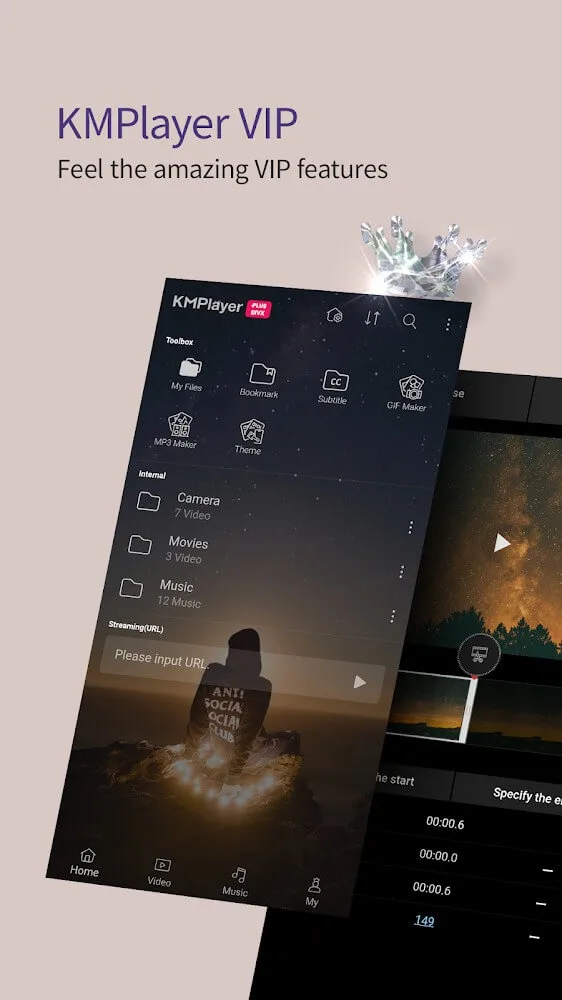
KMPlayer Plus is a user-friendly video player with a built-in search function to help users quickly find music and videos of interest. It allows users to import subtitles in different formats and freely adjust their position, color, and transparency for a comfortable viewing experience. The software's functionality extends beyond this; users can also adjust the brightness, contrast, and saturation of the playback screen and freely customize the playback speed to meet their specific needs. The software also includes a built-in video editor for easy video editing and extraction; with a simple click, users can export the content.
Click to load YouTube / 点击加载视频
YouTube ↗Features of KMPlayer Plus:
Smooth AVI Playback: With this application, you can play videos smoothly and easily with AVI playback features, giving you an extremely perfect, smooth, and easy viewing experience, without having to do it manually.
Versatile Format Handling: The application will also quickly and automatically process video formats in a versatile and fast way without requiring you to use professional support devices or perform too many other complicated operations, giving you extremely fast and convenient user experiences.
HD Video Playback: Coming to this application, you can play back videos quickly and easily. The videos played back will have extremely high quality and sharp HD quality, giving you extremely high quality videos with the sharpest images, no different from watching on large screens, giving you better and more advanced viewing experiences, helping your eyes to be less tired when having to watch for too long on your phone.
Subtitle Format Support: Not only that, the application also supports videos with subtitle formats. With this feature, you can watch videos faster and easier with the available subtitles that the application brings to you, giving you the most advanced and convenient viewing experience.
Highlights of KMPlayer Plus:
Change subtitle of videos: There are some situations when we had to watch movies, videos, or web series in other languages. Well, if you understand that language, then it may no issue. But if you are totally new to those languages, then subtitles could be a lifesaver for you.If your video has a subtitle, then this feature will help you a lot. As this feature allows you to change the subtitle position, it also permits you to change the color, size, and styles of the fonts, and you can also remove the subtitles if you want.
Play anywhere using Chromecast: Watching our favorite stuff on the big screen always gives us a better and detailed view of the videos, and with this app, you can also watch movies or videos of your smartphones on smart TV as it comes the Chromecast feature that allows you to cast videos, movies, and music to your TV.Simply, connect your smart TV to the same wifi network, and click on the ‘cast’ button. You can also manage speed, playback, and even the sound of the mirrored video.
Beautiful UI: The application comes out with a beautiful interface in which you will get a default black theme where you can view all the media files available on your device separately with smooth navigation. Moreover, you can change the look of the interface by applying different themes.Most of the KMPlayer Plus themes are locked and can only be used after purchasing them. Although, there are some free themes too which you can use if you are a free user on KMPlayer Plus.
FAQs of KMPlayer Plus:
Is KMPlayer Plus safe?
KMPlayer Plus is a long-standing media player under Pandora TV package listings, not a random unknown EXE brand. Safety still depends on the exact file you run. Compare SHA-256, read the digital signature if present, and decline optional bundles.
Which formats can KMPlayer Plus play?
Official lists include AVI, MKV, MP4, MOV, FLV, WMV, TS, WEBM, OGM, 3GP and many more for video; MP3, FLAC, AAC, ALAC, Opus, WAV and others for audio; SRT, ASS, SSA, SMI, SUB, IDX, SUP and more for subtitles.
Can it play 4K and 8K video?
4K / Ultra HD is listed on the standard PC pages. 8K, UHD and 60 FPS are listed on KMPlayer Plus 64X pages, with hardware acceleration recommended for demanding files.
Does KMPlayer Plus include malware?
Publisher 64X copy states no spyware. That is a vendor claim, not a substitute for your own hash check. This independent site does not claim the binaries are audited line by line.
Conclusion:
With just this one small application, you can make many full HD quality videos with vivid colors that match every movement in your footage. In addition to the user being allowed to adjust the parameters from the filter, you can also adjust the speed








