

CPU-Z is a utility application for Android devices. It allows you to view real-time processor and chipset information, aiding in game performance and benchmarking. It provides a clear overview of your device, including brand, model, resolution, and other parameters. To understand battery status, it quickly identifies apps that are consuming excessive power or overheating and alerts the user. It can also verify some of your phone's hardware information online. Links can be shared in forums and chat rooms. The information provided by this application is completely reliable.

Features
Real time processor and chipset details
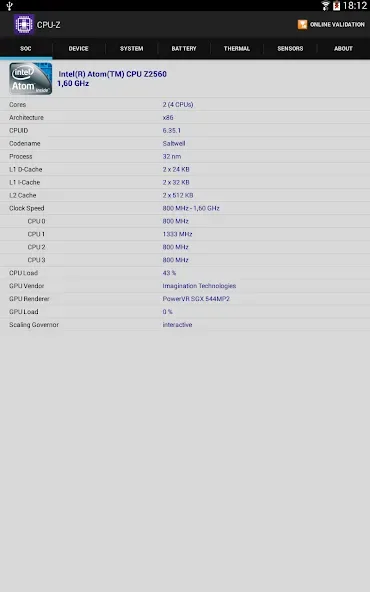
CPU-Z identifies the exact chipset name and its architecture as soon as you open the app. It also displays per core clock speeds that change as load changes, so you can see how the processor boosts or slows down. This makes it easier to confirm expected performance during games or when running a benchmark.
Complete device overview at a glance
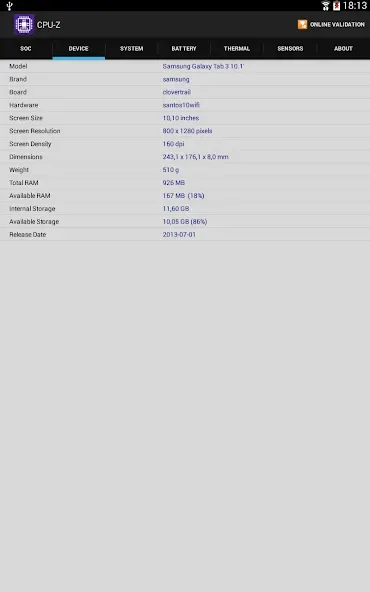
After checking the processor, CPU-Z also presents a clear device summary for quick confirmation. You can view brand, model, screen resolution, RAM, and storage in one place, which helps verify seller claims or confirm parts after a repair. The information is consolidated to reduce the time spent hunting through settings.
Battery status and temperature tracking
When you need to understand battery behavior, CPU-Z shows level, charging status, temperature, and the reported capacity. You can monitor these values while charging or playing, then look for patterns that match fast drain or overheating. This makes it easier to decide if the issue comes from the battery, the charger, or a heavy app.
Live sensor diagnostics for quick checks
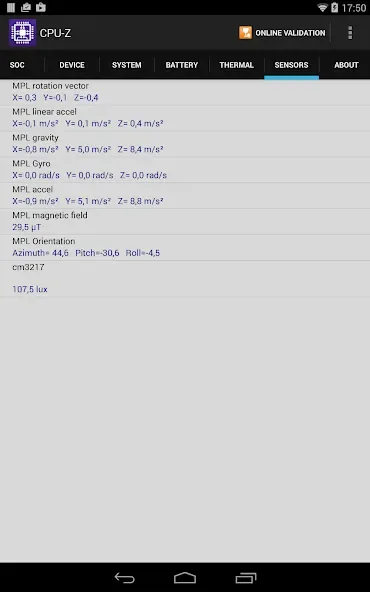
CPU-Z lists available sensors such as accelerometer, gyroscope, and light, then updates their readings in real time. You can move the phone or change lighting and watch the values react, which helps confirm if a sensor is present and working. This is useful after a drop or repair when a sensor fault is suspected.
Online Validation and stability options
When you need proof, CPU-Z can upload a device profile and return a unique link that you can share in listings, forums, or support chats. Upload is optional and limited to the device profile, so you stay in control. If detection causes a crash on a specific device, the app provides a debug report and a safe mode switch to help you open it again and reduce risk.

Advantages and disadvantages
Pros:
Offers detailed and accurate hardware information.
Completely free to use with no special permissions required.
User-friendly interface designed for easy navigation.
Real-time battery monitoring features enhance usability.
Cons:
Still in beta, so some features may be in development.
Lacks extensive customization options for advanced users.
FAQS
Is the information on CPU-Z reliable?
The information on CPU-Z is totally reliable, as long as the device is legitimate. Some counterfeit devices might have modified technical data, in which case the model or other specs might be incorrect.
What does CPU-Z measure?
CPU-Z breaks all its data into sections. In SOC, you can learn about your device's CPU and GPU. With Device, you can check the model, resolution, RAM, and available space. In System, you can look up the version of Android you're using. In Battery, you can check the status, capacity, and voltage. Finally, in Sensors, you can learn about the accelerometer and light sensor.
What does CPU-Z on Android do?
CPU-Z on Android is a great way to check all kinds of information related to the hardware on your smartphone and tablet. You can look up information about the processor, RAM, storage, sensor status, and other technical data related to your device.
User comments
This app works great. If you buy a tablet, laptop, or desktop online you need to use this app. A quick scan will show you if you got what you paid for. scammers can change what you see on the device but this tells the truth. check your RAM & ROM
This is a very useful app for anyone who needs all the info on their device. Great for modders! Great for app devs! Overall a great intuitive experience.
when paired with Chat gpt it becomes incredibly useful for identifying if your phone is a clone or the real deal.
Summarize
CPU-Z APK is a complete app that provides you with technical information about a cell phone. This is the Android version of the popular CPU ID tool for PC. Therefore, when you download CPU-Z Android for free, you can discover the ins and outs of the device, analyze how the system works, and examine the various components.








