
"Move to iOS" is a data transfer tool designed for Android devices that establishes a dedicated connection with an iPhone to initiate the migration process. It enables fully automated data transfer and supports connections via USB-C cables. The tool can transfer content such as WhatsApp chat history and photos. Once the transfer is complete, it facilitates the installation of familiar apps from the App Store. It also helps transfer mobile carrier information to assist with SIM card activation. Compatible with a wide range of devices, the tool is simple to use and operates automatically, eliminating the need for complex manual steps.
Features
Secure, guided connection
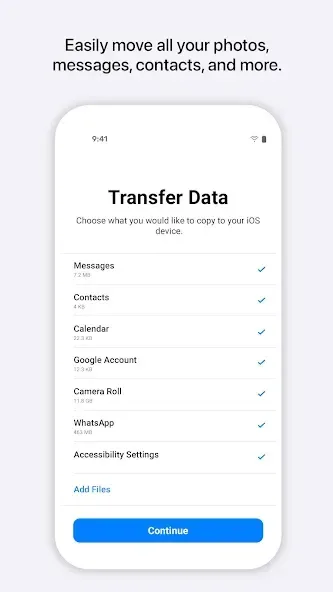
Move to iOS uses a one time code and a temporary private Wi‑Fi link to connect your Android phone with the new iPhone or iPad. You see clear prompts as the app requests permissions, such as location for Wi‑Fi setup. Optional permissions enable specific data types, so you can allow only what you plan to transfer. This guided flow helps you follow each step without guesswork.
USB C cable transfer option
You can connect both devices with a USB C cable for faster and more reliable transfers. This is useful when moving larger photo and video libraries or when Wi‑Fi is congested. With a wired connection, the process usually stays stable even if surrounding networks change. Choose the cable method when speed and consistency are important for your move.
Wide data coverage, including WhatsApp
Move to iOS moves contacts, SMS and MMS messages, group chats, camera photos and videos, calendars, mail accounts, call history, voice memos, and more. It also supports WhatsApp messages and media, which is a common need when switching. You select what to send, then the app places the items into the correct apps on the new device. This reduces time spent reorganizing after the transfer finishes.
App matching for free Android apps
After the transfer, Move to iOS can suggest your free Android apps that are available on the App Store. These suggestions help you reinstall familiar tools and services quickly. You can review the list and choose what to add, so only the apps you use return to your new device. This keeps setup focused on your priorities.
SIM and eSIM setup help
Move to iOS assists with bringing over carrier details so your phone number works on iPhone. It can help with SIM and eSIM activation, which keeps calls and data available after setup. You see prompts that guide you to complete carrier steps at the right time. This reduces the chance of missed messages right after you switch.
Advantages and disadvantages
Pros:
Compatible with thousands of devices
Free to use
Simple controls
Cons:
Can’t transfer data back to Android devices
Only works when first setting up a device
FAQS
Does Move to iOS transfer my WhatsApp messages?
Yes, the app now supports the transfer of WhatsApp chat history. You must ensure you are using the same phone number on both devices. During the selection process, check the box for WhatsApp to include your conversations and media.
How long does the transfer process take?
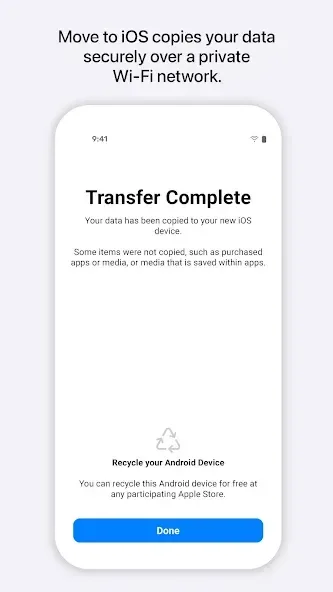
The duration depends on the volume of data you are moving. A few gigabytes might take ten minutes, while hundreds of gigabytes could take an hour or more. A stable Wi-Fi connection and keeping the devices plugged in will speed up the process.
Will my apps move to the new iPhone?
The app files themselves do not move because the systems are different. However, the tool identifies free apps you had and finds their counterparts on the App Store. You can then download them all at once during the final setup phase.
Can I use the app after I have already set up my iPhone?
No, the option to move data only appears during the initial setup of a new or erased iPhone. If you have already configured your device, you must erase it and start over to use the app. Alternatively, you can move data manually.
Do I need a SIM card in both phones?
You do not need a SIM card in the old device to use the app. It relies entirely on a direct Wi-Fi connection. However, having a SIM card in your new iPhone is helpful for activation and verifying your accounts.
User comments
Well I'm thinking the people who were successful didn't review because they don't use play store anymore. I was able to download this and activate my new iPhone no problem, whole process was about 25 minutes. You need to have wifi. The bad reviews scared me but after talking to a few different people from Verizon they all said to do it this way. it worked!! I hope it works as good for you as it did me!!
I had negative expectations after reading all the bad reviews, but, it worked flawlessly using the wired connection method. I think what made my transfer under 20 mins was the fact that I culled my contacts, media, and also messages beforehand so there would be less b.s. to transfer. Also, I don't take a lot of photos or videos with my phone. If you're culling, get ready to get all nostalgic as you review your past content.
Worked great for me! I wasn't holding out much hope after reading all of the one star reviews, and I did have a shaky start with a few error messages on my galaxy, but after reading Dawn's review, I put the android in airplane mode like she said, turned off the wifi on my android and it connected no problem. Took about 15 minutes to transfer all. Pretty good app!
Summarize
Move to iOS is an app developed by Apple, specifically created to transfer content from your Android phone to your new iPhone or iPad automatically and securely. This tool simplifies the task of moving all your data between devices through a simple, convenient, and fast user experience. Download the free APK from Move to iOS to transfer all the information from your Android phone to your new iPhone or iPad.








