

Test DPC is a Device Policy Controller designed for enterprise environments. It enables developers to test application behavior across various scenarios, configure specific settings and restrictions and control app activation or deactivation to meet diverse operational requirements. In terms of security, users can implement advanced configurations—such as defining specific permissions, managing passwords, and setting up lock-screen policies—to safeguard device data. The application supports background operation and receives continuous updates, with new features regularly introduced to keep the user experience fresh and engaging.
Click to load YouTube / 点击加载视频
YouTube ↗Features of Test DPC:
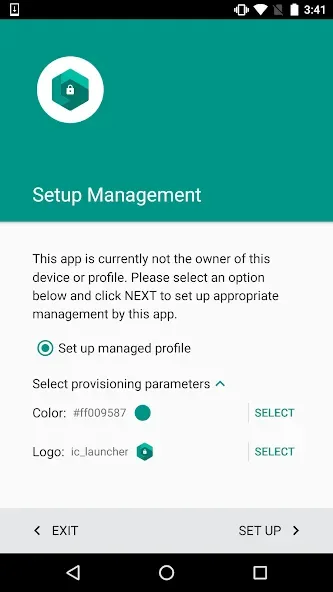
Provision real management modes: Test DPC lets you provision a test device in device owner mode for fully managed scenarios or set up a work profile for BYOD cases. This mirrors how management works on actual deployments. Therefore, you can validate behavior early and reduce surprises later.
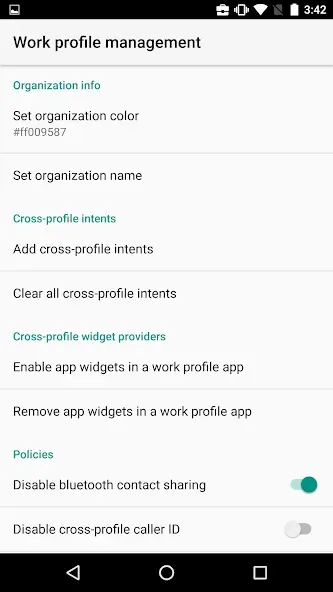
Create and control a work profile: You can set up a work profile and enable or disable work apps to mirror enterprise usage. Moreover, Test DPC separates work and personal spaces, so you can see how data separation and app visibility function in practice.
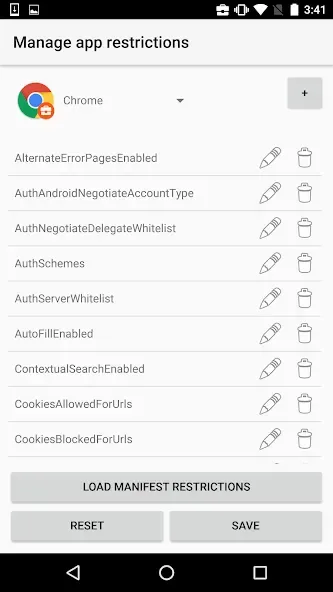
Apply policies and app restrictions: Test DPC allows you to configure app restrictions and enforce security policies across managed contexts. In addition, you can observe how policies affect installed apps, permissions, and user actions so you can fine tune your management strategy.
Validate compliance and flows: You can test compliance checks and end to end management flows safely on a test device. Moreover, Test DPC helps you find policy gaps and verify remediation paths before you deploy to real users.
Use an open source reference: Test DPC is published as open source, which makes it a useful reference for learning DPC capabilities and prototyping features. In addition, you can review the code to understand best practices and adapt patterns for your own DPC implementation.
Highlights of Test DPC:
In terms of user interface, Test DPC is designed to be straightforward, making it accessible for developers who may not have extensive experience with device management. The layout provides clear options for navigating through different functionalities, ensuring that users can quickly find the features they need to test or configure.
Moreover, the app facilitates the process of enrolling devices into management programs, which is a critical step for organizations looking to implement Android Enterprise solutions. By streamlining this process, Test DPC helps reduce the complexity associated with device enrollment, making it easier for IT departments to manage their fleets of devices.
Test DPC is not only a tool for developers but also serves as a learning platform for understanding the broader scope of Android Enterprise. Its features encourage experimentation and exploration, allowing users to discover the full range of capabilities available within the Android ecosystem for enterprise applications.
The app is particularly useful for organizations looking to transition to a managed device environment without the need for extensive resources or expertise. Test DPC provides a low-barrier entry point for enterprises to begin implementing mobile device management practices. By leveraging its functionalities, organizations can gradually build their knowledge and capabilities in managing Android devices effectively.
How to Use Test DPC:
Configure the app settings after completing the installation process.
Next, deploy the application you want to test.
The tool will work in the background, and you can view it within the tested program.
You will view the indicators of the tested application behavior on your screen.
Multiple devices can be emulated by adjusting the tool’s parameters.
User Reviews of Test DPC:
Works perfect for testing mdm Android restrictions, thank you One improvement which would be nice: When setting managed configuration restrictions it would be lovely to see the currently set value in the overview list. Then you would not have to click edit first on each option to check the values.
this is the best I've ever had I had lease 4 phones locked up on Google and I download this app and it unlocked it thanks to this wonderful person for making this app I wish that were raped respect my phone and let me download it and make a simple account but every time I log in to it it says it's not made for my kind of phone.
I want TestDPC can connect to a demo EMM server for managed configurations. Could you provide both of them?
This is a little bit of a complex application that does exactly what the description says. Definitely check out the documentation.
Conclusion:
Test DPC can activate managed contexts, toggle system-level restrictions, configure password and encryption rules, and simulate administrative oversight across installed apps. This free app also exposes policy feedback states, allowing observation of how applications respond when subject to enterprise governance rules, without embedding production infrastructure or persistent enterprise services.








