
USB TOOLS is a utility application for Android devices. Designed specifically for USB drives, it offers a powerful suite of features that allow users to format, partition, defragment, test, and back up USB drives without a computer. With USB TOOLS, users can perform ISO image writing using a variety of functions, and carefully use erase, format, and raw write control functions. With its simple and user-friendly interface, you can easily use a variety of accompanying tools to handle common copy, move, browse, and delete operations.
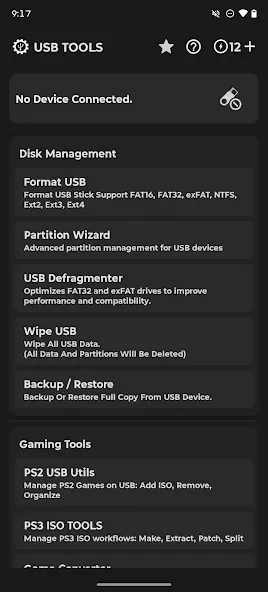
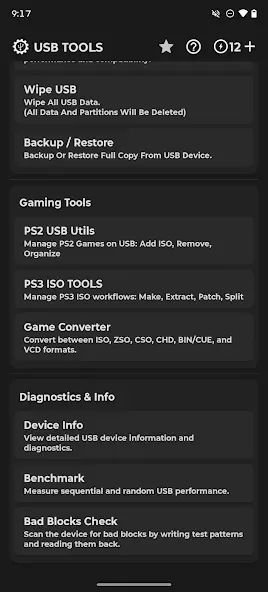
Gaming Tools:
PS2 USB Utils — OPL Games Utility
Import, organize, rename, delete, defragment and export PS2 games
Supports >4GB ISOs, BIN/ISO formats, USBExtreme (.ul) conversion
Import games already in .ul format
Auto-generate ul.cfg and OPL playlists
Download game arts (covers) automatically
PlayStation 1 support: import .VCD games for POPStarter
Convert to MBR without data loss
Clear corrupted or unused game files
PS3 ISO Tools — ISO Workflow Manager
Create (Make) ISO from folders or Extract ISO back to folders
Patch ISOs for specific Target CFW versions
Split large ISOs for FAT32 compatibility or Join file segments
View ISO info (title, game ID)
Modify: Auto-rename (Name/ID), add [auto]/[online] tags, extract icon/SFO
Game Converter
Convert between ISO, BIN/CUE, VCD, ZSO, CSO and CHD
Compress ISO to ZSO/CSO to save space
Features:
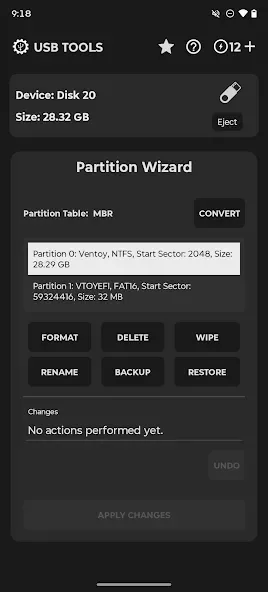
Formatting and partition control
Format drives to FAT16, FAT32, exFAT, NTFS, EXT2, EXT3, or EXT4.
Manually choose the file system for your device and use case.
Create or delete partitions and select MBR or GPT partition tables.
Secure wipe, backup and restore
Securely erase all data on a USB or SD card to prepare it for reuse.
Create full backups of drive contents before making changes.
Restore data from saved backups when needed.
PS2 game utilities
Organize, convert, and defragment PlayStation 2 game files for USB use.
Support images larger than 4 GB and BIN or ISO formats, including USBExtreme conversion.
Auto generate ul.cfg and OPL playlists for faster setup.
Convert drives to MBR without data loss and clear corrupted or unused files.
Pros & Cons:
Pros
Creates bootable media and writes raw disk images
Supports numerous file systems, archives, and partition types
Includes detailed PS2 and PS3 storage tools
Most tasks do not require root access
Cons
Formatting, partitioning, and Windows ISO writing require coins
Long operations pause when the app is minimized
Hard drives are not officially supported
Changelog:
Improve App Performance
New
Save a signed PDF certificate after erasing a drive
Bad Blocks Check + fake-flash detection
Fat32/Exfat Defragmenter
New USB Connection System
CHD in Game Converter, plus CSO ↔ ZSO
PS1 games on PS2 drives (POPStarter)
ISO to ZSO Converter
ISO to VCD Converter
BIN to ISO Converter
BIN to VCD Converter
VCD to ISO Converter
ZSO to ISO Converter
ISO to CSO Converter
CSO to ISO Converter
PS2 Option To Regenrate .ul file
PS2 Import .ul Games
PS2 Download Games ARTS
Conclusion:
It supports a variety of file systems including FAT32, EXFAT, NTFS, and EXT2/3/4, making it a versatile tool for maintenance of your removable storage devices. This user-friendly utility ensures data integrity and efficient performance, all accessible without the need for root access. Embrace the ease of managing removable storage with USB TOOLS.








