Moises AI Music is a unique music editor/player. This powerful application offers a wide variety of music and robust editing features, providing users with a comprehensive software experience. With Moises AI Music, you can easily enjoy songs of various styles, perform various operations, and find the music version that best suits your taste. Thanks to its user-friendly interface, you can easily edit songs; even if you're not a music editing expert, you can easily get started and make full use of various audio files and tools.

Highlights:
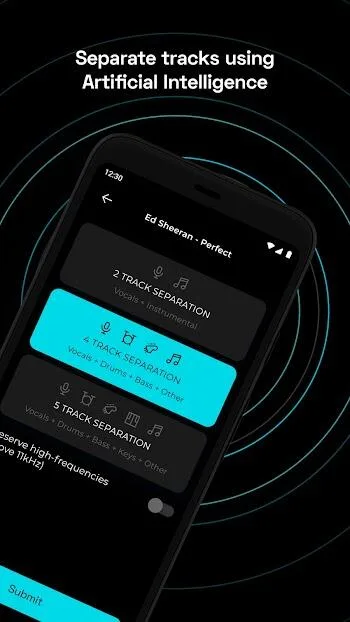
-AI Audio Separation of stems: Easily separate vocals, drums, guitar, bass, piano, strings, and other instruments in any song. Moises is your vocal remover or backing track maker.
-Smart Metronome: Instantly generate click tracks that are in sync to the beat of any song. Adjust click track subdivisions.
-AI Lyric Transcription: Convert music into text effortlessly, sparing cumbersome manual song transcription. Supports audio in English, Spanish, Portuguese, French, and Italian. Transcribe the lyrics of your music for the perfect karaoke track maker.
-AI Chord Detection: Play along with instantly synced guitar tabs and chords. Featured beginner, intermediate and advanced detection of chords.
-Audio Speed Changer: Make challenging sections easy with 1 click slow down or speed up. Moises automatically detects and displays the BPM.
-Pitch Changer: Easily control and change the key of audio. Shift the pitch to meet your vocal range or instrument tuning great for practicing karaoke.
-AI Key Detection: Detect and change the song key and instantly transpose chords to all 12 keys. Easily adjust song key and elevate music practice!
-Export: Extract and share high-quality audio mixes and separated stems including the metronome. Perfect to extract stems to be used for any other track maker or with our vocal remover.
-Playlist: Organize music playlists for practice and live rehearsals
-Count in: Set the "count in" period that precedes the playback so you and the band can start on the right beat. Perfect for rehearsals or your personal practice.
-Trim and loop music parts: Choose when the music starts and ends for practicing specific parts of the song.
-Backing Tracks: Create acapella, drum, guitar, karaoke, and piano backing tracks.
Features:
Edit audio files
There are so many musicians and instruments all over the world today. Musicians and singers are constantly creating new music for us to enjoy listening to on different occasions.
But if you want to edit any audio or music today, you can do it using a highly specialized platform. However, there’s a way to make it even simpler with Moises Premium! This app lets users edit any audio file today and make adjustments!
Here, users can extract and remove vocals from audio files so they can get only the sounds. With this, users can create karaoke songs or even background sounds to be used in any video.
Aside from that, users can remove any instruments from any audio, such as percussion, piano, guitar, drums, and more. Then, you can also access a lot of innovative tools like the Speed Changer, Smart Metronome, Count in, and many more. Feel free to remix any song today and upload them!
Extract vocals and instruments
A lot of songs today have lyrics which is how singers express themselves. But if you want to use the music without the vocals, you can easily do it here. You can easily extract the vocals from any song with just a few taps.
The app will automatically detect the vocals on the audio file, so you don’t need to edit it manually. This is a groundbreaking feature as you’d generally need an expert to do this. Then, you can use the audio for any video or as is!
Pitch changer and speed changer
With Moises Premium, you can enjoy the Pitch changer tool, which essentially changes the pitch of the audio.
This means you can control how high or low you want the different parts of the music. With this, you’re able to create any content today. Plus, a Speed Changer function will allow you to slow or speed up and audio.
Smart metronome, AI Chords detection
Moises Premium also has a Smart Metronome tool that allows users to generate synchronized click tracks automatically.
Then, there’s also the AI Chords detection tool which allows you to play these synchronized cords.
Remix, trim, and loop
With this app, you’re able to remix any instrument of any song! You can remix the piano, basslines, guitars, drums, and more. Create stunning music today, as you can edit freely here.
Tips for Users:
Real-time detection: Identify chords in real-time as you play the song.
Intuitive chord changes: Follow the changes intuitively for easier learning.
Guitar/Piano Chords tab: Get guitar and piano chords.
Understand song structure: Understand progressions through chords.
Learn Faster: View chord progressions to learn faster.
Ear training: Test chord detection to improve your musical ear.
Learning musical instruments: Essential for chord-based instruments.
FAQs:
What is Moises?
Moises is a mobile app that uses AI to separate vocals and instruments from any audio track, ideal for music practice, remixing, or karaoke.
Can I remove vocals from any song using Moises?
Yes, Moises lets you upload audio and separate vocals using AI, allowing you to mute them or create karaoke-style backing tracks.
Is Moises only for professional musicians?
Not at all—Moises works for everyone from casual singers to experienced instrumentalists, with tools that suit all skill levels.
Does Moises support pitch and tempo changes?
Yes, you can change the pitch and tempo of any track to match your vocal range or slow it down for easier practice.
What audio files can I upload into Moises?
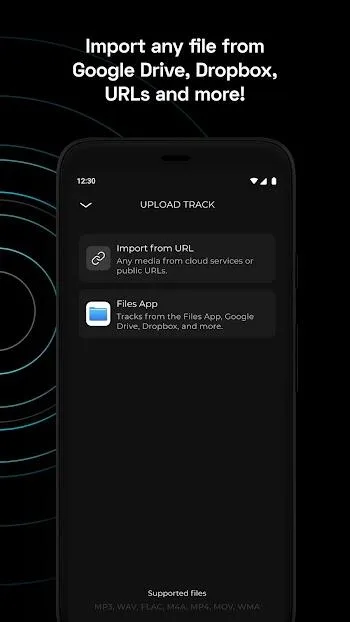
You can import files from Google Drive, Dropbox, iCloud, or your device, including MP3, M4A, and WAV (desktop version only).
Conclusion:
In short, Moises isn’t trying to replace your DAW, but it’s filling a massive gap for anyone who wants lightweight music editing tools on the go. From casual users to serious musicians, it’s built with the kind of features that make a difference, minus the techy intimidation. Whether you’re building backing tracks, learning a solo, or just vibing with new arrangements, this app puts control back in your hands—literally.