Taskito is a task management tool. Here, you can categorize all your completed and uncompleted tasks, put all your to-dos in one place, and set reminders that will alert you when the deadline approaches, ensuring you never forget anything important! The app offers multiple task widgets, allowing you to see your daily tasks and to-dos on the main screen. The user interface is clean and the organization is simple and easy to understand, allowing you to easily manage all your projects, pinning important ones to the top, and clearly prioritizing tasks.
Usage
Taskito is very easy to use and has a simple interface. Despite this, it still offers a wealth of features. Taskito's main function is to display your tasks and help you set realistic goals. While its primary use is as a daily task list, you can also use it to plan future projects.
Features
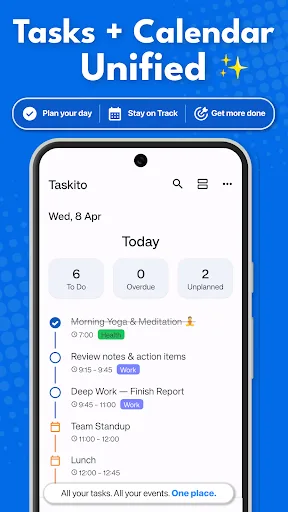
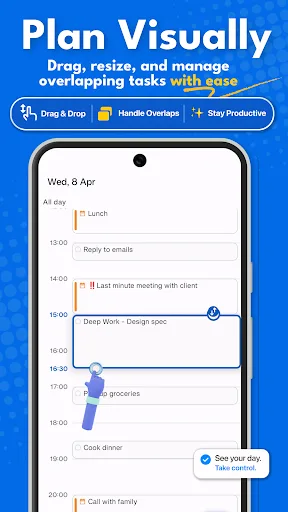
Timeline view: View all to-dos, lists, notes, calendar events, and reminders in one place.
Easy access to a calendar with busy or overdue indicators.
Manage your daily to-do list using daytime mode.
Add reminders to check your schedule at any time.
Kanban boards to manage projects.
Import Google Calendar events to view your daily schedule.
Train repetitive tasks or habits.
Get daily reminders. Weekly or monthly reminders to track your important tasks.
Full-screen reminder notifications with pause and reschedule options.
Tasks widgets to view your daily tasks on your home screen.
Instantly sync tasks and projects with multiple Android devices.
Highlights
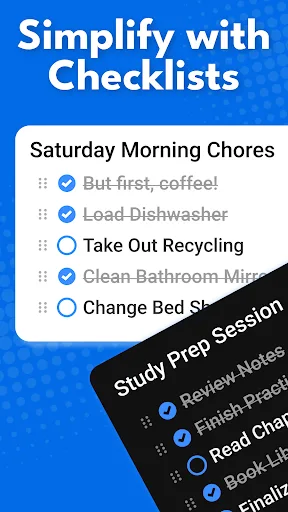
Taskito also features a built-in note-taking function, allowing users to record important information related to tasks. This feature helps maintain detailed records and ensures easy access to relevant notes when needed. Additionally, the app supports task lists, enabling users to break down large tasks into smaller, more manageable steps.
Another major advantage of Taskito is its integration with Google Calendar. Users can import calendar events into the app, allowing them to view scheduled meetings and appointments while viewing tasks. This integration aids in time management, helping users allocate time more effectively.
Visual organization is enhanced by using color-coded labels. Users can assign different colors to tasks or projects, making it easier to identify and differentiate responsibilities. This visual element adds an extra layer of organization, helping users complete tasks more efficiently.
Review
"I've downloaded and tried almost every task planning app, including all the well-known ones like ToDoist, Any.do, etc. They all have their pros and cons. But Taskito is the only one I've ever installed that truly motivates me to complete important personal tasks… I highly recommend it to anyone looking for a task/planning app. This app has changed my life."
"I just bought an annual subscription today. I love its user interface, especially the way it organizes tasks. I love that it imports Google Calendar events into tasks. Organizing events and tasks is so much easier with this app. I especially love the project management features, as well as reminders and pinned notifications. All in all, this app perfectly meets my expectations and I'm very satisfied. Thank you for developing this app; I will definitely use it every day."
"I'm so glad I can now use Taskito on my iPad. I've been using this app for two years, and now my colleagues are all Apple users, so I can share it with them. The advantage of Taskito is that I can easily manage my to-do list. Before, I would sometimes forget small steps, but with Taskito..." The problem was then solved.
Conclusion
Taskito is a truly outstanding task management tool that stands out from many similar products. With its unique and innovative features, customizable themes, and powerful productivity tools, Taskito aims to meet the diverse needs of all users and their individual preferences. Its hybrid task management approach, coupled with a beautiful timeline interface, makes Taskito an essential tool for users looking to optimize time management and improve work efficiency.