
Device Info is an excellent device utility application. This application helps users obtain all the important information about their Android devices, from analyzing storage space and applications to running device tests and benchmarks, giving them complete control over their devices. With Device Info, users can view comprehensive device information, manage applications on their devices, and monitor real-time data. Through a user-friendly interface and real-time data monitoring, it presents complete device information in a more intuitive way, allowing you to manage your devices more efficiently.
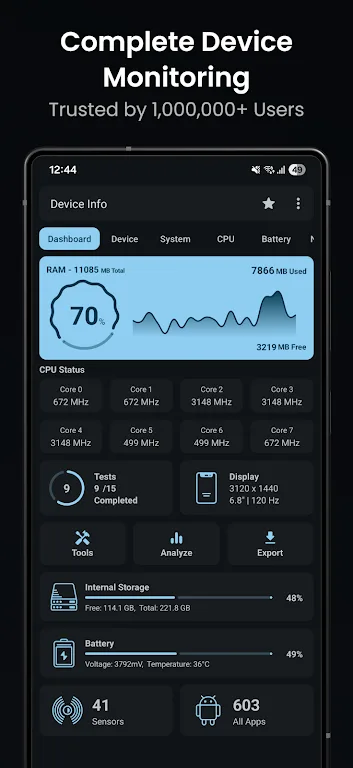
Highlights:
Dashboard
Overview of your device's software and hardware info, including RAM, Internal Storage, External Storage, Battery, CPU, Sensors Available, and Apps Installed.
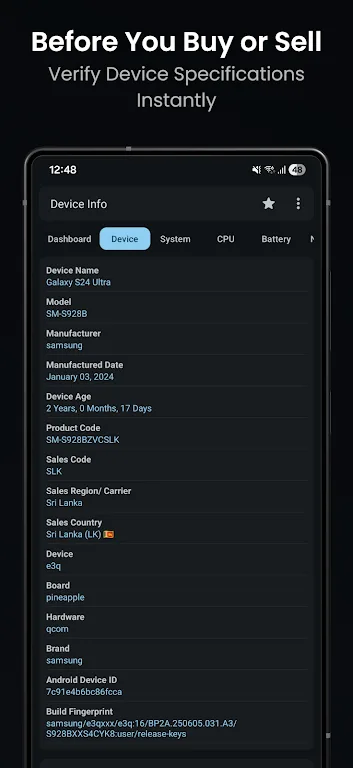
Device Information
Complete phone info including model, manufacturer, brand, hardware, board, build fingerprint, device age, manufactured date, USB host, SIM and network details, and IMEI.
System Information
Complete system and software information including codename, API level, released version, one ui version, bootloader, baseband, Java VM, Android version, security patch level, kernel, Google Play Services, Vulkan support, OpenGL ES, Treble, seamless updates, system uptime, root apps, and language.
CPU
Display all details about the System on Chip(SoC), Processors, CPU Architecture, Supported ABIs, CPU Hardware, CPU Governor, Number of Cores, CPU Frequency, GPU Renderer, GPU Vendor & GPU Version.
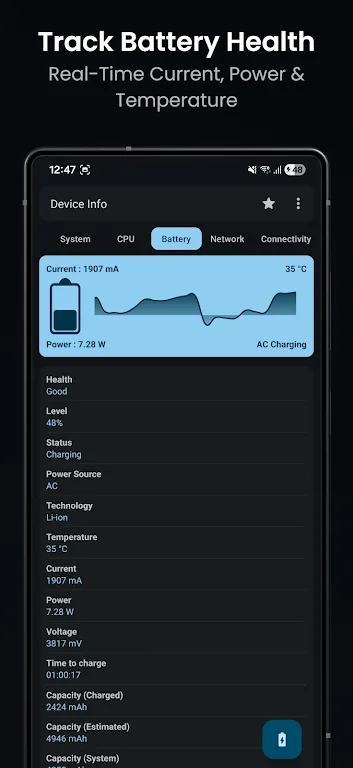
Battery
Monitor your battery's health, level, status, power source, technology, temperature, voltage, power (watts), current (mA), and capacity in real-time.
Features:
Real-time device insights
Device Info : View Device Information presents CPU, GPU, RAM, battery health, storage, sensors, display, camera, network connectivity, and thermal status in one at-a-glance dashboard. You can move through each category to see current values and trends, then use that context to understand slowdowns or overheating. This layout reduces guesswork and keeps important metrics easy to find during troubleshooting.
Wi‑Fi analyzer for nearby networks
You can scan nearby access points to evaluate signal strength, channels, standards, security protocols, and estimated distance. This helps identify congested channels and weak coverage, which is useful when optimizing home or office networks. After a scan, the app organizes results so you can compare signals and pick clearer channels step by step.
Device tests and benchmarks
Run targeted tests for multitouch, display, speakers, microphone, sensors, charging, Bluetooth, fingerprint, and physical buttons. These checks confirm whether each component responds correctly, which is especially useful after repairs or when a problem appears. Benchmarks give context to performance changes, making it easier to detect abnormal behavior over time.
App and permission analyzer
Inspect installed apps, their permissions, and components to understand what runs on your device. You can group apps by SDKs or installer and identify unexpected behavior, then optionally extract app APKs for backup or analysis. This view helps you spot hidden or seldom-used apps that might request sensitive permissions.
Exportable reports with privacy-first design
Generate text or PDF reports to share diagnostics with tech support or include in device audits. Reports summarize key data so teams can review issues without needing your phone in hand. The app is privacy-friendly with no tracking and no data sharing, and data remains on your device unless you choose to export.
FAQs:
Is Device Info compatible with all Android devices?
Yes, Device Info is compatible with a wide range of Android devices running on various versions of the operating system.
Does Device Info require an internet connection to access device information?
No, Device Info does not require an internet connection as it provides all hardware, software, and system information locally on your device.
Is Device Info a free app or does it require a purchase?
Device Info is a free app available for download on the Google Play Store with optional in-app purchases for additional features.
Changelog:
- New Floating monitor tool (BETA)
- Widget improvements
- Bug fixes and performance improvements
Conclusion:
This data may be too technical for the general public, but you never know when you might need detailed information to solve a problem with your device, in which case apps like Device Info will make your life much easier. Device Info takes up hardly any space on your device's memory, and it's simple to use, making it easy to review any aspect of your smartphone's health or performance at any time.