Edit PDF is a comprehensive PDF management tool. This application offers a range of features to meet various PDF-related tasks, helping users create, view, edit, and convert PDF files. With Edit PDF, you can easily modify PDF content through intuitive and user-friendly operation. Its high-quality image capture and convenient feature of merging multiple images into a single document make it an essential tool for business professionals and general users alike. Furthermore, the application is completely free, requiring no subscription fees, making it ideal for users seeking efficient PDF management without additional costs.

Highlights:
View PDF Files using this PDF Viewer app
Free to use, no subscription required
Scan Documents Offline without internet
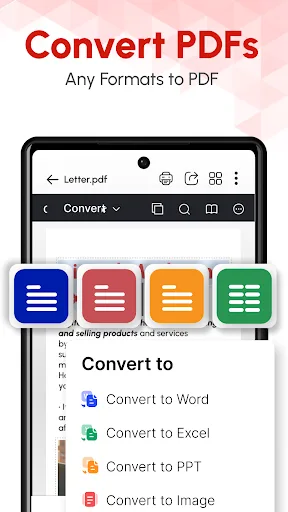
Merge into single PDF or Convert PDF Files
Text to PDF, Excel to PDF, Images to PDF
Easily remove duplicate PDF files
Features:
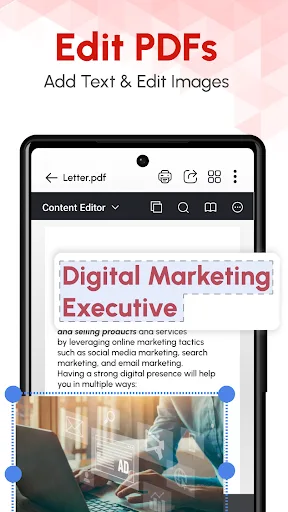
PDF Text Editor:
You can easily edit or change the text from your pdf for free. Upload your existing pdf and select the text which you want to change and tap on save, and your new pdf is ready in seconds. Say hello to our easy-to-use free pdf text editor app.
PDF Image Editor:
You can easily edit or change Images from your pdf for free. Upload your existing pdf and select the images which you want to change and tap on save, and your new pdf is ready in seconds.
PDF Camera Scanner:
You can carry this user-friendly mobile scanner app in your pocket wherever you go. You can trust it to capture high-quality images using your camera and merge them into a single PDF.
Crop Images after scanning:
You can automatically crop images using our automatic edge detector or even manually crop the images before converting images to PDF files.
ID Card Scanner:
Apart from being able to scan regular documents, you can even scan ID Cards such as any Driving License, Passport, PAN Card, Aadhaar Card, SSN Card, or any other Identification Documents. This is not just a document scanner, but a perfect ID Card Scanner that you can trust.
Tips for Users:
To start editing your PDF, you'll have to open the document, either from the tool itself or from your file manager, by selecting PDF Editor as the target app. Once all the pages have loaded, the available editing features are activated, including the page manager, annotations, full text editing, signature, and other features. With all these possibilities at your fingertips, you can do almost anything you want with your PDFs, from altering the order of the pages to changing any word or paragraph.
Once you've finished editing your documents, you can save the changes in a second, share them with anyone you want via email, or even add a password so that no one can access the PDF without your permission.
When it comes to viewing your files, PDF Editor offers a comfortable system that's adaptable to your needs. At the top of the screen, you'll see a thumbnail of the pages into which the PDF is divided, which you can close at any time. You can also change the font size, enlarge a specific area, or search for words in the text.
Changelog:
New PDF Editor Introduced! - with Powerful Features
- Edit existing text or images, and add new ones in PDF.
- Reorder, Replace, Rotate, Delete, Insert, Copy, or Export PDF pages.
- E-sign, Annotate, Add Comments, Audio record, shapes, links, and stamp in PDF.
- Create new PDF files, edit and save them on your device.
- Create or Fill Forms on fingertips with abundant options.
- New improved tools - Merge PDF, Compress PDF, Convert & Split PDF.
Conclusion:
For users who value prompt and effective customer service, feedback is invited and continual improvement based on user experiences is strived for. Users are encouraged to rate and share if satisfied with the performance. For a more comprehensive exploration of its offerings, visiting the official website provides an in-depth look at capabilities.