CPU X lets you easily view all the information about your phone's devices. Even if you're not a tech professional, using it gives you a deeper understanding of your device and helps you decide whether to upgrade or replace it. It displays a wide range of device information, including processor, multiplier, speed, and device mode, helping you determine their actual performance. It's also easy to use; you can display a transparent component in the corner of the screen and tap it to show the device's status. The app provides the latest tech information about your device, where you can see expert reviews and connect with other tech enthusiasts!
Usage
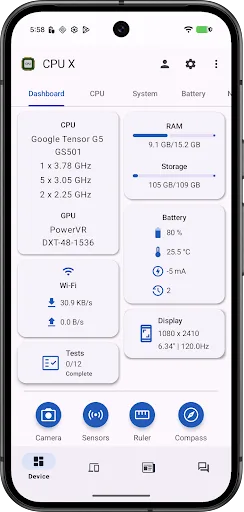
After installation, open CPU X and view the overview screen to see your model, processor, memory, storage, camera, and sensors.
Go to the speed monitoring section, enable the feature, and grant notification access so that current download and upload speeds are displayed in notifications and the status bar.
Open the battery monitor and view charging or discharging current in milliamps and battery temperature in notifications.
Navigate to hardware tests and check the display, multi-touch, speaker, vibration, Wi-Fi, Bluetooth, fingerprint recognition, volume buttons, flashlight, headphone jack, and charging port. Browse the smartphone database, compare other Android models, and then add a semi-transparent home screen widget or open tools to view rulers, compasses, bubble levels, and emergency signal screens.
Features
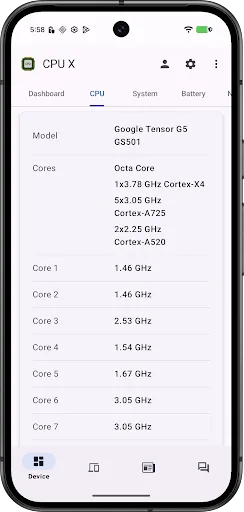
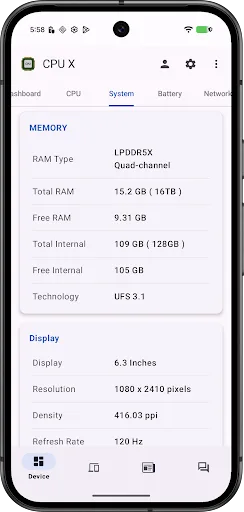
• Device Specifications - Get information about your device (such as processor, cores, speed, model, RAM, camera, sensors, etc.)
• Search Smartphones - View the most detailed Android smartphone specifications.
• Internet Speed Monitor - View current download and upload speeds in notifications, and merge speed in the status bar.
• Battery Monitor - View charging or discharging current in milliamps and battery temperature in notifications.
• News and Articles - Latest technology updates and informative articles.
• Questions/Answer Forum - A dedicated forum to answer your queries.
• Test - Test device features such as display, multi-touch, earbuds, speakers, microphone, vibration, Wi-Fi, Bluetooth, fingerprint, volume buttons, flashlight, headphone jack, and charging port.
• Tools - Ruler - A precise linear ruler for measuring distances in centimeters and inches.
Compass - A useful tool that displays the Earth's magnetic north using a magnetic sensor in the device.
Bubble Level - A tool for indicating whether a surface is level in a horizontal plane.
Emergency Signals - A color screen with text. The screen light signals in emergencies.
• Widget - A semi-transparent widget on the home screen displays clear information about the device's important status.
Pros & Cons
Pros
Very detailed device specifications, covering processor, memory, camera, and sensors.
A smartphone database helps track and compare Android models.
Network and battery monitors display information in real-time in notifications and the status bar.
Comprehensive hardware testing of the screen, audio, connectivity, buttons, sensors, and ports.
Some useful add-ons such as a ruler, compass, level, and emergency signal light.
Includes a widget, as well as news, articles, and a Q&A forum for tech enthusiasts.
Cons
The phone or chipset section does not have direct links to the manufacturer or detailed external pages.
News articles can only be opened within the app; there is no option to set it to open in an external browser by default.
FAQs
Installation What Android version does CPU X require?
CPU X requires Android 5.0 Key Lime Pie or later to install and run. CPU X ensures compatibility with the game's features and performance requirements. To check your device's Android version, go to Settings > About phone > Software information. If your device is running an earlier version, consider updating to meet the game's requirements.
Why can't I install the CPU X app on my Android device?
CPU X installation may fail due to insufficient storage space, poor network connection, or incompatibility with your Android device. To resolve this issue, ensure your device meets the minimum system requirements before attempting installation.
What is the file size of CPU X?
CPU X uses approximately 30.5 MB of storage space.
Conclusion
CPU X - Device System Information integrates in-depth hardware reporting, real-time monitoring, diagnostics, a range of utilities, and a small tech community. It's especially suitable for users who like to understand their phone's details, compare smartphone specifications, and regularly check network speed and battery life.