The internet has become an indispensable part of life, making network security a crucial concern. NetGuard is an application for complete network protection. Here, you can easily control your network security and prevent malicious files from intruding. Of course, the application isn't limited to network protection; it also helps prevent apps from running in the background, freeing up your phone's storage space, extending battery life, and making your device run more efficiently. Two solutions for both network and device security – one application delivers two benefits!
Features
Easy to use
No root required
100% open source
No phone calls home
No tracking or analysis
No ads
Actively developed and supported
Supports IPv4/IPv6 TCP/UDP
Supports network sharing
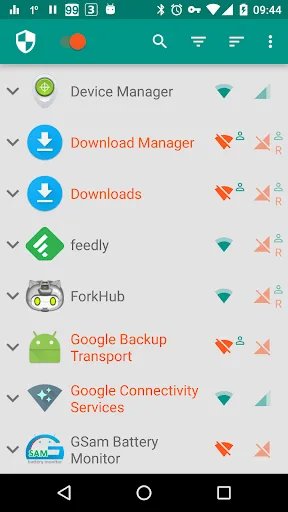
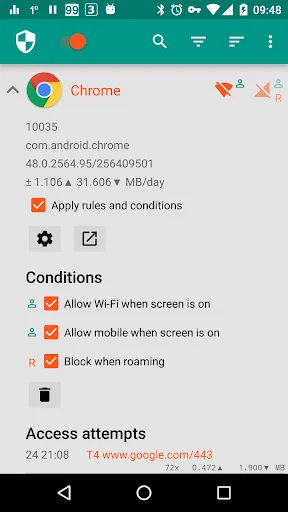
Options to allow when the screen is on
Options to block when roaming
Options to block system applications
Options to notify when an application accesses the internet
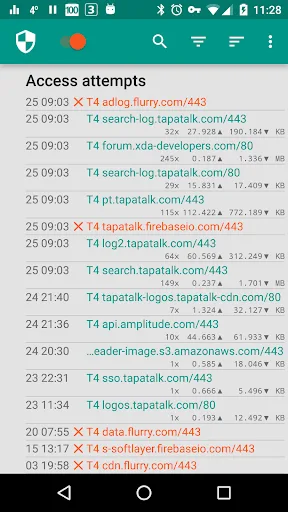
Options to log network usage for each address and application
Materials-based themes with light and dark themes
Notes
NetGuard's network startup and shutdown times largely depend on the device's operating system.
NetGuard does not directly interfere with the functionality of user-requested applications. It only controls network connectivity.
We recommend using this application to remove ads from offline games.
NetGuard is compatible with most mobile devices, including the latest Android devices.
Download
First, open Android Settings -> Security Settings.
Now scroll down to "Device Management".
Enable the "Unknown sources" option.
Install an app from an unknown source.
Now click the link above to download the NetGuard APK.
Save the file to your device's "Downloads" folder.
Locate the file in your storage and tap it.
Now tap "Install" and wait for the installation to complete.
Once installed, open the application and start using it immediately.
FAQs
How much storage space does NetGuard require?
Please reserve at least 10.1 MB of space. After installation, for smooth updates and cache management, please reserve an additional 100-500 MB of space.
What are the system requirements for NetGuard?
Your device should be running Android 5.1 or later (first released around March 2015). If your phone does not meet the requirements, you can download an older version of the application.
How long will the download take?
The NetGuard installation package is 10.1 MB in size. Download time may vary depending on your network connection. Typical speeds are as follows: - 4G: 30-100 MB/s - 5G: 170-400 MB/s - Wi-Fi: 50-500 MB/s
Conclusion
Controlling network access becomes incredibly simple with NetGuard. Now you can provide absolute security for your Android device, completely preventing mobile apps from accessing the internet without authorization. Experience the many benefits of NetGuard today!