File Manager Plus is a unique file manager. Download the latest Android version for free and experience powerful and easy-to-use file management features instantly. File Manager Plus provides users with integrated device storage management services. Users can organize their data into folders, easily view different categories of files, and quickly uninstall files to free up memory and save space. Use File Manager Plus now to securely and reliably manage your important files and data on your device!
Click to load YouTube / 点击加载视频
YouTube ↗Amazing Function
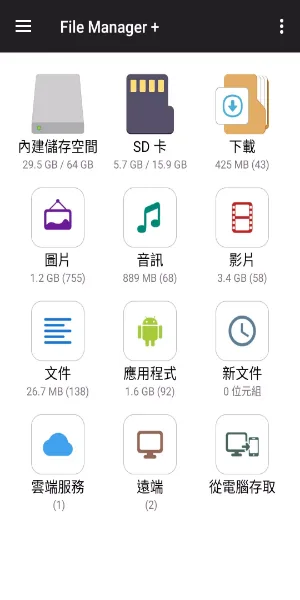
Main Storage/SD Card/USB OTG: You can manage all files and folders on internal and external storage.
Downloads/New Files/Pictures/Audio/Videos/Documents: Your files and folders are automatically sorted by type and characteristics so you can easily find what you're looking for.
Apps: You can view and manage all applications installed on your local device.
Cloud/Remote: You can access your cloud storage, as well as remote/shared storage such as NAS and FTP servers. (Cloud storage: Google Drive™, OneDrive, Dropbox, Box, and Yandex)
Access via PC: You can access your Android device's storage from your computer using FTP (File Transfer Protocol).
Storage Analytics: You can analyze local storage and clean up useless files. You can find out which files and apps are taking up the most space.
Built-in Image Viewer/Built-in Music Player/Built-in Text Editor: You can choose to use built-in utilities for faster and better performance.
Archive Management: You can compress and decompress archive files. - Supported compression format: zip
Supported decompression formats: zip, gz, xz, tar
Supported devices: Android TVs, phones, and tablets.
Attractive Performance
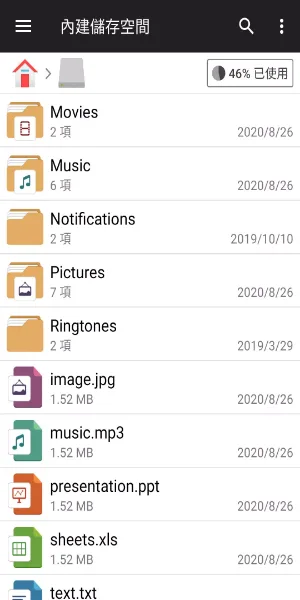
With this app, you can easily find and organize all the files on your Android device, moving or deleting them as needed.
The app is very intuitive, with a clean and easy-to-understand interface. The main screen features folders for videos, audio files, documents, apps, new files, cloud, and general storage, making it easy to view all the files stored on your smartphone. Each folder contains all the files in that category; for example, you can easily view all videos and quickly delete unnecessary files.
You can also clear your smartphone's cache and uninstall unused apps to free up memory. You can even track and delete files to speed up your smartphone. Furthermore, this app lets you easily move files from one folder to another and manage them any other way you want.
Finally, one of the best features of File Manager+ is that you can use it to remotely access files or share them to the cloud, so you can access them even when you don't have your smartphone with you.
User's Comments
I had to find something that wasn't something google chrome because I kept running out of storage. I ran into this, and the other reviews aren't exaggerating at all. it works unlike any other files manager app I've ever used. it's quick, it's easy, and clean to look at, and so nice to organize your stuff. there are some ads, but it's a little bar that sits at the bottom of the screen, and they haven't bothered me at all yet. none that jump you while you're doing your thing. highly recommend
Lovely app, which works extremely well in conjunction with the standard file manager on my phone but is superior overall. It's extremely easy to navigate and organise one's files. The search function is quick and delivers good results. I especially enjoy the analyse feature to find large files and folders (am using something similar on the PC) in order to manage my storage. It's what brought me to this app in fact. Ads aren't too intrusive either. Great app, thanks.
Very impressed by the app. Easy access to files. Organized by type. Even manage cloud storage. Amazing analyze capabilities allow to quickly see disk usage by type, largest files (I detected a couple of outlier files occupying several GB), clear cache files of apps, uninstall apps. Super useful and easy to use. After my first 5 mins of use I know how to access all my data (downloads, media, ...) and have cleared ~10% of useless data.
Wow, im impressed, ive been through so many file managers some i bought some free, they all are so inconvenient to use on mobile, even more so network files. This app feels much easier and the gui works for me. i ended up buying the premium, well worth it. i only wish i knew how to contact the developer about a basic question.
Final Thoughts
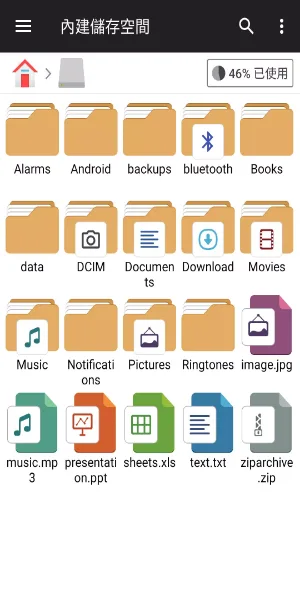
File Manager+ is a simple and easy-to-use Android file manager. It's free, fast, and feature-rich. Its clean user interface makes it extremely convenient to use. You can easily manage your device's storage space, NAS (Network Attached Storage), and cloud storage. Furthermore, upon opening the app, you can immediately see the number of files and apps on your device at a glance.